
 Design
 App Development
 Web Engineering
 AI Services
 Cloud
Cloud Staffing
 Startups
 Health / Fitness
 Education
 Social
 Nonprofit
 Fintech
 Construction
 Logistics
 Government
 Travel/Hospitality
 HR Software
 About Simpalm
 Our News
 Client Testimonials
 Careers
 Our Blog
 Awards
 Resources
 Information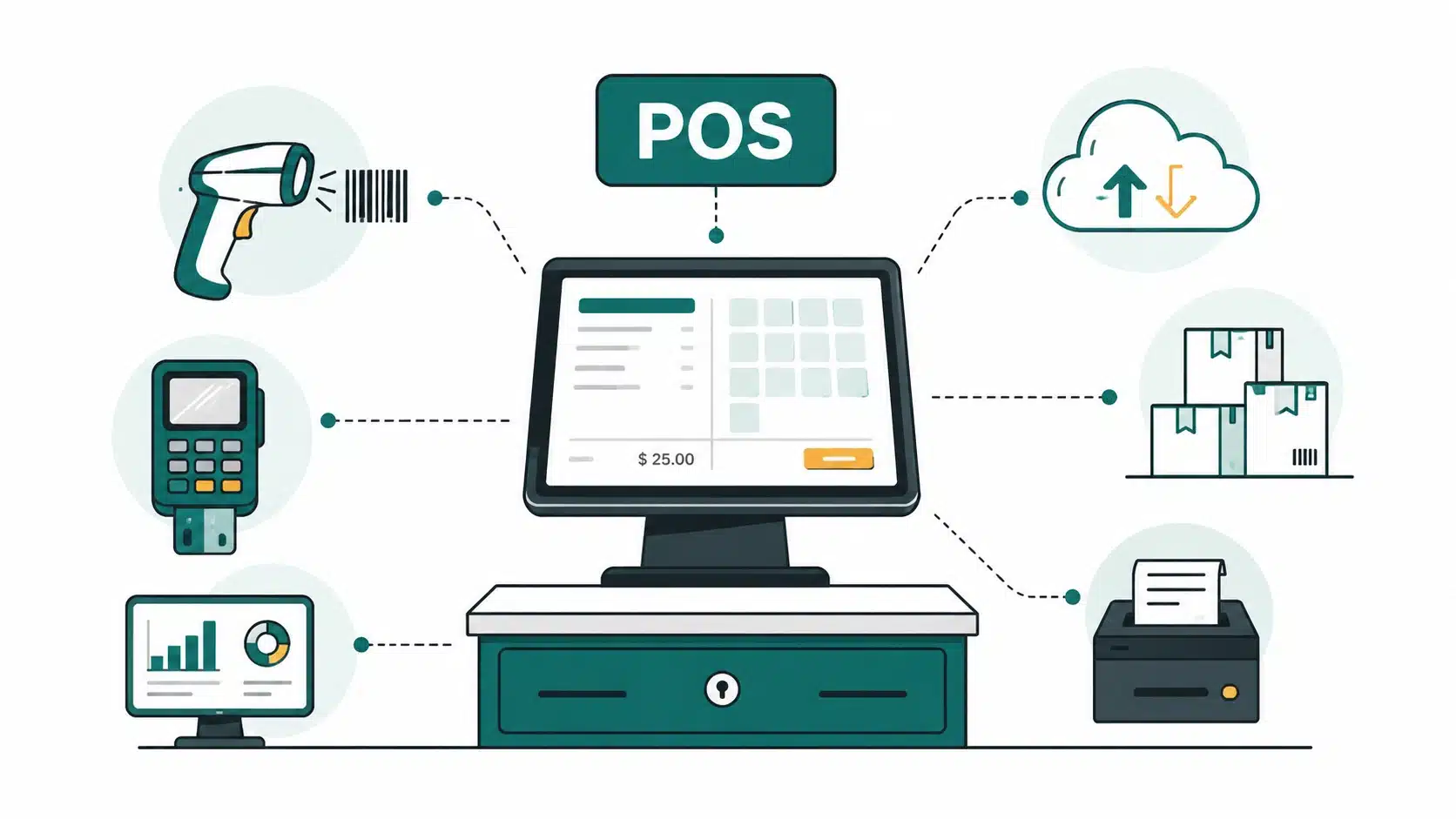
Key Takeaways
- POS software is not one type of product. Terminal-based, mobile or tablet, cloud, and multi-store POS each solve a different operational problem, and picking the wrong type is the single most common early mistake retailers make.
- Reliability and offline capability matter more than feature count. A POS system that goes down at checkout costs a retailer more trust than one that is simply missing a nice-to-have feature.
- Cost is driven by hardware integration, payment compliance, and inventory or ERP sync, not by interface polish or add-on features.
- A POS system is infrastructure, not a launch-and-done project. Store rollouts, staff training, and legacy system integration are ongoing work that continues well past launch day.
_________________________________________________________________________________________
For retail businesses, that shift is not optional anymore. A POS system today is expected to process a sale in seconds, stay functional when the internet does not, sync inventory across every location in real time, and hand off clean data to accounting and e-commerce systems without anyone re-typing a number.
The global point of sale terminal market is on track to reach roughly 130 billion dollars in 2026 and keep growing at a high single-digit rate through the decade, and most of that growth is coming from retailers replacing aging fixed hardware with cloud-connected systems that can keep up with how people actually shop today.
This guide walks through how retail POS software actually gets built in 2026: the types of systems available, the features that matter most, the technology choices that hold up under real transaction volume, and what the project tends to cost. It is written for retail operators and founders deciding whether to build custom POS software or adapt an existing platform.
Which Type of POS System Actually Fits How You Sell
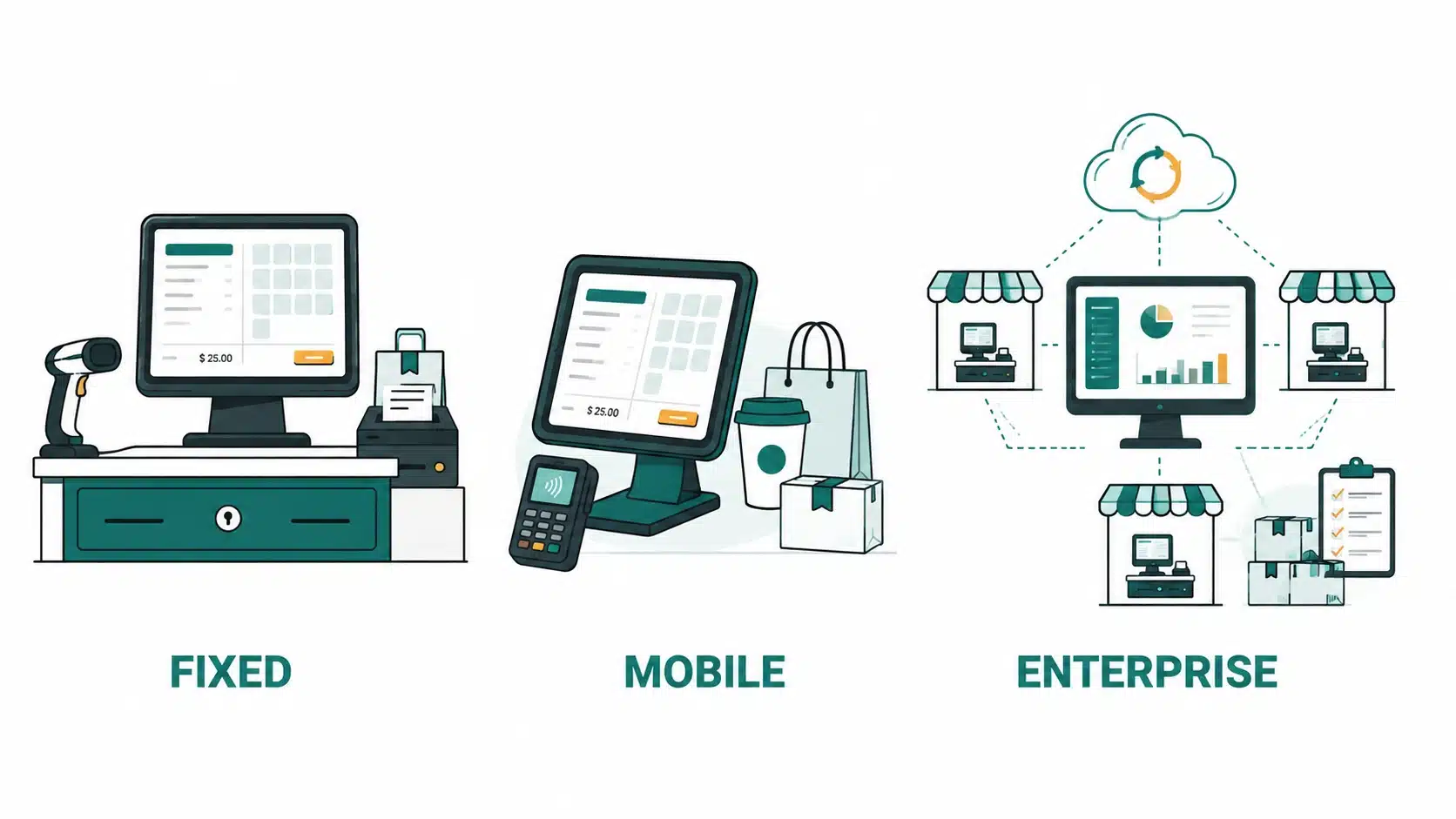
Not every retail business needs the same kind of POS system, and the type you choose shapes everything downstream, from hardware cost to how easily you can add a second location.
01. Traditional PC-Based POS
This is the older, familiar model: fixed hardware connected to an on-premises database, usually running at a single counter in a single location. It works well for retailers with stable, low-change operations who are not planning to expand soon. Modern versions often include an option to back up the local database to the cloud, so a hardware failure does not wipe out transaction history.
02. Mobile and Tablet POS
Mobile POS runs on iPads or Android tablets and has become the default choice for smaller-footprint retail. It fits coffee shops, ice cream parlors, bubble tea shops, and pop-up or farmers market vendors that need to move quickly, bust queues during rush hours, or set up a checkout point anywhere without running new cabling.
The appeal goes beyond mobility. These systems typically centralize data across locations automatically, push software updates without a technician visit, and run on a subscription pricing model that keeps upfront costs low. For a retailer opening a second or third location, that centralization is often the deciding factor.
03. Enterprise POS for Multi-Store Retail
Once a retailer operates across multiple locations or a franchise network, POS needs to shift again. Enterprise POS centralizes inventory and pricing across every store, supports role-based access so a store manager sees different data than a regional director, and handles franchise-specific requirements like localized promotions or per-location tax rules.
A POS system chosen for a single counter rarely scales cleanly to ten. The businesses that struggle most with multi-store rollouts are usually the ones that picked their original POS based on what worked at store one, without asking whether it would still work at store five.
Matching POS Type to Store Size and Complexity
The right POS type depends less on industry and more on three factors: how many locations you run, how much your staff moves around while selling, and how complex your inventory is.
For a smaller operation with a limited menu or SKU count, such as a coffee shop, ice cream shop, or bubble tea counter, a mobile or tablet-based POS is usually the better fit. It keeps hardware costs down and lets staff take orders anywhere in the store. For a larger operation with a broader menu, such as a liquor store, furniture store, or grocery store, a PC-based POS with a more robust inventory engine tends to hold up better at that volume.
| PC-Based POS | Points Toward Tablet/Mobile POS | Points Toward Enterprise POS |
| Key Features:
– Single location – Fixed counter, low movement – Moderate to high SKU count, stable catalog – Not planning to expand soon Best for: Established retail stores, pharmacies, grocery stores, hardware stores, and other businesses with fixed checkout counters that prioritize reliability over mobility. |
Key features:
– Single to a few locations – Roaming staff, line-busting needed – Lower SKU count, simpler catalog – Planning to add locations quickly Best For: Cafes, restaurants, food trucks, boutiques, pop-up shops, salons, and growing retailers that need flexible checkout and staff mobility. |
Key Features:
– Multiple locations or franchise network – Mixed, varies by location – High SKU count across multiple stores, shared catalog – Already multi-location or scaling fast Best For: Retail chains, supermarkets, franchise businesses, department stores, and enterprise retailers that need centralized inventory, reporting, and management across multiple locations. |
Key Features Every Modern POS System Should Have
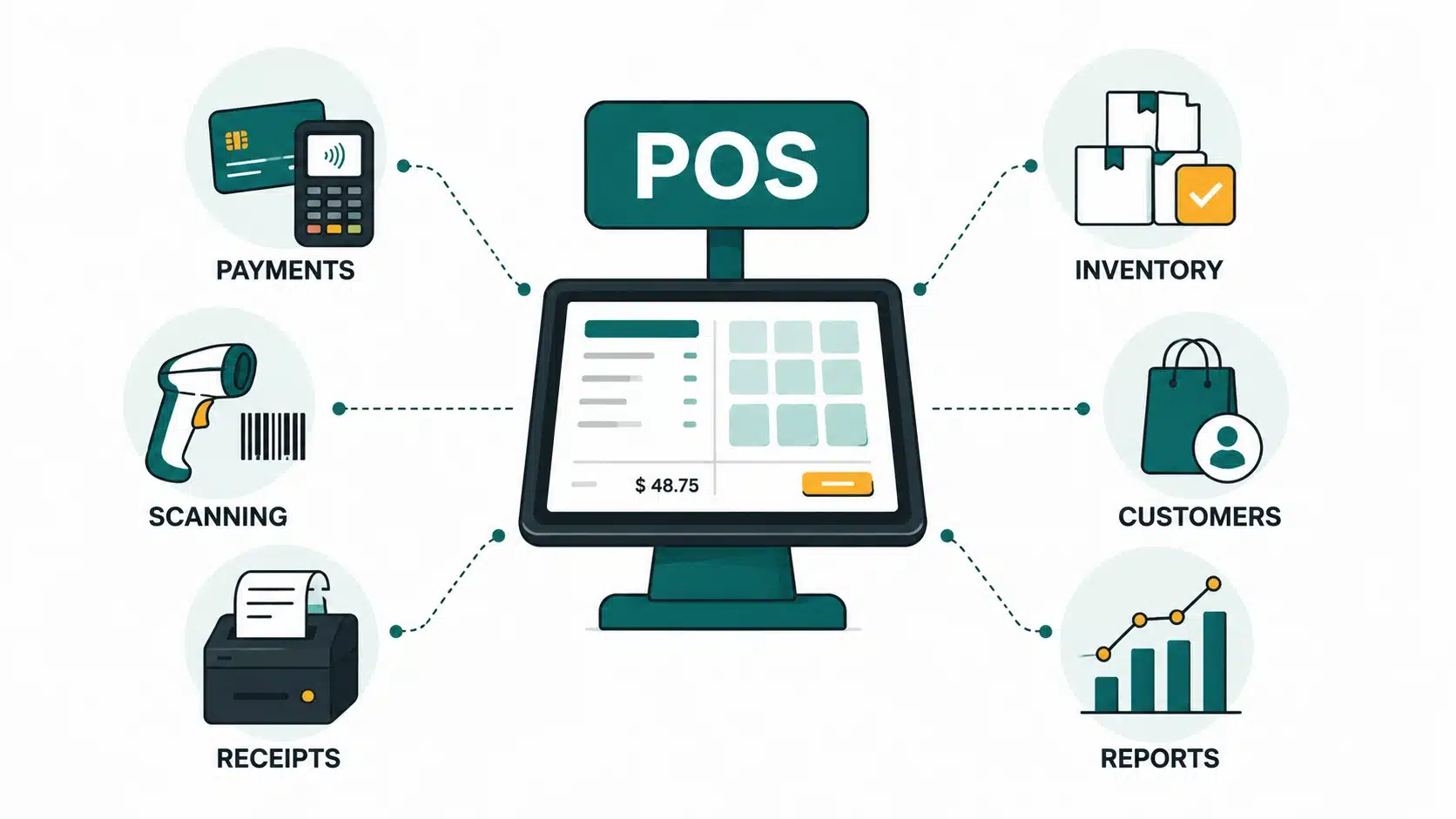
Feature lists for POS software tend to look similar on paper. The difference between a system that holds up under real volume and one that frustrates staff within a month usually comes down to how well a handful of core areas are built, not how many extra features got bolted on.
Core Checkout and Billing
This is the part customers actually experience, and it needs to be fast under pressure. Look for:
- Fast barcode and QR scanning: checkout speed at the counter directly affects how long lines get during peak hours.
- Split tender payments: letting a customer pay part card, part cash, or split a bill across multiple cards without slowing the transaction down.
- Discount and tax rule handling: built-in logic for promotions, coupons, and location-specific tax rates so staff is not doing manual math.
- Offline transaction queueing: the ability to keep processing sales when connectivity drops, then sync automatically once it returns.
Hardware Integration
A POS system is only as reliable as the hardware it connects to. Every payment, receipt, and barcode scan depends on these integrations working smoothly, so compatibility should be verified before development begins. Look for:
- Barcode scanner integration: fast, accurate scanning for products, coupons, and inventory updates.
- Receipt printer compatibility: support for thermal printers used at checkout counters.
- Pole display integration: customer-facing displays that show purchased items, totals, and payment status.
- Card reader and EMV support: compatibility with chip cards, tap-to-pay, and contactless transactions.
| Tip: If you’re still deciding on a payment processor, this guide to choosing the right payment gateway can help compare the available options before you commit. |
Third-Party Integrations
Modern POS systems rarely operate in isolation. They should connect with the other tools your business already uses so data flows automatically instead of requiring manual updates. Look for:
- Payment gateway integration: secure support for your preferred payment processor and multiple payment methods.
PCI DSS compliance: secure handling of cardholder data throughout the payment process. - Accounting software integration: automatically sync sales, taxes, and financial records.
- CRM integration: keep customer profiles and purchase history updated across systems.
- Loyalty and rewards integration: manage points, memberships, and promotional campaigns from the POS.
- E-commerce integration: synchronize products, pricing, and inventory between online and physical stores.
- ERP integration: connect purchasing, inventory, finance, and operations through a single workflow.
Inventory and Stock Management
- Real-time stock deduction: inventory counts update the moment a sale happens, not at the end of the day.
- Low-stock alerts: automatic flags before a popular item actually runs out.
- Multi-location stock visibility: staff and managers can see what is available at other stores, not just the one they are standing in.
- Purchase order and supplier management: reordering tied directly to actual sales velocity.
Staff and Shift Management
- Role-based permissions: cashiers and managers see and can do different things inside the system.
- Shift open and close with drawer reconciliation: built-in cash counting at the start and end of every shift.
- Sales-by-employee reporting: useful for both performance tracking and commission calculations.
Reporting and Analytics
A POS system should do more than process transactions. It should help you understand sales trends, monitor business performance, and make better decisions using real-time data. Look for:
- Daily sales reports: track revenue, transactions, and payment methods at a glance.
- Best-seller and slow-mover reports: identify top-performing products and items that need attention.
- Tax reporting: generate tax summaries formatted for easier filing and compliance.
- Customer and sales insights: analyze buying patterns, average order value, and peak sales periods.
- Exportable reports: download data in formats your accountant or business intelligence tools can use without extensive reformatting.
Also Read | How AI is Changing The Game for the E-Commerce Industry
Designing a POS That Powers Your Entire Retail Ecosystem
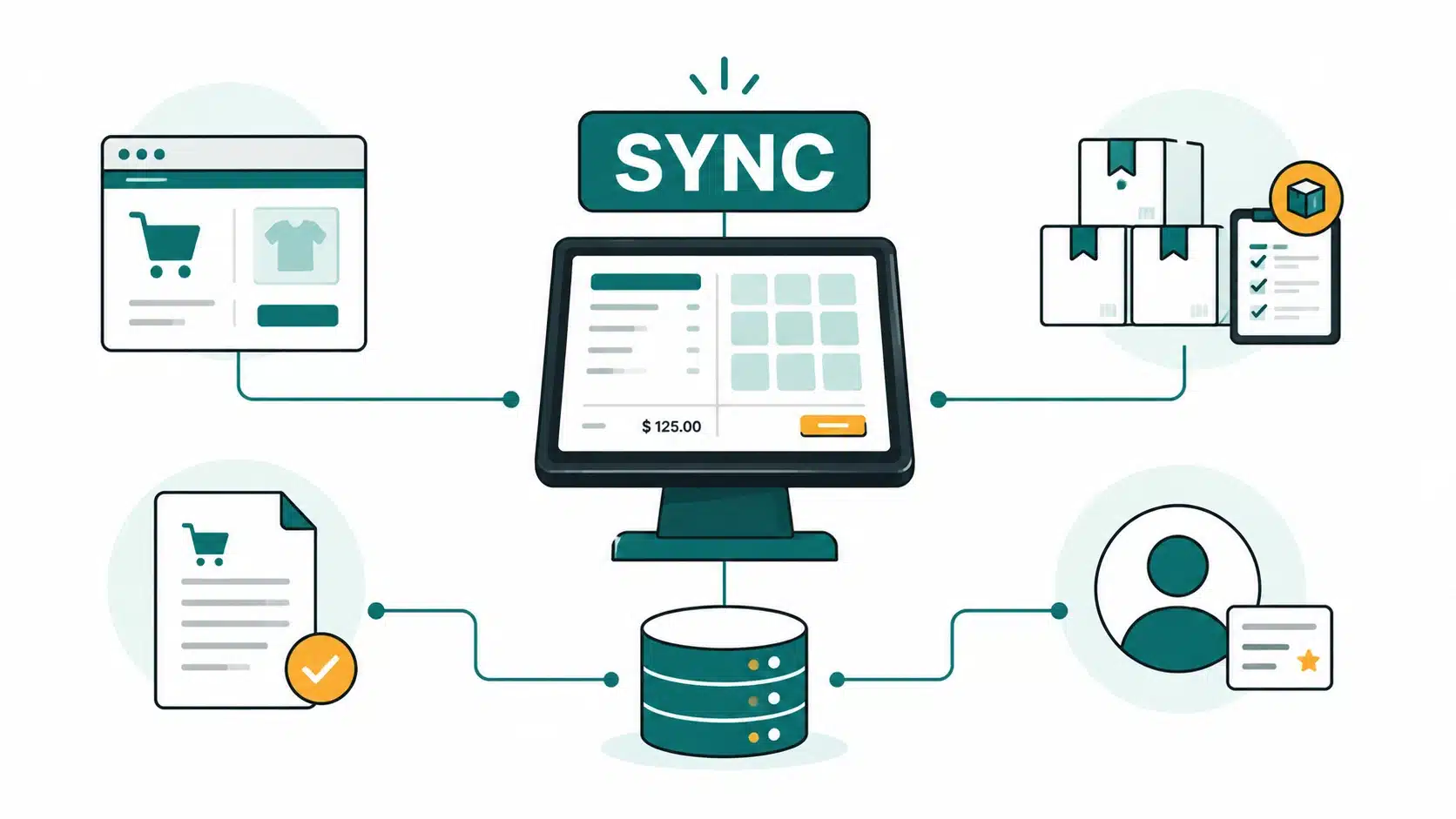
When building a custom POS system, one of the most important architectural decisions is determining where your business data lives. While customers interact with separate storefronts, your physical store and your online shop, both should rely on the same operational backend.
For most retail businesses, the POS should serve as the system of record. Every in-store sale, return, inventory adjustment, and price change is processed through the POS first. The e-commerce platform then reads that information to display accurate product availability, pricing, and order status online.
This architecture creates a single, reliable source of truth instead of maintaining separate inventory records across multiple systems. It reduces overselling, keeps stock synchronized across channels, and makes features like Buy Online, Pick Up In Store (BOPIS), click-and-collect, and multi-location fulfillment significantly more reliable.
When developing a custom retail solution, think of the e-commerce website as one customer-facing channel connected to the same backend that powers your POS, inventory, orders, and customer data. A unified architecture is far easier to scale than trying to synchronize multiple independent systems after they’ve already been built.
What Technology Choices Make or Break a POS Build
The technology stack behind a POS system looks different depending on whether you are building traditional counter software or a mobile and cloud-based system, but the priorities shift in a consistent direction: reliability first, everything else second.
| Layer | Traditional POS | Mobile and Cloud POS |
| App layer | Local application with on-premise database | Local-first app with SQLite or local cache, syncing to cloud |
| Database | Local SQL database, occasional cloud backup | PostgreSQL, structured for saving data in the cloud with local cache |
| Backend | Often monolithic, tied to local server, .Net services | built for Location sync, Node.js or Python services, |
| Hardware SDKs | Vendor-specific, often proprietary | Standardized SDKs for printers, scanners, cash drawers, card readers |
| Payment gateway | Legacy processor integration | Stripe Terminal, Adyen, or Square Hardware |
| Cloud infrastructure | Minimal or backup-only | Core to multi-store sync and reporting |
| ERP or accounting integration | Manual export or basic sync | Direct integration with Tally, QuickBooks, SAP, or NetSuite |
The single most important decision in this table is offline-first design. A shopping app can afford to show a loading spinner while it waits for connectivity. A POS system cannot. If the internet drops mid-transaction, the sale still has to complete, and the inventory count still has to update locally, then reconcile cleanly once the connection returns. That constraint, more than any single feature, separates POS architecture from typical consumer app architecture.
How to Build a POS System Without Disrupting the Register?
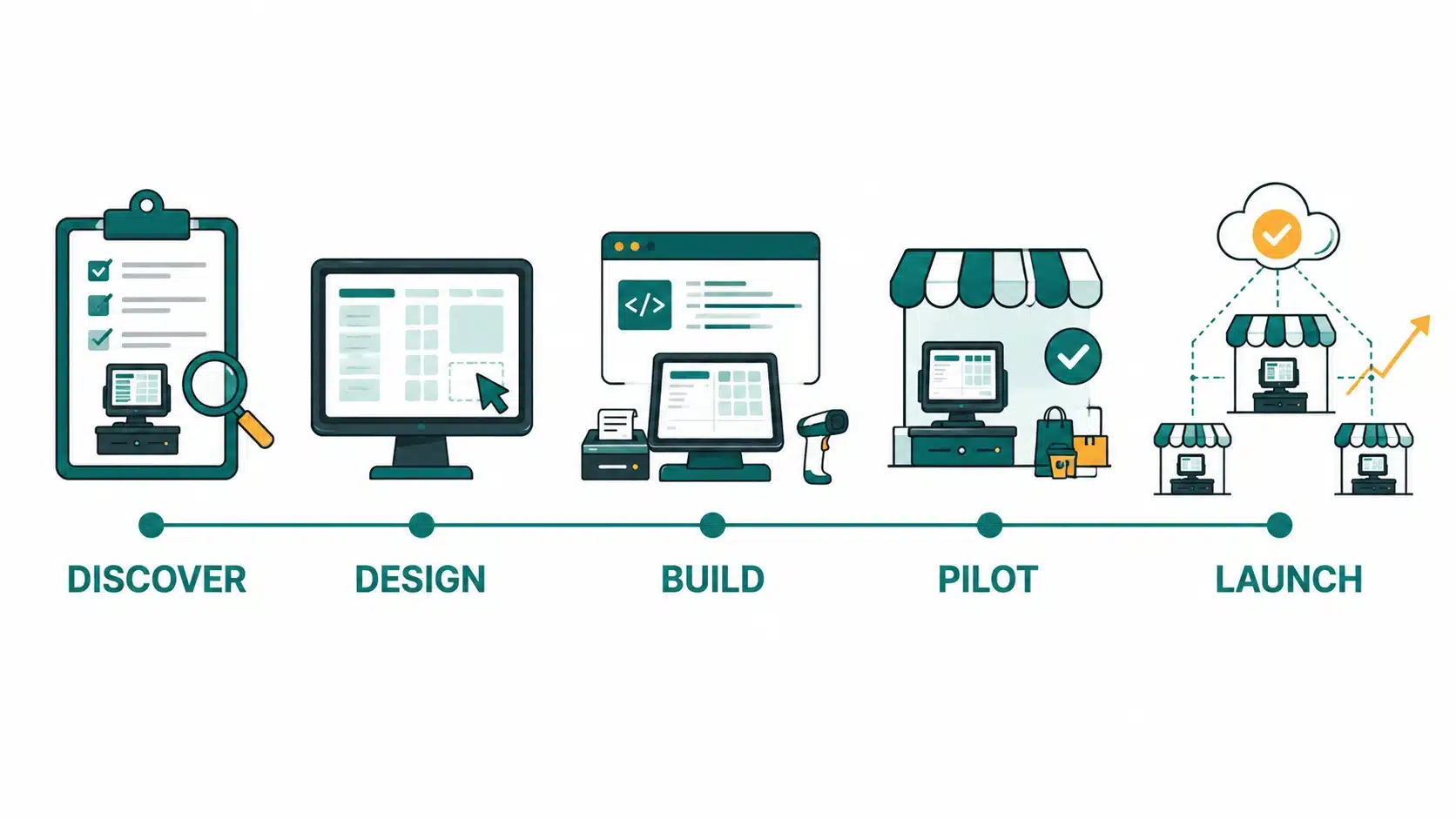
Retail POS development follows a fairly consistent path, but sequencing matters more here than in most software projects, because a broken checkout has an immediate, visible cost.
- Discovery. Audit existing registers, current payment processors, and actual store workflows. This is operational research, not customer persona research.
- UX design. Interfaces should be designed around cashier speed and error-proofing, not shopper delight. A confusing checkout screen slows down every transaction of the day.
- MVP development. Build checkout, inventory, and basic reporting first. Loyalty and omnichannel features come later, once the core system is proven stable.
- Hardware and payment integration, plus QA. Test across the actual combinations of terminal, scanner, and printer hardware in the real store, along with PCI compliance testing before anything touches live cardholder data.
- Pilot in one store. Real cashiers, real transaction volume, real edge cases, before rolling out to a second location.
- Staff training and launch. The rollout plan should center on training cashiers and managers, since they operate the system daily, not on marketing the launch to shoppers.
- Post-launch monitoring. Track transaction failures, sync errors, and staff-reported friction closely in the first weeks after go-live, when problems are cheapest to catch.
Retailers estimating budget and timeline for this kind of build often start with a general sense of app development costs before scoping POS specifically. Simpalm’s breakdown of what it costs to build an app in 2026 is a useful starting reference, even though POS carries its own specific cost drivers, covered next.
What Actually Drives POS Software Development Cost?
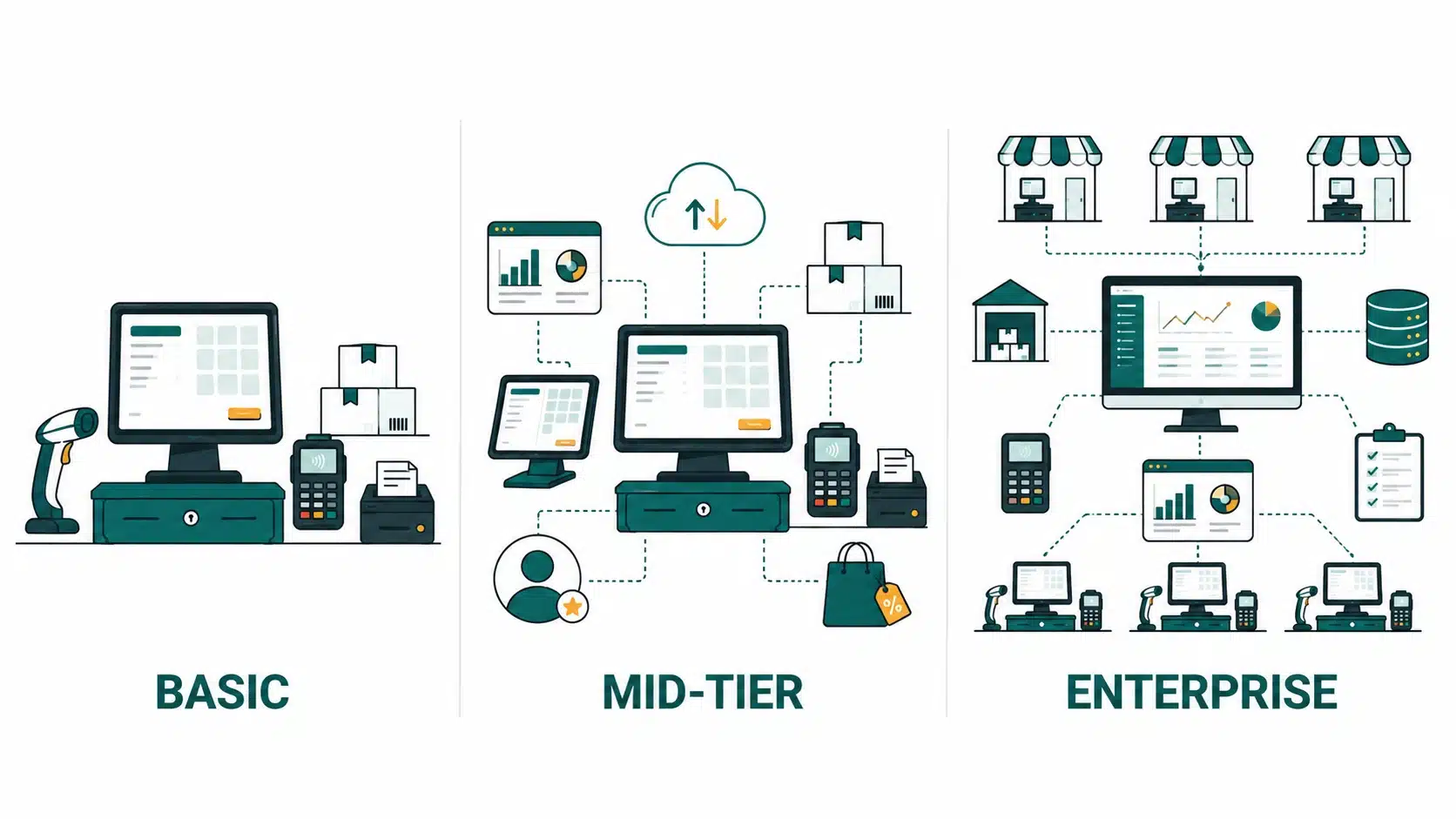
POS software cost scales with scope, but not in the way most retailers expect. The features that add the most cost are rarely the customer-facing ones. They are hardware integration, payment compliance, and inventory or ERP sync depth.
| Typical Scope | POS Tier Segment | Primary Cost Drivers |
| Single terminal, checkout plus basic inventory | Basic
Best for: cafés, food trucks, boutique shops |
Core hardware integration, single payment gateway |
| Multi-terminal, cloud sync, reporting, loyalty | Mid-tier
Best for: Restaurants, grocery stores, pharmacies, apparel retailers |
Multi-device sync architecture, expanded reporting engine, loyalty logic |
| Multi-store, ERP integration, advanced analytics | Enterprise
Best for: Retail chains, supermarket groups, department stores, franchise businesses |
Deep ERP or accounting integration, role-based multi-location access, advanced analytics pipeline |
A retailer building POS with an existing inventory or accounting system already in place, such as Tally, QuickBooks, SAP, or NetSuite, should expect integration work to be one of the larger line items in the budget, particularly if that system was never designed to expose a clean API. Retailers building broader merchant tooling alongside POS may find it useful to see how payment app development approaches merchant-side features like inventory management and PoS integration, since the considerations overlap closely with standalone POS builds.
Common POS Rollout Problems and How to Fix Them?
Most POS problems are predictable, and most of them show up in the first few months after launch. Planning for them ahead of time is far cheaper than fixing them under pressure once a store is already relying on the system.
Challenge 01: Offline reliability and sync conflicts.
When connectivity drops, transactions still need to process, and when it returns, two devices that both sold the last unit of an item need to reconcile without corrupting inventory data.
Fix: Build offline queueing into the app layer from day one, and design a clear conflict-resolution rule, such as last-write-wins with a manual review flag.
Challenge 02: Hardware compatibility across printer, scanner, and card reader brands.
Retailers rarely standardize on one hardware vendor, especially across locations opened at different times.
Fix: Build against standardized hardware SDKs where possible, and test against the actual hardware combinations in use at each location, not just a reference device in a lab.
Challenge 03: Multi-store inventory drift.
A system shows an item as available when it has already sold out at another location, leading to canceled online orders or frustrated staff.
Fix: Treat POS as the single source of truth for inventory, with real-time sync rather than batch updates, and alert any location where sync latency exceeds an acceptable threshold.
Challenge 04: Staff resistance and adoption.
Cashiers fall back on old registers or manual workarounds because the new system feels unfamiliar or slower during a rush.
Fix: Involve frontline staff in UX testing before launch, run the pilot phase long enough to surface real friction, and build training around actual peak-hour scenarios.
Challenge 05: Legacy ERP or accounting integration complexity.
Older accounting systems were rarely built with modern API access in mind, making clean data sync harder than it looks on paper.
Fix: Scope legacy integration work early in discovery, not after the MVP is built, and budget extra time for systems with no documented API.
Also Read | Subscription-Based App Development: Complete Guide
POS Performance Metrics to Track After Launch
Once a POS system is live, the right success metrics look different from what most software teams default to. Transaction speed and error rate matter far more than engagement metrics, because a POS system’s job is to disappear into the background of a fast, reliable checkout.
Growth tends to follow a consistent pattern: prove the system works reliably at one location, centralize inventory and reporting as a second and third store come online, and only layer in loyalty programs or deeper omnichannel features once the core system has proven stable under real volume. Retailers that add loyalty or analytics before checkout reliability is solid tend to spend that effort solving the wrong problem first.
POS Platforms Worth Studying Before You Build Your Own
Looking at how established platforms are structured is useful groundwork before scoping a custom build, since each one has optimized for a different segment of the market.
- Square: mobile POS paired with a tightly integrated hardware ecosystem, a strong reference for how mobile and hardware should work together.
- Toast: vertical-specific, built for restaurants, useful as a cross-reference for baking industry workflows directly into POS.
- Clover: a flexible hardware and software combination aimed at small to mid-size retailers.
- Lightspeed Retail: built specifically for multi-location retail, with inventory and reporting designed around chain operations.
- Shopify POS: a strong example of omnichannel sync, tying in-store and online inventory together tightly.
- Zettle: focused on simplicity for small businesses that need core POS functionality without enterprise complexity.
None of these platforms fit every retailer perfectly out of the box, which is exactly why many retail businesses end up commissioning custom POS software once they outgrow what an off-the-shelf platform can flex to support.
Conclusion
The best measure of a retail POS system has nothing to do with how impressive its feature list looks in a sales deck. It succeeds when the checkout line never slows down, when a dropped connection never costs a sale, and when a manager can pull an accurate inventory report without cross-checking three tools first. That is a narrower target than most POS projects aim for, and a far more valuable one.
Retailers that get this right share a pattern: they resist over-investing in customer-facing features before the checkout and inventory foundation is genuinely solid, they treat offline reliability as a requirement rather than a nice-to-have, and they plan for staff training and store rollout as seriously as they plan for the software build itself.
If you are weighing whether to build custom POS software or adapt an existing platform to your store’s actual workflow, Simpalm’s team works directly with retailers on exactly this kind of build, from initial discovery through hardware integration and multi-store rollout. Reach out to talk through your specific setup before you commit to an approach.
Frequently Asked Questions
Q1. How much does it cost to build POS software?
Ans. Cost depends heavily on scope. A basic single-terminal system with checkout and simple inventory tracking sits at the lower end of custom software pricing, while a multi-store enterprise system with deep ERP integration, advanced analytics, and loyalty features costs significantly more. The biggest cost drivers are hardware integration, payment compliance work, and inventory or accounting sync complexity, rather than the visual design of the interface.
Q2. How long does it take to build a retail POS system?
A basic single-location POS system with core checkout and inventory features can realistically launch in a few months once discovery and design are complete. Multi-store or enterprise systems with ERP integration and advanced reporting take considerably longer, partly because the engineering scope is larger and partly because a pilot phase at one store before full rollout is essential and should not be rushed.
Q3. Should I choose cloud-based or on-premise POS?
Cloud-based POS has become the default recommendation for most retailers because it centralizes data across locations, pushes updates automatically, and typically costs less upfront through subscription pricing. On-premise, PC-based POS still makes sense for single-location retailers with stable operations who want full local control over their data and are not planning to expand soon.
Q4. Should retail POS hardware use native or cross-platform development?
This depends on the depth of hardware integration required. Systems that need tight, low-level integration with specific card readers, receipt printers, or barcode scanners often benefit from native development, since hardware SDKs are frequently platform-specific. Retailers prioritizing faster development across iPad and Android tablets sometimes choose cross-platform frameworks instead, accepting some tradeoffs in hardware depth.
Q5. How does POS integrate with e-commerce and ERP systems?
POS should generally act as the source of truth for inventory, with the e-commerce storefront reading stock levels from POS in real time rather than the other way around. ERP and accounting integration typically happens through API connections to platforms like QuickBooks, SAP, Tally, or NetSuite, syncing sales data, tax information, and inventory movement so financial records stay accurate without manual re-entry.
Q6. What is the biggest mistake retailers make when building a POS system?
The most common mistake is over-investing in customer-facing features, like loyalty programs or personalization, before checkout reliability and offline capability are genuinely solid. A POS system that occasionally fails at checkout does far more damage to a retail business than one that is simply missing a nice-to-have feature. Getting the core transaction and inventory layer right first, then layering in additional features, consistently produces a more trustworthy system.