
 Design
 App Development
 Web Engineering
 AI Services
 Cloud
Cloud Staffing
 Startups
 Health / Fitness
 Education
 Social
 Nonprofit
 Fintech
 Construction
 Logistics
 Government
 Travel/Hospitality
 HR Software
 About Simpalm
 Our News
 Client Testimonials
 Careers
 Our Blog
 Awards
 Resources
 Information
Key Takeaways
- Scalability is a sequence of decisions, not a single infrastructure choice – The apps that scale well are built in layers, starting with clean separation between frontend and backend and adding complexity only when usage demands it.
- Overengineering early is as costly as underbuilding – Teams that adopt microservices, sharding, or multi-region infrastructure before validating their product often spend more time maintaining architecture than shipping features.
- Downtime and data breaches are the real cost of skipping scalability planning – Enterprises now report hourly downtime costs exceeding $300,000, and the global average data breach now costs $4.44 million.
- Security has to scale alongside performance – Authentication, rate limiting, and data protection need to be designed for growth from day one, not retrofitted after an incident.
- A stage-based roadmap prevents both extremes – Knowing what to prioritize at the MVP, traction, growth, and enterprise stages keeps teams from either stalling out or overbuilding.
________________________________________________________________________________________
A scalable web application is not one that survives success. It is one that is built to grow without sacrificing performance, reliability, or user experience. If your app cannot handle a sudden surge in traffic from a product launch, viral campaign, or holiday shopping season, the consequences go far beyond technical downtime. You lose revenue, damage customer trust, and risk driving users to competitors. That is why businesses continue to invest heavily in cloud infrastructure, with the global cloud computing market projected to reach $1.11 trillion by 2026, much of it focused on building applications that can scale reliably.
Yet scalability is also one of the most misunderstood aspects of software architecture. Many startups try to replicate the distributed systems used by companies like Netflix or X (formerly Twitter) long before they have the traffic or operational complexity to justify them. Instead of preparing for growth, they end up with an expensive, overengineered stack that slows development and increases maintenance costs.
The goal is not to build the most sophisticated architecture from day one. It is to make technology decisions that support future growth without introducing unnecessary complexity today. In this guide, we’ll explain what web application scalability really means, the architectural and infrastructure choices that matter most, the common mistakes that limit growth, and a practical framework for scaling your application as your business evolves.
What Does Scalability Actually Mean?
Scalability is often reduced to a single question: can the app handle more users? That framing is too narrow. A web application can technically support a million concurrent users and still fail at scalability if every new feature requires touching fragile, tightly coupled code, or if a single slow database query brings the entire system to a crawl during a traffic spike.
A genuinely scalable web application has a few defining traits:
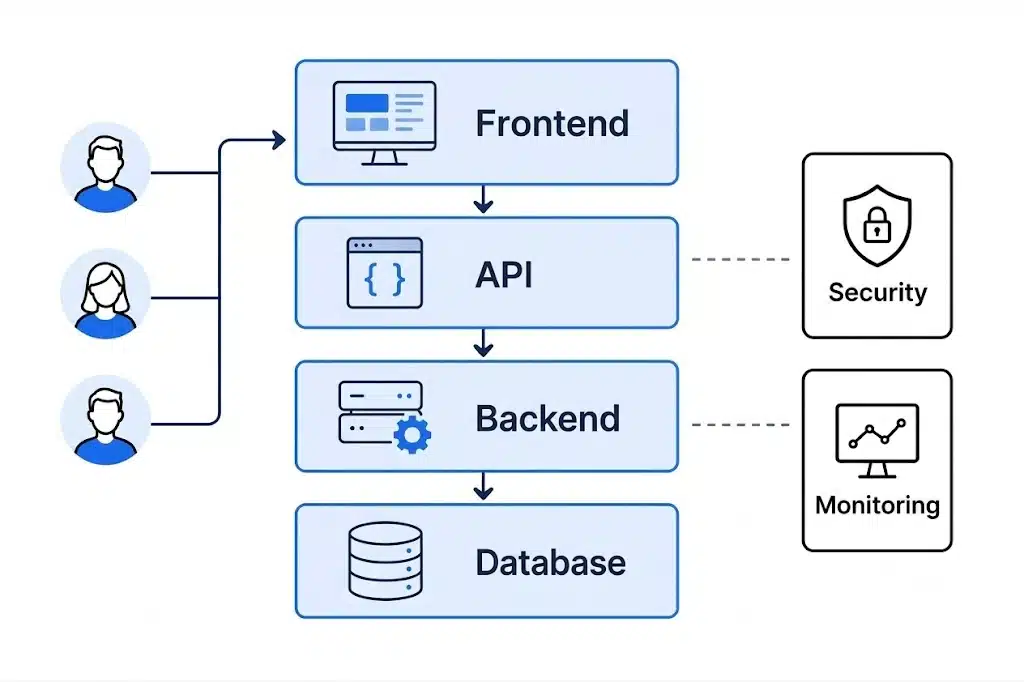
- Frontend and backend can evolve independently – Changing how a screen looks or behaves should not require backend redeployment, and vice versa.
- The backend absorbs more data, users, and workflows without a full rewrite – Growth should mean adding resources, not re-architecting the system.
- APIs are structured to support new features and clients – A well-designed API layer lets you add a mobile app or a partner integration without duplicating business logic.
- Authentication and permissions are planned, not bolted on – Retrofitting access control after launch is one of the most expensive corrections a team can make.
- Database queries stay fast as records grow – An unindexed query that runs fine with 10,000 rows can bring a production database to its knees at 10 million.
- The system is observable – You can see what is slow, what is failing, and why, before users start complaining.
Scalability, in other words, is less about raw capacity and more about how much friction stands between your product today and the product it needs to become. This is the same lens we apply when comparing frontend and backend responsibilities during architecture planning. Getting that separation right early is one of the cheapest scalability decisions a team can make.
Signs Your Web App Isn’t Built to Scale
Before investing in new infrastructure, it helps to diagnose where the actual bottleneck lives. Scaling the wrong layer wastes time and money. Common warning signs include:
- Every new feature touches the same handful of files – This usually points to tangled frontend and backend logic that should have been separated earlier.
- API response times climb as data grows, with no clear cause – This is often a database indexing or query design problem, not a server capacity problem.
- One slow endpoint can degrade the entire application – This suggests the absence of caching, async processing, or rate limiting.
- Deployments are risky and infrequent – Teams without CI/CD often ship large, high-risk releases instead of small, testable changes.
- Nobody can say with confidence what caused the last outage – This is a monitoring and observability gap, not necessarily an infrastructure gap.
- Permission logic is scattered across the codebase – Ad hoc access checks added under deadline pressure become a security liability as the user base grows.
Different bottlenecks call for different fixes. Adding more servers will not fix a bad query. A CDN will not fix a permissions system that was never designed to scale. Diagnosing the actual constraint before reaching for a solution is the difference between a targeted fix and an expensive rebuild.
Core Architectural Foundations for Scalability
Before choosing frameworks or cloud services, it is important to get the application’s core architecture right. These foundational decisions determine how easily your product can handle growth, accommodate new features, and evolve without costly rewrites.
Frontend and Backend Separation
Keeping the presentation layer and the business logic layer independent is one of the most foundational scalability decisions a team makes. When the frontend calls the backend exclusively through well-defined APIs, either layer can be rebuilt, replaced, or scaled without disrupting the other. This also makes it possible to support multiple clients (web, mobile, partner integrations) from a single backend.
API-First Design
Designing the API before writing frontend or backend implementation code forces early clarity about what the application actually needs to do. It also means the application is ready for integration from day one, rather than needing a retrofit when a mobile app or third-party partner shows up later. An API-first approach pays off especially in fintech and healthcare products, where third-party integrations and compliance requirements tend to arrive earlier than founders expect, something we’ve seen play out repeatedly while helping fintech teams navigate scaling and compliance challenges.
Monolith, Modular Monolith, or Microservices
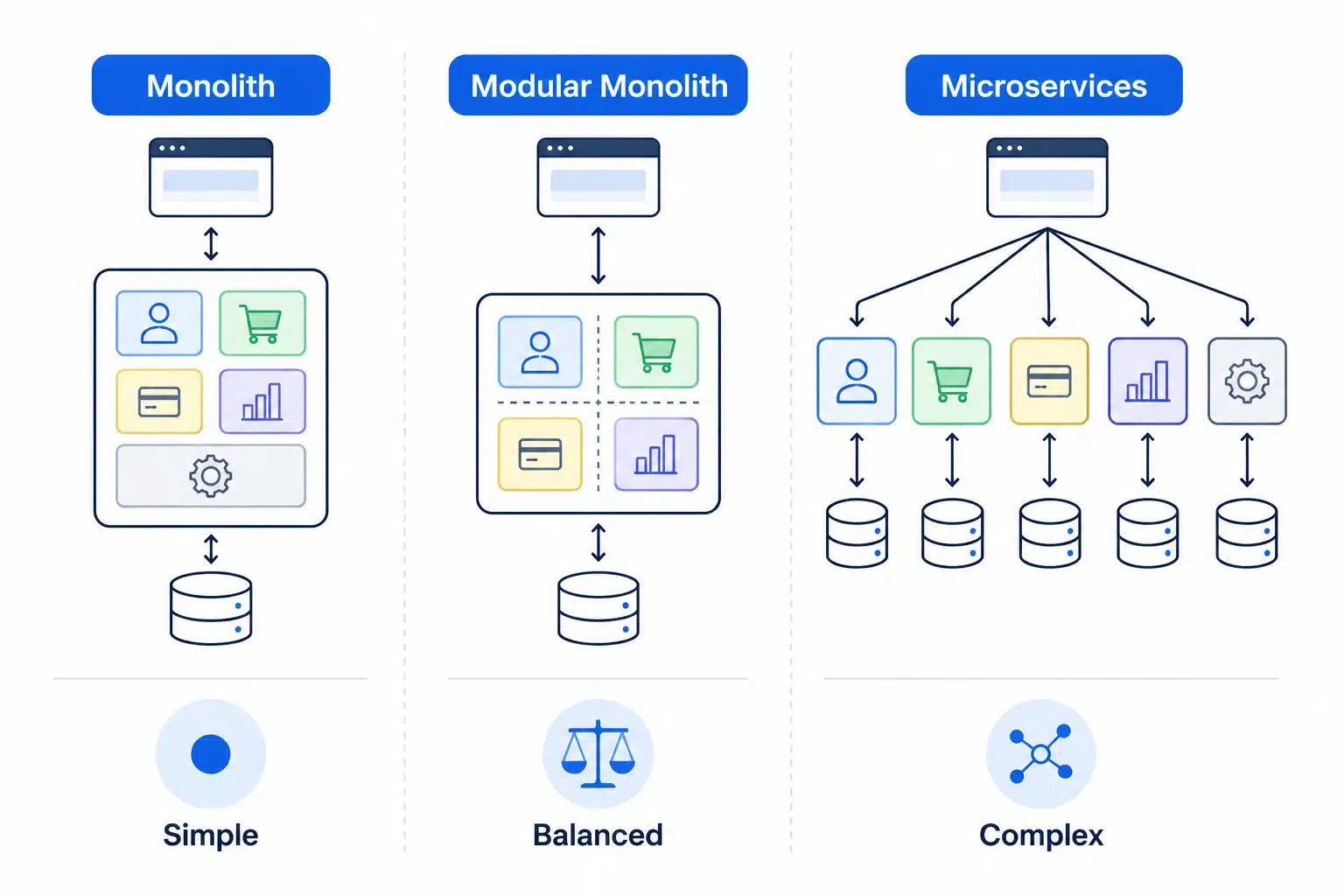
This decision gets oversimplified in most scalability content. The real choice is not binary.
- Monolith: A single, unified codebase and deployment unit. Fastest to build and easiest to reason about early on, but can become difficult to maintain as the team and codebase grow.
- Modular monolith: A single deployable application internally organized into well-separated modules with clear boundaries. This gives most of the maintainability benefits of microservices without the operational overhead of managing distributed systems.
- Microservices: Independent services, each responsible for a specific business capability, deployed and scaled separately. This offers the most flexibility and fault isolation, but it introduces real complexity around service discovery, distributed data consistency, and inter-service communication.
For most early and growth-stage products, a modular monolith is the more practical choice. It keeps the codebase organized and prevents the tangled dependencies that make monoliths hard to scale, while avoiding the premature operational burden of running and monitoring a dozen independent services before the product has proven it needs that level of isolation.
Cloud Infrastructure Scaling Strategies
When an application needs more capacity, there are three broad ways to add it.
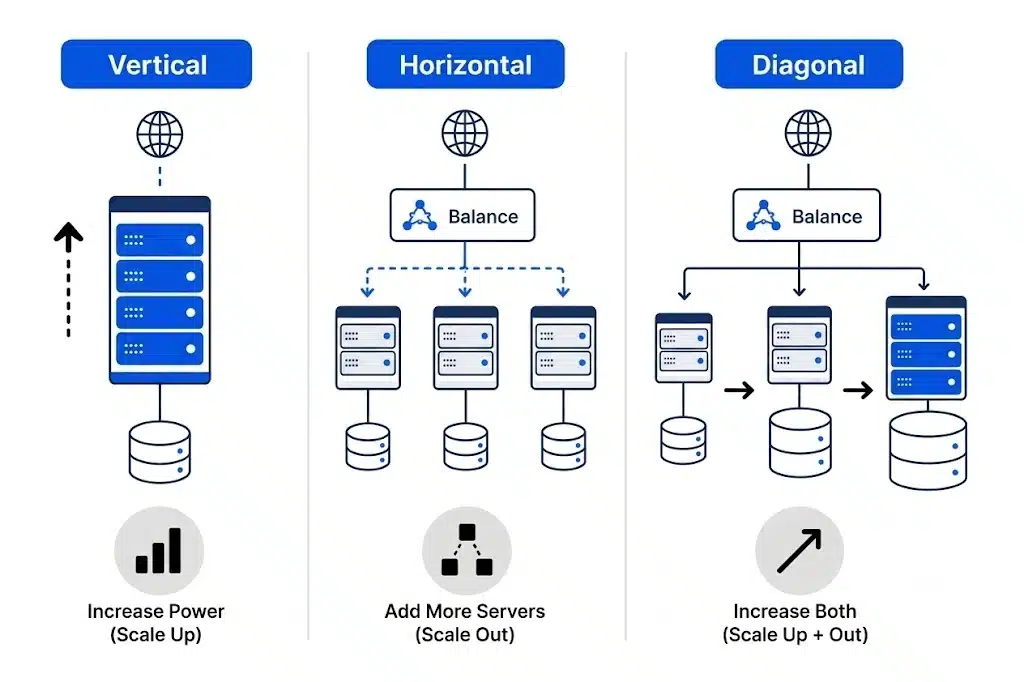
Vertical scaling means adding more CPU, RAM, or storage to a single server. It is simpler to implement and avoids the complexity of distributed systems, but every server has a ceiling, and a single powerful machine becomes a single point of failure if it goes down.
Horizontal scaling means distributing load across multiple smaller servers instead of one large one. This is the foundation of modern cloud architecture. It has no practical capacity ceiling, and if one server fails, the others continue serving traffic, which makes the system meaningfully more resilient.
Diagonal scaling combines both. Teams scale a server vertically up to a cost-efficient size first, then scale horizontally by adding more of those optimized servers as demand grows. This approach tends to offer the best balance of performance and cost for most growing web applications.
| Scaling Approach | Best For | Key Tradeoff |
| Vertical | Early-stage apps, simpler operational needs | Hard ceiling, single point of failure |
| Horizontal | High-traffic, high-availability apps | More operational complexity to manage |
| Diagonal | Growing apps balancing cost and performance | Requires ongoing capacity planning |
Database Design and Data Layer Scalability
The data layer is often where scalability challenges appear first because it is the hardest part of an application to change once it is running with live user data. Choosing the right database is only the first step. As data volume grows, optimizing how that data is stored, queried, and distributed becomes equally important.
SQL databases – like PostgreSQL and MySQL store data in structured, related tables and excel at complex queries and transactional consistency. They remain the right default for most applications with clearly defined relationships between entities, such as users, orders, and payments.
NoSQL databases – like MongoDB and Cassandra trade some of that structure for flexibility and horizontal scalability, making them well suited to unstructured data, high write volumes, or real-time features like activity feeds and chat.
Many mature applications use both: a SQL database for core transactional data, and a NoSQL store for logging, caching, or high-velocity data that does not need strict relational integrity.
Once the database is in place, query performance becomes the next scalability challenge – Indexing is often the single highest-impact optimization available to a growing application. A well-placed index can turn a query that scans millions of rows into one that resolves in milliseconds, without changing a single line of application code.
Eventually, optimization alone may no longer be enough – When a single database cannot handle the read or write load, even after indexing and query tuning, sharding becomes an option. It splits the database into smaller, independent pieces, each responsible for a subset of the data, distributing both storage and query load. Sharding adds significant operational complexity, and most applications do not need it until they are well beyond the MVP stage and have reached substantial scale.
Performance Engineering: Caching, CDN, and Async Processing
Once your application’s architecture and data layer are in place, the next challenge is handling growing traffic efficiently. Performance engineering focuses on reducing unnecessary work, serving content faster, and ensuring that resource-intensive operations do not slow down the user experience.
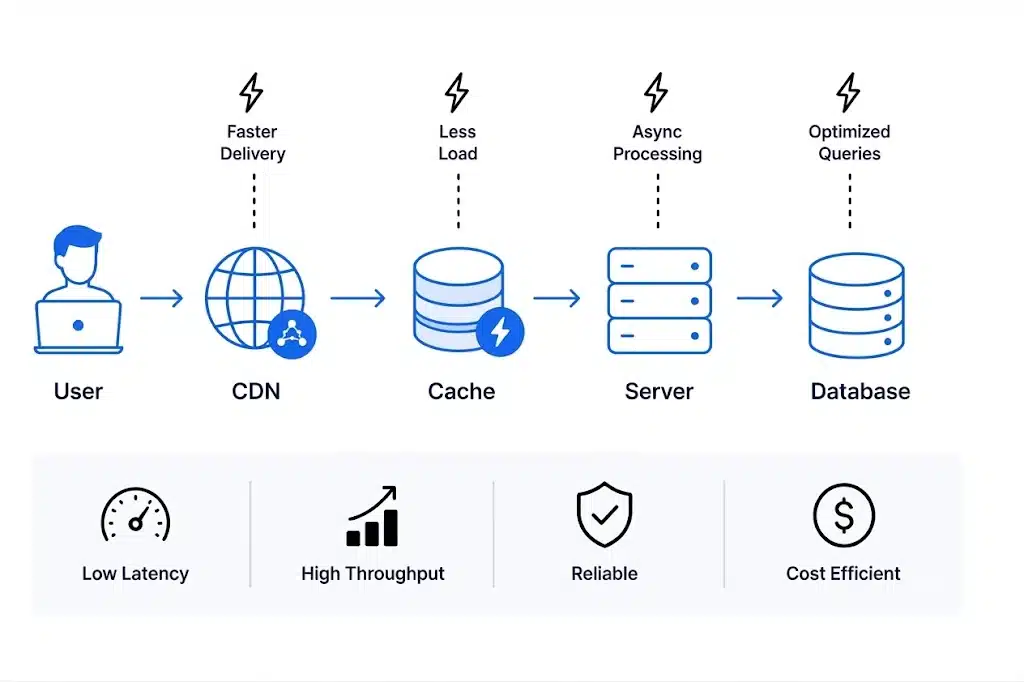
You might consider following performance engineering techniques to optimize performance and handle growing traffic smartly:
- Caching – stores frequently requested data in a fast storage layer so the application does not have to hit the database on every request. A well-designed caching strategy can absorb a large share of read traffic, freeing the database to handle the requests that actually need it.
- Content Delivery Networks (CDNs) – cache static assets like images, scripts, and videos on servers geographically closer to users. This reduces load times significantly for users far from your primary server region, and it is a cornerstone of both performance and scalability for any application with a global user base.
- Asynchronous processing – moves long-running tasks, like video transcoding, report generation, or bulk email sending, out of the main request-response cycle. The user gets an immediate response while the heavy work happens in the background, which keeps the user-facing app fast even as the underlying workload grows.
These three techniques address different bottlenecks but compound well together. A page that loads static assets from a CDN, pulls dynamic data from a cache, and defers heavy computation to a background job will stay fast under load far longer than one relying on synchronous database calls for every request.
Security at Scale
Most scalability guides treat performance and security as separate conversations. In practice, they are deeply connected. An application that scales its infrastructure but not its security posture is simply scaling its exposure.
- Authentication and session management – need to hold up under concurrent load. Token validation, session storage, and login flows that work fine with a thousand users can become a bottleneck or a vulnerability at a hundred thousand.
- Rate limiting – protects both performance and security. It prevents a single client, malicious or otherwise, from overwhelming an endpoint, and it is one of the more effective defenses against credential stuffing and scraping.
- Data protection under load – matters because breach costs do not scale down with company size. The global average cost of a data breach reached $4.44 million in 2025, and that figure climbs sharply for organizations handling healthcare or financial data.
- API gateways – centralize authentication, rate limiting, and logging for every request entering the system, rather than duplicating that logic across services or endpoints.
- Least-privilege access control – should be designed into the permissions model from the start. Retrofitting granular permissions after launch, once dozens of features already assume broad access, is far more disruptive than designing for it early.
Security debt behaves like technical debt in general: it is invisible until it is very expensive. Building it into the architecture from the beginning is cheaper than remediating it after an incident.
Infrastructure and DevOps for Growth
A scalable application needs infrastructure that can support continuous growth without sacrificing reliability. Modern DevOps practices make it easier to release software quickly, recover from failures, and automatically adapt to changing traffic, allowing engineering teams to scale both their applications and development processes.
- CI/CD (Continuous Integration and Continuous Deployment) – automates testing and release, which lets teams ship smaller, safer changes more frequently instead of large, risky releases. Elite-performing engineering teams deploy far more often than low performers, and that frequency is a direct byproduct of mature CI/CD pipelines rather than raw team size.
- Containerization – most commonly with Docker, packages an application with its dependencies so it behaves identically across a developer’s laptop, a staging environment, and production. Containers are what make modern orchestration and autoscaling practical, since they let infrastructure treat each service as a predictable, portable unit.
- Load balancers – distribute incoming traffic across multiple servers, preventing any single instance from becoming a bottleneck and rerouting traffic automatically if a server goes down.
- Autoscaling – adjusts compute resources up or down automatically based on real-time demand, so the application has enough capacity during traffic spikes without paying for idle servers the rest of the time.
The cost of skipping these practices is not abstract. Enterprises now report that a single hour of downtime costs more than $300,000 for over 90% of mid-size and large organizations, and that figure climbs into the millions for regulated industries like banking and healthcare. Automated deployment, monitoring, and failover are not just operational conveniences. They are what keeps that number from becoming a reality.
Monitoring, Observability, and Load Testing Before You Scale
You cannot manage what you cannot measure, and scalability decisions made without data are guesses.
Monitoring tracks the health of known metrics: CPU usage, memory, error rates, response times. It tells you when something is wrong.
Observability goes further. It gives you the ability to understand why something went wrong by combining metrics, logs, and traces, which becomes essential once an application has more than a couple of moving parts.
Load testing simulates real traffic patterns before they happen in production, surfacing bottlenecks under controlled conditions instead of during a live traffic spike. Teams that skip load testing often discover their scaling limits for the first time during a marketing campaign or a product launch, which is the worst possible moment to find out.
Together, these three practices turn scaling decisions from reactive firefighting into planned, data-backed capacity management.
Common Scalability Mistakes to Avoid
- Adopting microservices before the product has proven its core workflow – This adds operational overhead without a corresponding benefit, and it slows down the exact iteration speed an early-stage product needs.
- Treating caching as an afterthought – Bolting on caching after performance problems appear is harder and riskier than designing cache invalidation logic from the start.
- Ignoring database indexing until queries are already slow – By the time this becomes obvious in production, it is often affecting real users.
- Skipping load testing before major launches or campaigns – Marketing timelines and infrastructure readiness are rarely coordinated unless someone makes it a deliberate step.
- Designing permissions as an afterthought – Retrofitting access control into a system that was not built with it in mind is one of the most expensive corrections in software development.
- Scaling infrastructure while ignoring the frontend – A backend that can handle massive load will still feel broken if the frontend loads unnecessary data or renders inefficiently. Scalable responsive design practices matter just as much as backend capacity.
- Copying enterprise architecture patterns too early – Shared databases, multi-region deployments, and complex service meshes solve problems most early and growth-stage products do not have yet.
A Practical Roadmap by Growth Stage
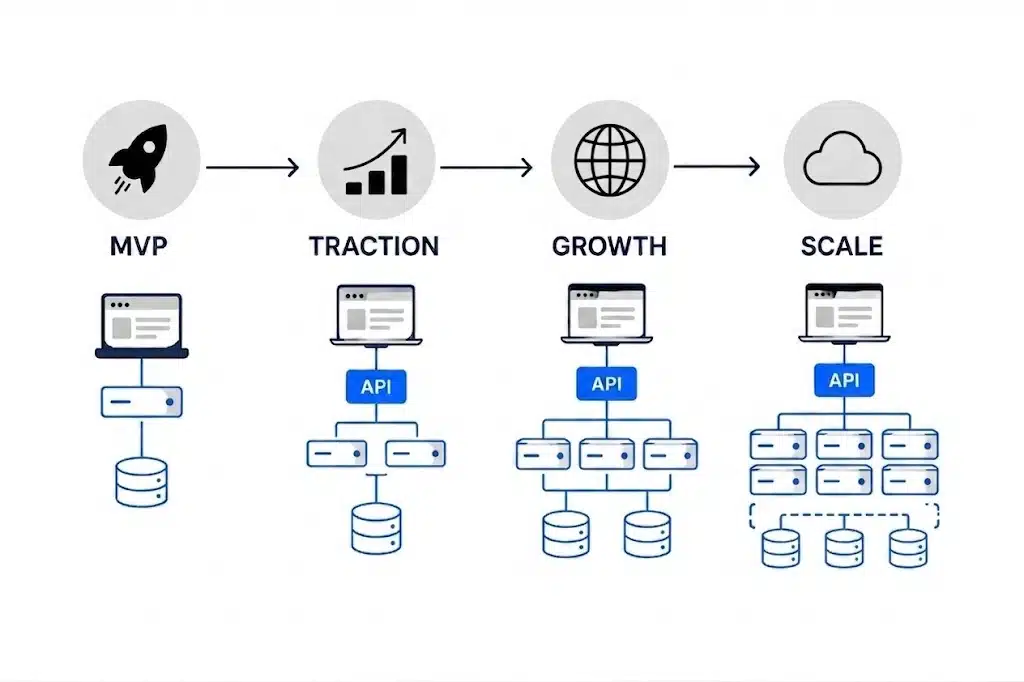
Here’s practical growth map depending on the stage on which you app is:
| Stage | Focus | Avoid |
| MVP | Clean frontend/backend separation, basic auth and permissions, sensible database schema, simple performance hygiene | Microservices, premature sharding, custom DevOps pipelines |
| Early traction | Reusable components, better API structure, pagination and filtering, error handling, basic monitoring | Letting MVP shortcuts become permanent architecture |
| Growth | Caching, background jobs, database indexing, CDN usage, observability, formal deployment processes | Scaling only the frontend while backend and database bottlenecks persist |
| Advanced scale | Autoscaling, load balancing, multi-region architecture, microservices where justified, sharding, incident response processes | Copying enterprise patterns before the product has enterprise-scale problems |
The teams that scale well are rarely the ones with the most advanced infrastructure early on. They are the ones who match architectural complexity to actual usage, and who treat each stage transition as a deliberate decision rather than a reaction to an outage.
Wrapping Up
Building a scalable web application is not about predicting exactly how big your product will become and building for that outcome on day one. It is about making a series of good decisions in the right order: separating your frontend and backend cleanly, designing your API and database with room to grow, building performance and security into the architecture rather than retrofitting them, and adding infrastructure complexity only when your actual usage justifies it.
The cost of getting this wrong shows up in two places: expensive rebuilds when a fragile MVP hits real traffic, or wasted time and budget when a team overengineers infrastructure for a scale they have not reached yet. Both are avoidable with the right sequencing.
At Simpalm, our engineering teams design and build web applications with this layered approach, from initial architecture through the infrastructure and DevOps practices that support long-term growth. If you are planning a new web application or evaluating whether your current stack can support your next stage of growth, our web app development team can help you map out an architecture that scales with your product instead of against it.
Frequently Asked Questions
Q1. What is the first step in building a scalable web application?
Ans. The first step is architectural planning, not infrastructure provisioning. This means deciding how the frontend and backend will separate, choosing a database structure that fits your core workflows, and adopting an API-first mindset so future clients and integrations do not require a rebuild. Teams that skip this step often end up retrofitting these decisions later, which is significantly more expensive than designing for them upfront.
Q2. Do I need microservices to build a scalable web application?
Ans. Usually not at the beginning. Most applications are better served by a clean, well-organized modular monolith in the early and growth stages. Microservices become genuinely useful once the product, team size, and traffic patterns justify the added operational complexity of running and coordinating independent services.
Q3. How much does it cost to build a scalable web application?
Ans. Cost depends heavily on the stage you are building for. An MVP with clean architecture and sensible defaults costs far less than a system built with premature microservices, sharding, or multi-region infrastructure. The more effective way to manage cost is to build in layers, spending on infrastructure complexity only as usage data justifies it, rather than trying to estimate a final architecture cost upfront.
Q4. What is the difference between horizontal and vertical scaling?
Ans. Vertical scaling adds more power (CPU, RAM, storage) to a single server, which is simpler to manage but has a physical ceiling and creates a single point of failure. Horizontal scaling adds more servers to distribute the load, which has virtually no capacity ceiling and improves fault tolerance, at the cost of additional operational complexity.
Q5. When should a growing app introduce caching and a CDN?
Ans. Caching and CDN usage typically become priorities once an app moves past early traction into the growth stage, when repeated database queries or global user distribution start affecting performance. Introducing them earlier is not harmful, but they usually are not the first bottleneck an early-stage app needs to solve.
Q6. How does security fit into a scalability strategy?
Ans. Security should be designed alongside performance, not addressed separately. Authentication systems, rate limiting, and permission structures all need to function correctly under increasing load, and retrofitting them after launch is far more disruptive and costly than building them into the architecture from the start.
Q7. What is the most common mistake teams make when scaling a web app?
Ans. The most common mistake is mismatching architectural complexity to actual product stage, either by overengineering infrastructure before the product has proven its core workflow, or by ignoring foundational decisions like database indexing and permission design until they cause visible problems in production.
Q8. How do I know if my app’s database is a scalability bottleneck?
Ans. Common indicators include query response times that climb as data volume grows, slow page loads tied to specific database-heavy features, and performance degradation during traffic spikes even when server resources appear underutilized. These usually point to missing indexes or inefficient query design before they point to a need for sharding or a database migration.