
 Design
 App Development
 Web Engineering
 AI Services
 Cloud
Cloud Staffing
 Startups
 Health / Fitness
 Education
 Social
 Nonprofit
 Fintech
 Construction
 Logistics
 Government
 Travel/Hospitality
 HR Software
 About Simpalm
 Our News
 Client Testimonials
 Careers
 Our Blog
 Awards
 Resources
 Information
Here’s a surprising fact for founders: about 95% of apps don’t survive their first year.
And it’s usually not because the idea was bad or the team wasn’t capable. It’s more subtle than that. Ignored bugs, small mistakes, one after another, compile until things stop working.
And the reason why users jump so early after having even a brief bad experience is that there are millions of apps out there, hundreds of alternatives to the same niche. Amidst such a tight market, the apps that stick aren’t always the flashiest ones; they’re just built better.
If you’re building an app for your business, this isn’t just another checklist. It’s about understanding common mobile app development mistakes and how to avoid ending up there.
Why Most Mobile Apps Fail & What It Usually Comes Down To
Before getting into specific wrong development practices, let’s take a look at the bigger patterns.
p that does one thing exceptionally well, ships to real users fast, and collects data that shapes every future decision.
Most apps don’t fail because of one bad decision. It’s usually a combination of things:
- Planning wasn’t aligned from the start
- The product wasn’t built with real users in mind
- Technical shortcuts were taken during aggressive development
- Launch was treated like the end, not the beginning
If you take up case studies of why an app failed, you’ll notice these patterns at large. In this guide, we have decoded that exact pattern, avoiding which can increase the success ratio of your app by 70%. We have covered all the common mobile app development mistakes and how to avoid them.
Pre-Development Mistakes – Before Anything Gets Built
To make an app successful, you need to focus right from the start, even before you write the first line of code. By doing research and planning meticulously, you solve half of the challenges. The first thing to do is to identify the purpose of your app.
Mistake 1: Not really knowing the purpose
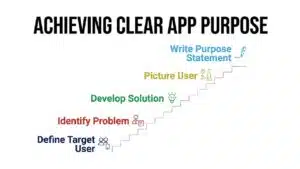
Identifying purpose is one of those things that feels obvious until you actually try to define it clearly.
Most teams can explain what their app does, but when it comes to who it’s for and what exact problem it solves, things start getting fuzzy.
And that’s where the problem begins. Without a clear purpose, apps tend to grow in all directions in a generalized way and lose focus.
What’s the Fix? Write down the purpose of your app in one sentence: “[Target user] struggles with [problem]. Our app solves this by [solution].”
If that sentence isn’t clear, it’s worth slowing down before building. Imagine your user as a real person to get more clarity about the gap or friction point that users are facing while using your app. What their day looks like, what frustrates them, and how comfortable they are with tech.
Teams that do this early usually avoid a lot of confusion later. In fact, planning early also helps to avoid technical debt and plan the budget clearly.
Mistake 2: Skipping Market Research
Market research is a comprehensive step and requires critical analysis. The entire market research step feels slow, so either it is skipped or half-done.
You should be aware of what is already available. Who is doing something like that, what is not liked by the users, and where are the gaps? App Store reviews, the bad ones in particular, tell you a lot.
Knowing the exact market gaps helps you approach your first MVP by building 30% of the features that deliver 70% of the value.
Additionally, verify whether individuals are concerned about your idea or not. In the early stages, you can validate your idea with your team, friends, business circle, and real users.
While doing the market research for your app idea, keep it simple:
- Find 3-5 competitors and read their most negative reviews.
- Discuss with 10-15 people before writing anything in detail.
- Utilize tools such as Google Trends, App Annie, or Sensor Tower.
Spending a few more days at this stage will save you months of technical debt in later stages.
Mistake 3: Choosing the Wrong Development Approach
Choosing the right tech stack and development framework is another common mistake that businesses commit. Picking among native, cross-platform, or builder platforms depends on the audience that you are targeting. A misguided decision at the outset can quickly become a costly mistake.
Here are three-pronged development approaches for you to consider,
- Native: Ideal when you require maximum performance or integration with device features.
- Cross-platform (React Native, Flutter): This is likely the most feasible option for most startups. You develop once and run on both platforms seamlessly. Newer frameworks, such as React Native, deliver a near-native experience.
- App Builder Platform: There are platforms like Flutter Flow and Appyfi, which can be used to build lightweight apps like restaurant apps and realtor apps.
| Tip: For 90% of the app, a cross-platform approach works great, and it is cost-effective. Sometimes, you need a very advanced app with engaging UI/UX and maybe device integrations, then a native approach is good. |
Mistake 4: Unrealistic Budget and Timeline Expectations
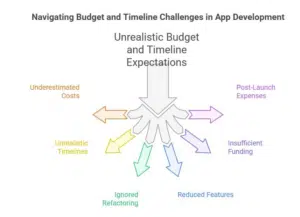
Development teams often operate under compressed timelines, where testing cycles are shortened, refactoring is deferred, and technical debt accumulates. All these factors gradually slows the pace and quality of future releases. When budgets are constrained, teams are forced to either scale back critical features or exhaust their runway before reaching product-market fit.
To mitigate these risks, establish a 20 to 30% contingency buffer in both timeline and budget at project inception.
Additionally, separate the financial planning for the MVP from the full product roadmap. Funding both simultaneously can dilute focus, increase burn rate, and introduce unnecessary delivery risk.
Also, include the post-launch expenses, such as maintenance, updates, and server expenses,which are usually 10 to 15 percent of development cost per year and should be taken care of while planning the app development.
Mistake 5: Poor UX/UI Design
Studies indicate that 88 percent of users never come back after having a negative UI/UX experience.
It is not the visual design that is often the problem. Most apps are decent visually. The gap is typically in navigation, information architecture, and the onboarding flow.
The typical indicators of bad UX in mobile applications are:
- Navigation with over three taps to important actions.
- Onboarding processes that require excessive information initially.
- Irregular placement of buttons and patterns of interaction between screens.
- No blank spaces, loading status, or warning messages to guide users.
Actual cost of poor UI/UX design for your business: Bad UX has a direct effect on retention. When you have a low day 7 (D7) retention rate, it is probably due to bad UX. Ideally, a 15-20% retention rate on D7 is considered healthy, meaning your app has established a short-term habit among the first-time users.
Hire a UI/UX designer first, then bring in an app developer. And before writing a single line of code, validate your ideas; run usability tests using paper prototypes or Figma mockups with real users.
Mistake 6: Feature Creep – Overloading the App
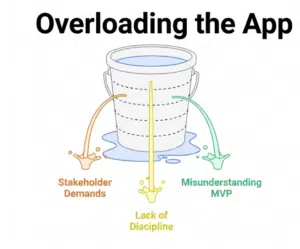
Consider this boardroom scenario: Every stakeholder has a favorite feature; product managers want analytics dashboards, marketing wants referral systems, and the CEO wants something he saw in a competitor’s app.
The result is a bloated first version that takes twice as long to build, costs twice as much, and confuses users who just wanted the core experience.
Feature creep is not just a planning problem but a discipline problem. The cure is a systematically planned MVP.
An MVP (Minimum Viable Product) is not a half-baked app. Rather, it is a focused app that does one thing exceptionally well, ships to real users fast, and collects data that shapes every future decision.
| Ideal Framework: For every proposed feature, ask a single question: “Will the user fail to achieve their primary objective without this feature?” If the answer is no, it goes to later sprints. If yes, it is core. Keep the core small and sharp. |
Development Phase: Common Mistakes in Mobile App Development
Mistake 7: Ignoring Scalability from Day One
One of the most costly phrases in software development is “we will fix it when we need to.”
Applications not designed with scalability in mind simply hit walls quickly. API responses are slow when user requests increase in real time, database queries take seconds instead of milliseconds, and infrastructure is unable to cope with a spike in traffic without crashing.
Here’s what you need to keep in mind while coordinating with your engineering team:
- There is no need to over-engineer your MVP. However, you must make architecture choices early that do not put you in a box in later stages.
- Auto-scale at the beginning by using cloud-native infrastructure (AWS, GCP, or Azure).
- Design your database schema with scalability in mind. Avoid deeply nested or tightly coupled data structures that are difficult to query, index, or extend efficiently at scale.
- Design backends using microservice-ready principles, even when starting with a monolithic architecture.
- Provision a CDN for static assets early in the development lifecycle. The cost is minimal, and the performance, scalability, and reliability benefits justify the investment.
Mistake 8: Ignoring App Performance Optimization
As per research conducted by Google, 53% of mobile users leave a site or app that takes longer than three seconds to load. And a slow app does not just annoy users; it feels laggy, increases data usage, and generates negative reviews.
What you should look for while optimizing app performance:
- Compress and optimize all assets before release to reduce payload size and improve load performance.
- Offload compute-intensive tasks using asynchronous processing, background workers, or task queues.
- Enforce lifecycle management and automated cleanup to maintain application stability over time.
- Batch requests, implement caching strategies, and replace inefficient polling with event-driven mechanisms such as WebSockets where appropriate.
- Integrate observability and performance monitoring tools (e.g., Firebase Performance, Datadog, New Relic) from the outset to detect regressions and bottlenecks early.
Mistake 9: Security Negligence
Security and compliance are often ignored and cost more after launching your digital product. Most startups treat security as a post-MVP problem; however, security should be embedded right from the beginning. A data breach involving user information does not cost just money but it destroys trust and can kill a product entirely.
The most common security vulnerabilities in mobile apps to consider are:
- Hardcoded API keys and secrets in client-side code (visible to anyone who reverses the APK)
- Unencrypted local storage of sensitive user data
- Inadequate API authentication, missing rate limiting, no token expiration, or weak input validation
- Insecure communication, or not enforcing HTTPS, or skipping certificate pinning
- No penetration testing before launch
| Minimum security baseline: Use HTTPS for all API communication. Never store sensitive data in plain text on the device. Implement OAuth 2.0 for authentication. Rotate API keys regularly. Run an automated security scan (OWASP Mobile Security Testing Guide is a good starting point) before every major release. |
Testing and Launch Mistakes
Mistake 10: Inadequate Testing
Teams often become overly optimistic about testing because the product “feels fine” during internal use. However, dogfooding is not a substitute for structured, unbiased validation. Internal teams understand the system’s edge cases, such as where flows break, latency spikes, or inputs fail, and naturally avoid those paths. Real users do not.
Robust testing shall include deliberate coverage. Conduct task-based usability testing with naive users, perform exploratory testing to uncover unexpected behaviors, and implement testing instrumentation (event tracking, session replay, error logging) to observe real-world usage at scale.
Consider including the following tests before the launch:
- Test compatibility with devices – Your application may run great on the latest iPhone, but crash on mid-range Android devices. Therefore, make sure your app is responsive for most screens as well.
- Network condition testing – Test how your app responds in 3G, 4G, and intermittent connectivity.
- Regression testing – Ensure that the new features are not retrogressive of the old features.
- Accessibility testing – Widely ignored, by far, but an aspect that will affect your App Store ratings.
| Conduct pre-launch test on real devices using a device farm (BrowserStack or AWS Device Farm). Automate your regression tests with tools like Detox (React Native) or Espresso (Android). |
Mistake 11: Launching Without MVP Testing
Releasing a complete application that has not been tested with actual users is akin to publishing 10,000 copies of a book that has not been finished. Although the product itself may feel technically sound, you cannot tell whether the product is resolving the problem in the right way until real users try it out.
Consider a small-scale initial release to a small beta team, even 100 to 500 users, would provide you with information that would save months of false development. Test the app with platform-specific testing tools, such as TestFlight (iOS) or the internal testing track of Google Play, before the actual launch.
Note that perfection is not the aim here. The aim is to learn fast enough to correct the core features before you spend money to acquire them.
Post-Launch Mistakes
Mistake 12: Treating Launch as the Finish Line
Top-performing apps are regularly updated, constantly monitored, and enhanced depending on what the data reveals.
Treat launch as the starting point, not the milestone. Once you launch your app, observe its behaviour continuously and improve on the basis of real usage data.
Mobile ecosystems are volatile. Operating system updates can introduce dependency failures, user expectations shift quickly, and new security vulnerabilities surface over time. If your app goes 4 to 6 months without meaningful updates, both users and app store ranking algorithms interpret it as abandoned.
Core health metrics to monitor include crash rate, ANR rate (Android), and length of session.
Establish performance tripwires. Do not solely rely on reviews to inform you that something has gone wrong.
Mistake 13: Ignoring User Feedback
Your app store reviews are a first-person account of what your users are frustrated with, and most teams are only reading them once a week at most. That is a lost opportunity where you can improve on the basis of real user feedback.
In addition to reviews, establish a feedback system within the app. Track the user behavior in your app with tools such as Mixpanel, Amplitude, or Firebase Analytics to see how they navigate the app, where they leave it, and what features they do not pay attention to.
| Practical tip: Have a monthly review ritual: drag the past 30 days of reviews, group feedback by theme, and visualize the three most important themes for your next sprint issues. This itself puts you better off than 80 percent of the apps in the market. |
Mistake 14: No App Store Optimization (ASO) Strategy
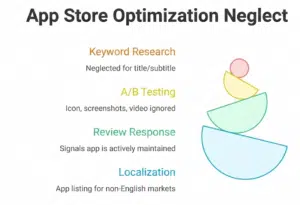
You can build the best app in your category and still get buried in search results because you did not invested in ASO. Think of app store optimization (ASO) as an SEO for app stores. It directly affects how many people find your app through organic search.
What gets neglected most often:
- Keyword research for the app title and subtitle (the highest-weight fields in App Store search)
- A/B testing your icon, screenshots, and preview video
- Responding to reviews, both positive and negative (It send a signals to algorithms that the app is actively maintained)
- Localizing your app listing for non-English markets
| In the context of all the above points, it is a must to learn how you choose a mobile app development partner. |
How to Avoid Mobile App Development Mistakes: A 5-Step Framework
Rather than a checklist of things not to do, here is a framework for how to build apps that actually succeed. This is what disciplined teams do differently.
Step 1: Validate the Idea Before Building Anything
Run five to ten user interviews. Build a landing page and run a small paid test to measure real interest. Create a paper prototype and observe someone using it firsthand. The goal is to confirm that the problem is real and that your solution makes sense to the people who have that problem.
Step 2: Build the Right MVP
An MVP is not a demo. It is a proper functional product that solves the core problem. Every feature on the backlog that did not make it into the MVP should require a data-backed argument for inclusion in the next version. Keep the basic rule in mind: “Build the minimum, ship it fast, observe constantly, and evolve accordingly.”
Step 3: Develop in Agile Sprints
Agile development keeps you aligned with what users actually need rather than what you assumed they needed three months ago. Two-week sprints with clear goals, daily standups, and end-of-sprint reviews give you the feedback loops you need to course-correct continuously. Waterfall development for mobile apps is a reliable way to build something nobody wants by the time it ships.
Step 4: Test Continuously and Ruthlessly
Automated tests should run on every commit. Manual QA should happen at the end of every sprint. Device testing should cover at least the top ten devices in your target market. Security scans should be part of your release process, not an afterthought. The cost of finding a bug in development is roughly ten times cheaper than finding it in production.
Step 5: Optimize After Launch – Always
Build a post-launch rhythm: weekly metrics review, monthly retrospective on user feedback, quarterly security audit, and regular ASO updates. The apps that grow are not necessarily the ones that launched best. They are the ones who improved fastest based on what they learned.
Developer Mistakes vs. Business Mistakes: Who Owns What?
One thing almost no other resource covers: mobile app development mistakes are not all the same type. Some are technical. Some are strategic. And accountability for each sits in a different place.
| Developer / Technical Mistakes | Business / Product Mistakes |
| Security vulnerabilities | Skipping market research |
| Poor performance optimization | Unrealistic timeline and budget |
| Inadequate testing | Feature creep / MVP scope issues |
| Scalability architecture issues | Ignoring post-launch strategy |
| Missing analytics integration | No ASO investment |
Understanding this distinction helps you have the right conversations with the right people. A developer who points out scalability concerns is doing their job. A product manager who insists on skipping user research is making a business decision and should understand the business risk attached to it.
Common Execution Failures Teams Are Still Making in 2026
The fundamentals of app development do not change much. But the context does. Here are a few emerging areas where teams are making new versions of old mistakes.
- Overbuilding AI features: Adding AI functionality because it is trendy rather than because it solves a specific user problem. The same validation rule applies – users need to find the feature useful, not just impressive.
- Ignoring privacy regulation: GDPR, CCPA, and Apple’s App Tracking Transparency framework have real teeth. Apps that do not build privacy compliance from the start face expensive retrofits and potential removal from app stores.
- Skipping CI/CD pipelines: Teams that deploy manually are slower, more error-prone, and have no reliable rollback mechanism. Setting up continuous integration and delivery (GitHub Actions, Bitrise, or Fastlane) is no longer optional for teams that want to ship confidently.
- Building for specific screen sizes only: With the rise of foldable phones, tablets, wearables, and super apps, designing for a single screen size is increasingly a mistake. Responsive mobile layouts and multi-device support should be considered during the design phase.
Conclusion
The teams that succeed in developing a successful app are not the ones who move the fastest or spend the most money. They are the ones who conduct proper research and planning, and catch mistakes early on before those mistakes compound to higher technical debt.
Audit your current approach against this guide, pinpoint your highest-risk gaps, and resolve them before they surface as real-world failures.
You can start by focusing on a clear problem. Build the smallest thing that proves your solution works. Test it with real users. Ship, measure, and improve in real time.
Every mistake discussed in this article is avoidable. At Simpalm, our mobile app development services focus on disciplined planning, targeted user research, rigorous testing, and a systematic commitment to continuous improvement well beyond launch.