
 Design
 App Development
 Web Engineering
 AI Services
 Cloud
Cloud Staffing
 Startups
 Health / Fitness
 Education
 Social
 Nonprofit
 Fintech
 Construction
 Logistics
 Government
 Travel/Hospitality
 HR Software
 About Simpalm
 Our News
 Client Testimonials
 Careers
 Our Blog
 Awards
 Resources
 Information
Nonprofits/Associations are growing and connecting with different communities day by day. There are thousands of nonprofits in the world, with a focus on serving specific purposes. Mobile apps are very crucial for nonprofits to reach out to their audience to stay connected from their smartphones.
In this quest, a mobile app with rich UI, user-friendly navigation, and interactive features can help non-profits/associations maximize their reach and connect with millions of supporters from across the globe. Nonprofits can use mobile apps to better organize members, volunteers, donors and strive to create a better world.
If you are thinking of building a mobile app for your nonprofit, you should know about the process of building it. This can help you to come up with the right strategy, product, budget, and ROI for your mobile app. As a leading mobile app development company, we have outlined a process for developing a mobile app for your nonprofit.
Why Should You Consider Having a Mobile App for Non-Profit Business?
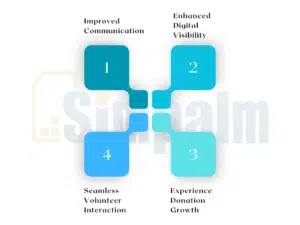
An average person spends around 3-4 hours every day on their mobile devices, and 90% of their time is spent on apps. So, this becomes a lucrative opportunity for non-profit businesses to attract the attention of a larger audience group and seek support towards your mission. Beyond just the engagement aspect of mobile apps, here are a few other reasons why you should consider having a non-profit app for your business:
-
Improved Communication
For non-profits, establishing seamless communication and staying connected with members is paramount. Having a mobile app for non-profit services can make it convenient for users or contributors to seamlessly communicate with your team, and vice versa.
-
Enhanced Digital Visibility
Once you have your non-profit app live on App Store or/and/or Play Store, you can use it to promote your social events through it/them. You can implement push notifications and social sharing features to keep your contributors or members aware of the event schedules and added details. Moreover, having a mobile app will also help you fill up your volunteer requirements faster.
-
Seamless Volunteer Interaction
Some sources reveal that more than 25% of all volunteers contributing to varying causes prefer connecting with non-profits through their smartphones. With a technology-backed mobile app for your business, you can facilitate volunteers to interact with your mission online. Furthermore, your app will entice potential volunteers to sign up for the service and also extend their support in other ways.
-
Experience Donation Growth
Beyond having a website or a physical donation booth, your non-profit app will act as an additional mode of accepting monetary contributions from members and supporters. Features like one-click donation, recurring payment convenience, Google Pay/Apple Pay integration, live progress trackers, and others will further accelerate fundraising through secured means.
Some of the Popular Features of a Mobile App for Non-Profits
A non-profit app is built and integrated with several features or tools, specific to the industry operations or requirements. Considering that, some of the popular features that a non-profit may have in their mobile app:
-
Easy Volunteer Sign-Up Forms and Coordination Features
Users must have easy accessibility to volunteer sign-up forms with clear and only the required fields, ensuring a positive experience for them. Following that, your non-profit app will also have coordination features for you to schedule, manage tasks, and track volunteers’ working hours easily.
-
Event Management Tools
You can organize and schedule fundraising events on the mobile app, and list them out for users to see, interact with, and respond. Not just that, but non-profit apps can be used for managing attendees and tracking the participation rates.
-
Data Management and Predictive Analytics
Store and retrieve information of donors, updates on past/current projects, and the impact reports on the app database, which will contribute to crucial planning and decision-making of your non-profit business in the long run. Furthermore, non-profit apps are backed with a predictive analytics feature, enabling them to be used alongside big data for optimizing funds.
-
Payment Gateways for Accepting Real-Time Donations
There will be integrated payment gateways within the mobile application for users to quickly and securely pay their donations. You can also add live progress trackers to show users how far you are from the financial milestone, and how their donations have helped you come closer to it.
-
Real-Time Impact Tracking
The real-time impact tracking feature in your non-profit mobile app will help you establish trust and rapport with donors. As your donors can get a live update on the impact their donations or contributions have made towards the cause, they will be able to trust your process. Alongside impact tracking, your app will also provide photo updates and impact reports to validate your non-profit activities.
-
Gamification
You can introduce a gamification feature to your non-profit app by implementing reward systems or achievements for donors. This way, you will be encouraging your members, supporters, donors, and volunteers to participate even more actively in your cause. For instance, you can offer impact badges, donation streaks, or community leaderboards.
Tips to Effectively Strategize Your Non-Profit App Development Project
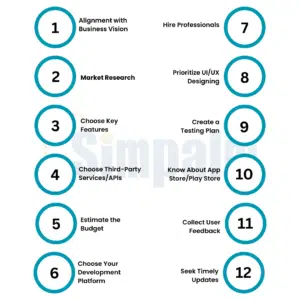
Now that you know how effective a non-profit mobile app can be for your business, it is time to help you effectively strategize the overall process of building one. Here are the tips that you must count on:
1. Align Your App with the Organization’s Vision, Mission, and Goals:
Your mobile app must strengthen and support the goals and vision of your non-profit organization and drive it forward.
For instance, if an NGO aims at spreading environmental education, the mobile app representing it must be a knowledge base for users to access relevant information sources. There must be virtual challenges encouraging good for the planet, and the interactive actions must motivate environmental friendliness.
2. Conduct a Thorough Market Research
Even if you are a non-profit business with a social cause and vision, you ought to understand the market you are stepping into. Study the competitors’ apps to identify any popular features that the target audience is fond of, and also look for gaps that you think you can fill with your product.
However, that shouldn’t be where your market research must end! You must engage with your stakeholders, volunteers, and donors to learn about what their expectations and frustrations are when they come across non-profit apps. Using that insight, you will be able to shape your product so that the audience can resonate with it.
3. Decide on the Features You Want for Your App
Now that you know the purpose of your non-profit app, it is important that you decide on the features it must have to help you achieve the goals. Some of the key features that must be part of your non-profit app include:
- Member login
- One-tap donation
- Saved payment methods
- In-app messaging
- Push notifications
- Volunteer sign-ups
- Loyalty rewards
- Social Media integration
- Impact updates
- Offline access
- Live chat
- Predictive analytics
- Event organizer too
- Community forums
4. Wisely choose Third-Party Services/APIs
Your app might need to stay connected with your website, AMS, CMS, text messaging services, and other 3rd party APIs. Some apps also integrate text messaging services such as DialMyCalls to ensure critical communications reach users instantly. This is something that should be discussed upfront! Here are some situations you need to consider and decide on the type of APIs or third-party integrations you need for your mobile app:
- If the app has to connect with your website CMS, then decide what APIs and data need to be connected.
- If the app has to connect with your membership management software, decide on the data and API points that need to be connected.
- Do you need text messaging services? Which API is better to efficiently send text messages via the app?
- Does your app require payments? Which payment gateway would you use: Stripe, Braintree, PayPal, or in-app purchase?
- Does the app have to connect with your social media accounts like Facebook, Twitter, and Instagram?
5. Estimate the Budgets
Budgeting is one of the most important considerations when building a mobile app for non-profits/associations. The overall cost of the project will depend on several factors, including the level of customization, complexity of the app, design efforts, development platform, and more.
You can reach out to top app development companies offering services to non-profits for technical suggestions and price quotations. Share your list of features, business idea, customization requests, and other such details with the app development team, and let them help you estimate a budget for the project.
Some of the things you can keep in mind while estimating your budget for your mobile app development project are:
- Break the app features and create a small, medium, or large app version. Get quotations from app developers. It is better to estimate the cost.
- Estimate the Cost for the native app development approach against the cross-platform approach.
- Decide on the platform like iOS, Android, or Web, and estimate.
- If the cost is more than your budget, you should trim down the feature list.
- Building apps at different phases can cut down the overall cost and implementation of unnecessary features.
6. Pick Your Development Platform
Consider your budget, target audience, and timeline to decide on the development platform for your non-profit app. You can build apps using a native approach, cross platform approach, or build a progressive web app.
Native apps for the iOS or Android platform are expensive; however, they will offer better performance. On the contrary, the cross-platform apps can help you reach a wider audience at a lower cost.
If you don’t want your users to first download your app from the App Store or Play Store for engaging with your offerings, you can consider building Pa WA, a responsive web-based app, facilitating features like offline access, push notifications, etc. You ought to make your choice based on what aligns with your users’ preferences and business resources.
| Criteria |
Native |
Cross Platform |
PWA |
|
Cost |
A higher cost as a separate development approach is required for iOS and Android. |
Moderate pricing as shared code will be used for building a cross-platform app. |
Cost is low, as PWA is web-based and uses a single code. |
|
Performance |
Robust app performance. |
Near-native performance. |
Browser-dependent performance. |
|
Time-to-Market |
Needs longer development time, which delays the deployment timeline. |
Can be deployed faster. |
Fastest among others. |
|
Hardware Accessibility |
Complete device hardware accessibility, including camera, GPS, etc. |
Near-full accessibility of device features by using plugins. |
Limited support. |
7. Hire the Right Team of Developers
You must look for an app development company with expertise in handling non-profit projects and with a proven track record. Check the portfolio of your shortlisted companies and decide on whether they have the tools, resources, and technologies to meet your feature and customization requests.
Here are a few characteristics of the right non-profit app development company you must count on:
- Seek a partner offering long-term assistance for your non-profit app, beyond just building an MVP and deploying it. The right team must help you continually scale it based on user feedback and help your app stand out from the competition.
- Look for a team of app developers with experience in building non-profit apps with varying complexities, while adhering to the industry standards.
- You should get end-to-end support with your app development project, right from initial ideation and UI/UX designing to deployment and post-launch maintenance.
8. Prioritize UI/UX Above All
Your app must be designed in a way that it can be simple enough to be used by non-tech-savvy users seeking convenience with signing up for volunteering or making donations. However, at the same time, your app must also have the necessary features for the audience group with the intent to learn everything about your business, its activities, and future plans.
When designing your non-profit mobile app, you must adhere to these simple tips:
- You ought to put your users first! If your user is a supporter, volunteer, donor, charity champion, or community member, your mobile app must aim to make complex tasks easier for them. The UI/UX for your app must be straightforward and streamlined.
- Make sure your app is accessible to everyone, ensuring people with disabilities and varying language preferences. This will eventually make your app accessible to all possible audience groups.
- Creativity is always encouraged when crafting the UI of a non-profit app. However, clarity is often prioritized above it! Therefore, you should avoid cluttering your app interface with excessive design elements and keep it readable.
9. Create a Testing Plan
Creating a testing plan needs a broader understanding of the product. As an association member, you should work with nonprofit app developers to develop a test strategy and define the scope of testing. Based on the strategy, you need to develop a testing schedule and decide the roles and responsibilities of various members in the association. This way, you will be able to anticipate all risks and execute testing plans.
The testing phase begins when a development team completes all milestones, and all features are implemented. The development company tests all the features implemented before publishing an app. They can provide you with a final build to test and give you enough time to test all screens and functionalities, and provide feedback. You can also invite a group of people to test the app and get feedback.
10. Know About the Apple App Store and Google Play Store
Once your mobile app for non-profits is ready, you will have to publish it to either Apple’s App Store or Google’s Play Store, or both. So, the next step will be to set up a developer account, and your app vendor can help you with the process.
A developer account is required on the Google Play Store and Apple App Store to publish an app. The team of developers working on your project will ensure that your mobile app adheres to the strict review guidelines of App Store and Play Store, guaranteeing quick approval.
Beyond that, to make your App Store or Play Store listing more appealing, there are a few things you can include while publishing your app:
- You should prepare a good app description highlighting the purpose of your app and what problems it will solve for your users.
- Create 3-4 beautiful screenshots
- Add the contact details that should be displayed on the app page.
- Keep the logo simple.
- Add a preview video that will show users the actual experience of your app.
11. Collect Feedback and Respond to Them
One of the key parameters of success for your non-profit app will be collecting and responding to user feedback. Some of the use cases, followed by analyzing the user feedback post-launching of your MVP, are:
- You will be able to determine different ways you can update your non-profit app. User feedback often highlights the way you can be in touch with what the community expects from you, and later fine-tune your offerings through app improvements and updates.
- Working towards attaining positive reviews will influence how your non-profit app ranks on the App Store or Play Store. People will rely on these reviews to decide if they should download your app and be part of the cause.
- Collecting feedback on bugs, crashes, and usability hassles will help you make quick fixes and prevent negative posts. Thus, you will be able to protect your brand reputation.
12. Seek Timely Updates for Your Non-Profit App
Your non-profit app might be performing well in the market and drawing the attention of global donors and supporters. However, over time, as your app starts to fall out of date in terms of features or information, users will stop coming back to it.
Therefore, you must consider updating your non-profit app periodically with the help of expert developers. Here are some things that will help you plan the updates for your non-profit app:
- Download the growth trends or social signals across online reviews and mentions.
- Use in-app analytics to get insights into how users respond to your non-profit offerings within the app.
- Monitor app performance to determine any potential bugs or functionality issues that must be addressed.
- Learn from users’ feedback and make recommendations part of your regular updates.
- Review the existing app code after every new OS release and ensure it works well on the users’ devices. Any updates required must be made immediately!
Let Simpalm Pave the Path for Your Non-Profit App Development Project!
Simpalm is a leading non-profit app development company with years of experience in the domain. We have a team of proficient developers, trained and skilled to work on non-profit projects, and catering to their unique feature or functionality needs.
From initial ideation and budgeting to UI/UX designing, deployment, and post-launch support, Simpalm will assist you across every stage of building your mobile app. So far, we have partnered with several non-profit organizations and membership associations to build their digital presence.
Even with your complex customization requests, our developers can help shrink down the development time from months to weeks, all at a cost-effective and reasonable price. So, if you want to give your non-profit business global recognition, you must have a performance-centric and conversion-driven mobile app!
Reach out to us for more information.






3 Responses to Essential Mobile App Strategy Guide for Non-Profit/Associations