
 Design
 App Development
 Web Engineering
 AI Services
 Cloud
Cloud Staffing
 Startups
 Health / Fitness
 Education
 Social
 Nonprofit
 Fintech
 Construction
 Logistics
 Government
 Travel/Hospitality
 HR Software
 About Simpalm
 Our News
 Client Testimonials
 Careers
 Our Blog
 Awards
 Resources
 Information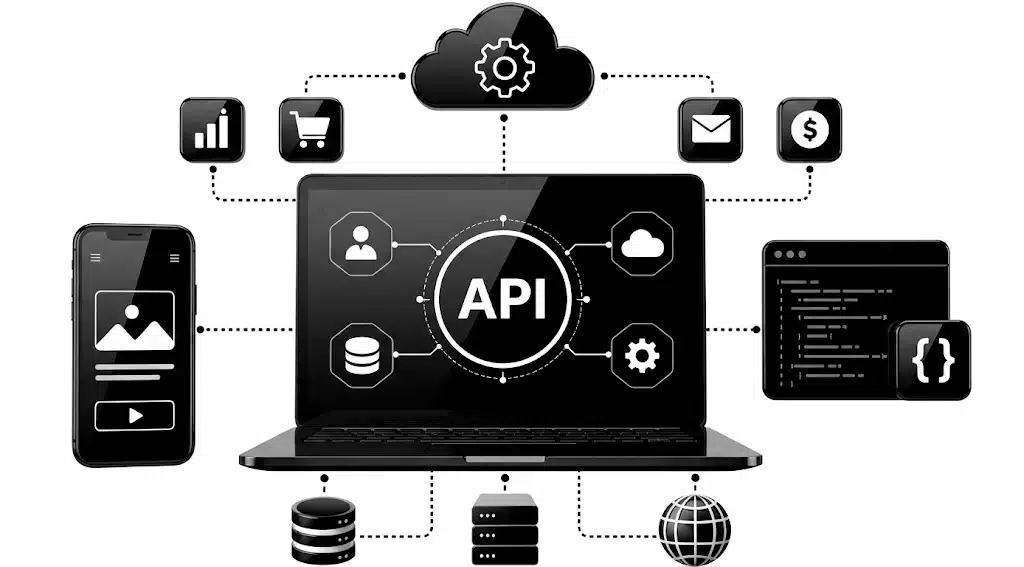
Key Takeaways
- APIs have become core business infrastructure, letting companies like Stripe and Twilio power thousands of other businesses without those businesses rebuilding core systems from scratch.
- Choosing the right architecture style, REST, GraphQL, or SOAP, shapes everything from development speed to how easily other developers can work with your API.
- Security is not a single feature you add at the end. It needs to be built into authentication, rate limiting, and data handling from the very first version.
- Testing an API well means covering more than just functionality. Load testing and security testing matter just as much as checking that endpoints return the right data.
- Cost and timeline depend heavily on how many integrations, authentication layers, and compliance requirements the API needs to support.
________________________________________________________________________________________
APIs are the reason a fintech app can verify a bank account in seconds, a food delivery app can show a driver’s live location, and a SaaS tool can connect to hundreds of other platforms without custom code for each one. Companies like Stripe, Twilio, and Plaid built entire businesses around APIs, letting thousands of other companies plug into their infrastructure instead of building payment processing or messaging systems from scratch.
This guide covers what an API actually is, how it works, the different types and architecture styles you can choose from, the features that matter most, the tech stack behind a modern API, the development process, how to test it properly, security and compliance, realistic costs, the team you need, and how some of the best-known APIs built their businesses.
What is an API?
An API, short for Application Programming Interface, is a set of rules that lets two software systems talk to each other. Instead of one app needing to understand another app’s entire codebase, the API acts as a defined contract. It tells one system exactly what data it can request, how to ask for it, and what format the response will come back in.
Think of an API like a restaurant menu. You do not need to know how the kitchen works to order food. You just pick an item from the menu, the kitchen prepares it, and it comes back to your table. An API works the same way. A developer sends a request through a defined endpoint, the server processes it, and a response comes back in a predictable format, usually JSON.
This simple idea is what allows a weather app to show live forecasts, a travel site to pull flight prices from dozens of airlines, or a login button to let users sign in with Google instead of creating a new password. APIs remove the need to build every piece of functionality from scratch.
How Does an API Work?
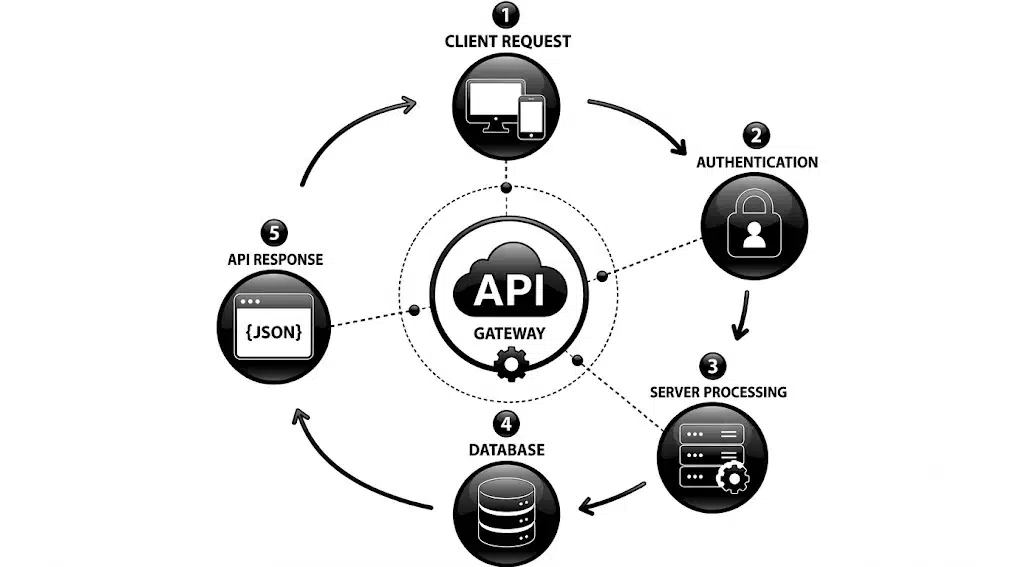
When a user interacts with an app, whether that is searching for a product or logging in, the app sends a request to a server through the API. The server checks the request, processes it, and sends back the relevant data. The app then displays that data to the user, often within a fraction of a second.
Take a flight booking app as an example. A user enters their travel dates and destination and hits search. The app sends that request through an API to the airline’s system. The airline’s server checks flight availability and pricing, then sends the data back through the same API. The app displays the results on screen. The user never sees any of this happening; they just see a list of flights appear almost instantly.
Most modern APIs communicate using REST, a lightweight architectural style built on standard web requests. Older systems sometimes use SOAP, a stricter and more heavyweight protocol. Newer APIs increasingly use GraphQL, which lets clients request exactly the data they need in a single call. We will compare these three approaches in detail below.
Pro tip: Before writing any code, map out the exact request and response flow for your most common use case. This simple exercise catches design problems early, before they get baked into your architecture.
Types of APIs
Not every API is built for the same audience or purpose. Choosing the right type shapes how much access control, documentation, and support your API will need.
Based upon accessibility
- Open APIs, also called public APIs, are available to any developer with minimal restrictions. They are built to expand reach and encourage third-party integrations, and companies use them to grow their ecosystem without heavy internal dependencies.
- Partner APIs are shared with specific external partners under controlled access. They let businesses collaborate with vendors or strategic allies while keeping tight control over what data gets shared and with whom.
- Internal APIs, also called private APIs, are used only within an organization. They let different internal systems and tools talk to each other securely, which is especially useful when multiple teams are building features that depend on shared data.
- Composite APIs bundle multiple service calls into a single request. This reduces the number of round trips between client and server, which speeds up complex workflows that would otherwise require several separate calls.
Based on Architecture
- REST APIs are the most widely used type of API for modern web and mobile applications. They use standard HTTP methods like GET, POST, PUT, and DELETE to exchange data, making them simple to build, scalable, and easy for developers to integrate with.
- SOAP APIs use a strict XML-based messaging protocol with built-in security and reliability standards. They are commonly used in enterprise systems, banking, healthcare, and other industries where transactions, compliance, and data integrity are critical.
- GraphQL APIs let clients request exactly the data they need instead of receiving a fixed response. This reduces unnecessary data transfer, improves performance, and is especially useful for applications with complex user interfaces or multiple connected data sources.
- WebSocket APIs provide a persistent, two-way connection between the client and server, allowing data to flow instantly in both directions. They are ideal for real-time applications such as chat platforms, live trading systems, multiplayer games, and collaborative tools.
- Webhook APIs enable one application to automatically send data to another when a specific event occurs. Instead of repeatedly checking for updates, the receiving system is notified instantly, making webhooks a lightweight and efficient solution for event-driven workflows such as payment confirmations, order updates, and notifications.
REST vs GraphQL vs SOAP: Which Should You Choose?
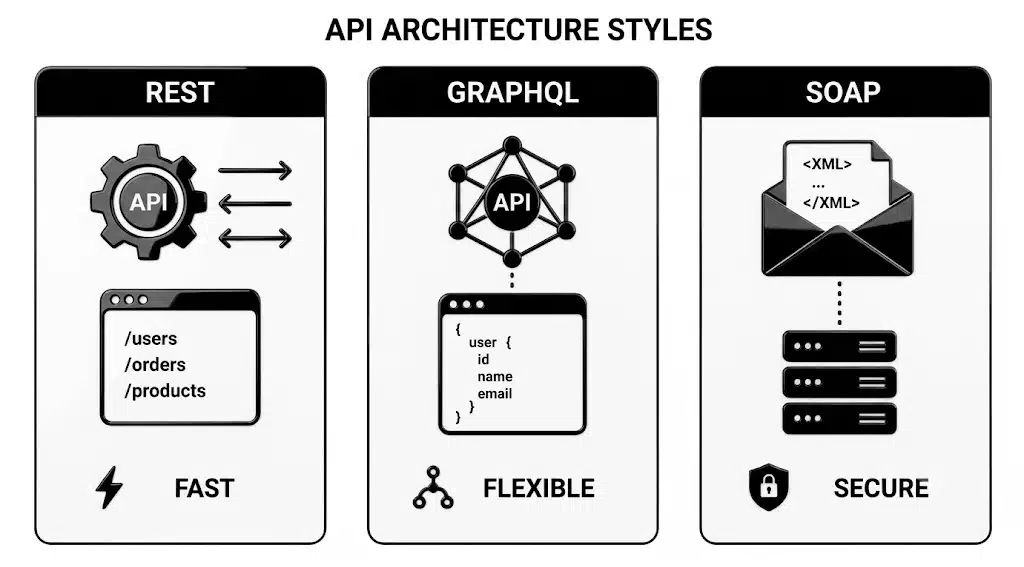
The architecture style you choose affects development speed, performance, and how easy your API is for other developers to use. Each of the three main styles solves the communication problem differently.
- REST structures data around resources, with each resource getting its own endpoint. It is lightweight, stateless, and works with standard HTTP methods like GET and POST, which makes it the most widely adopted style today.
- GraphQL lets the client specify exactly what data it needs in a single request, rather than pulling fixed data from multiple endpoints. This reduces over-fetching and under-fetching of data, which is especially useful for mobile apps trying to minimize data usage.
- SOAP is a stricter, more heavyweight protocol built around strict standards and built-in error handling. It is more complex to implement than REST but offers stronger guarantees around transaction reliability, which is why it still shows up in banking and legacy enterprise systems.
| Factor | REST | GraphQL | SOAP |
| Learning curve | Low | Moderate | High |
| Data flexibility | Fixed per endpoint | Client defines exact data needed | Fixed, rigid structure |
| Best for | Most web and mobile apps | Apps with complex, nested data needs | Banking, legacy enterprise systems |
| Performance | Fast, lightweight | Fast, fewer round trips | Slower, heavier payloads |
For most new products, REST remains the safest default choice due to its simplicity and wide tooling support. GraphQL is worth considering if your app pulls data from many related sources in a single screen, such as a social feed or dashboard. SOAP is rarely the right choice for a new build unless you are integrating with a legacy system that requires it.
Must-Have Features of a Good API
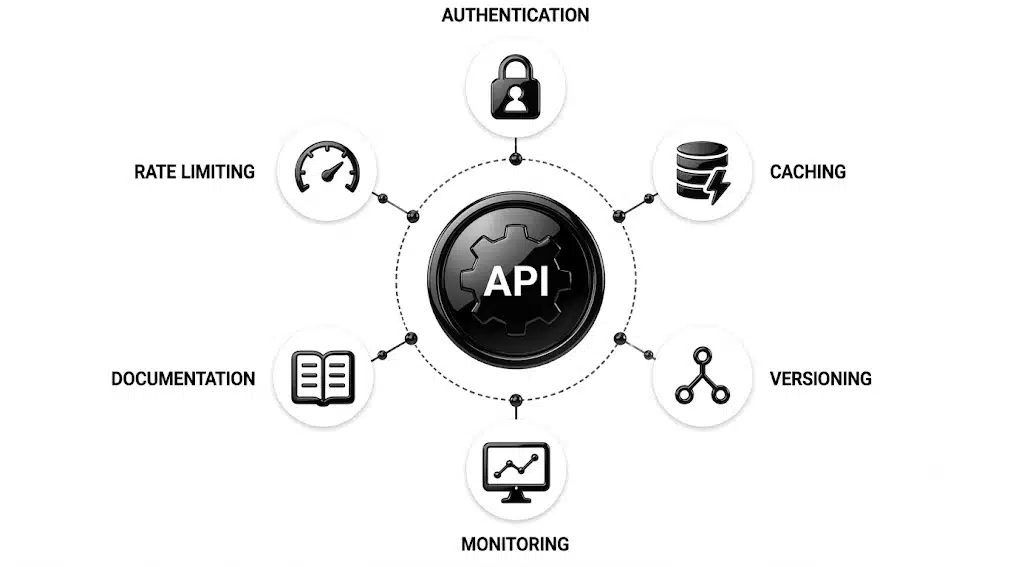
A technically functional API is not the same as a good one. The features below are what separate an API developers actually enjoy using from one that creates constant support tickets.
Performance Features
- Speed and high availability: An API should respond quickly under normal and peak load, with minimal downtime. Low latency is one of the clearest signals of a well-built API.
- Scalability. Your API needs to handle growth without falling over. As your user base or data volume grows, the API should scale smoothly rather than requiring a rebuild.
- Caching: Storing frequently requested data temporarily reduces server load and speeds up response times, which matters most for read-heavy APIs serving the same data repeatedly.
Security Features
- Authentication and authorization: Every API should support secure, standardized authentication such as OAuth 2.0 or token-based access, so only the right users and systems can reach sensitive data.
- Rate limiting and throttling: Limiting how many requests a user can make in a given period protects your servers from overload and abuse, while throttling manages sudden traffic spikes gracefully.
Pro tip: Build rate limiting into your API from day one, even if your initial user base is small. Retrofitting it after a traffic spike or abuse incident is far more stressful than designing for it upfront.
Developer Experience Features
- Comprehensive documentation: Clear documentation covering authentication, endpoints, and error codes directly affects how quickly other developers can integrate with your API. Poor documentation is one of the top reasons developers abandon an integration.
- API versioning: As your API evolves, versioning lets you roll out changes without breaking existing integrations. This is essential for any API with external consumers.
- Detailed logging and monitoring: Tracking requests, response times, and errors helps you catch problems early and understand how your API is actually being used in production.
Features by API Type
| Feature | Public API | Internal API | Partner API |
| Rate limiting | Strict | Flexible | Moderate |
| Documentation depth | Extensive | Light, team-facing | Moderate, partner-specific |
| Versioning strategy | Required | Optional | Required |
| Monetization support | Common | Not applicable | Sometimes |
Tech Stack for API Development
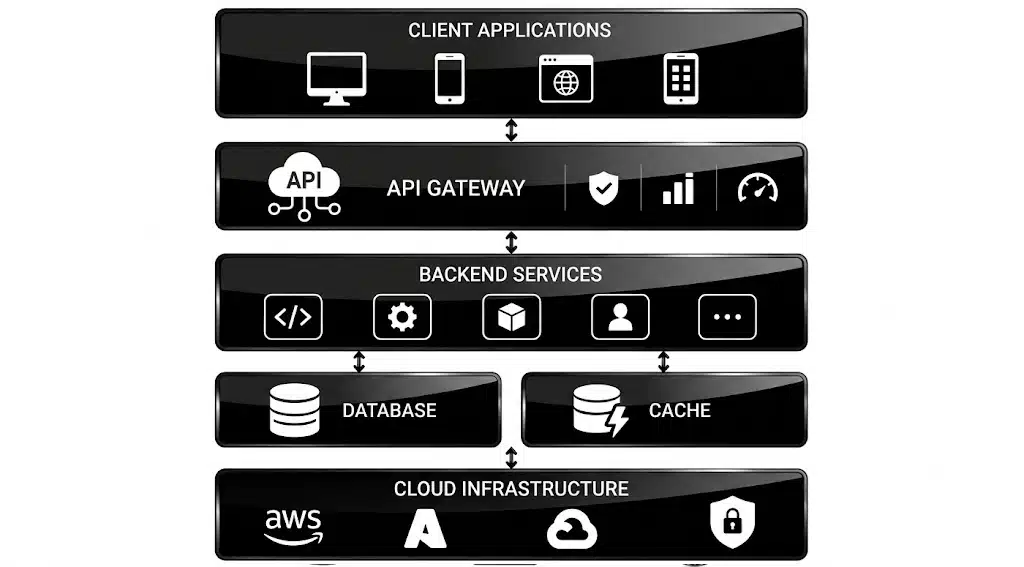
A modern API is built on a stack that balances developer productivity with performance and security.
On the backend, Node.js works well for APIs that need to handle many concurrent, lightweight requests, while Python frameworks like Django or FastAPI suit APIs with heavier data processing needs. Our App development team typically chooses the framework based on the complexity of the business logic rather than defaulting to one stack for every project.
For the database layer, PostgreSQL handles structured, relational data reliably, while MongoDB suits APIs working with flexible, less structured data. Redis is commonly layered in for caching frequently requested data and speeding up response times.
For API management, tools like Swagger, also known as OpenAPI, handle documentation generation, while Postman supports testing and collaboration across development teams. API gateways like Kong or AWS API Gateway manage traffic, enforce rate limits, and handle authentication at the infrastructure level rather than inside application code.
| Layer | Recommended Technology | Purpose |
| Backend Framework | Node.js, Django, FastAPI, .Net, PHP | Core business logic and request handling |
| Database | PostgreSQL, MongoDB | Structured or flexible data storage |
| Caching | Redis | Faster responses for repeated requests |
| Documentation | Swagger (OpenAPI)
Postman |
Auto-generated, standardized documentation |
| Testing | Postman | Request testing and team collaboration |
| API Gateway | Kong, AWS API Gateway | Traffic management, rate limiting, auth |
Step by Step API Development Process
Building a reliable API involves much more than writing endpoints. Every stage, from planning and architecture to testing and ongoing maintenance, affects performance, security, scalability, and the overall developer experience. While the exact workflow varies by project, most successful API development follows these core steps.
Step 1: Define Your Purpose and Requirements
Before writing any code, get clear on exactly what the API needs to do, who will use it, and what data it will expose. This phase should produce a clear scope and a list of required integrations.
Step 2: Design the API Architecture
Design your resources, endpoints, request and response formats, and error handling before building anything. Good architecture at this stage saves significant rework later, especially once external developers start depending on your endpoints.
Step 3: Choose the Tech Stack
Select the languages, frameworks, and tools that fit your performance, scalability, and team skill requirements. This decision should be driven by your architecture, not the other way around.
Step 4: Build Core Functionality
This is where most of the development time goes. Endpoints get built, authentication gets implemented, and the API starts handling real requests. Most teams build in stages, starting with core endpoints before adding advanced features.
Step 5: Write Documentation (Ongoing, Alongside Development)
Documentation should be written as the API gets built, not after. Tools like Swagger can auto-generate much of this from your code, but clear explanations and examples still need a human touch.
Step 6: Test Rigorously
Testing needs to cover functionality, performance under load, and security vulnerabilities before the API goes live. We cover this in detail in the next section, since it deserves its own focused approach.
Step 7: Deploy and Integrate
Once testing is complete, deploy the API to your target environment and provide clear integration guidelines for the teams or partners who will consume it.
Step 8: Monitor and Iterate (Ongoing)
Launch is the beginning, not the end. Monitoring usage patterns, error rates, and performance data lets you catch problems early and guides which features to build next.
Testing an API: Types and Strategy
Testing an API well means covering more ground than simply checking that an endpoint returns data. A rushed testing phase is one of the most common reasons APIs fail in production.
- Unit testing checks individual functions and endpoints in isolation, confirming that each piece of logic behaves correctly before it gets combined with everything else. This is the fastest and cheapest type of testing to run frequently.
- Integration testing checks how different parts of the API work together, including database calls, third-party integrations, and multi-step workflows. This catches issues that unit tests miss, since problems often show up only when components interact.
- Load testing simulates high traffic to see how the API performs under pressure. This reveals bottlenecks before real users hit them, and it is especially important for APIs expected to handle traffic spikes or rapid growth.
- Security testing looks for vulnerabilities like injection attacks, broken authentication, and data exposure. Given how much sensitive data flows through APIs, security testing should never be treated as optional or left until just before launch.
Pro tip: Automate your unit and integration tests so they run on every code change. Tools like Postman’s collection runner or CI-integrated test suites catch regressions early, before they reach production.
API Security and Compliance
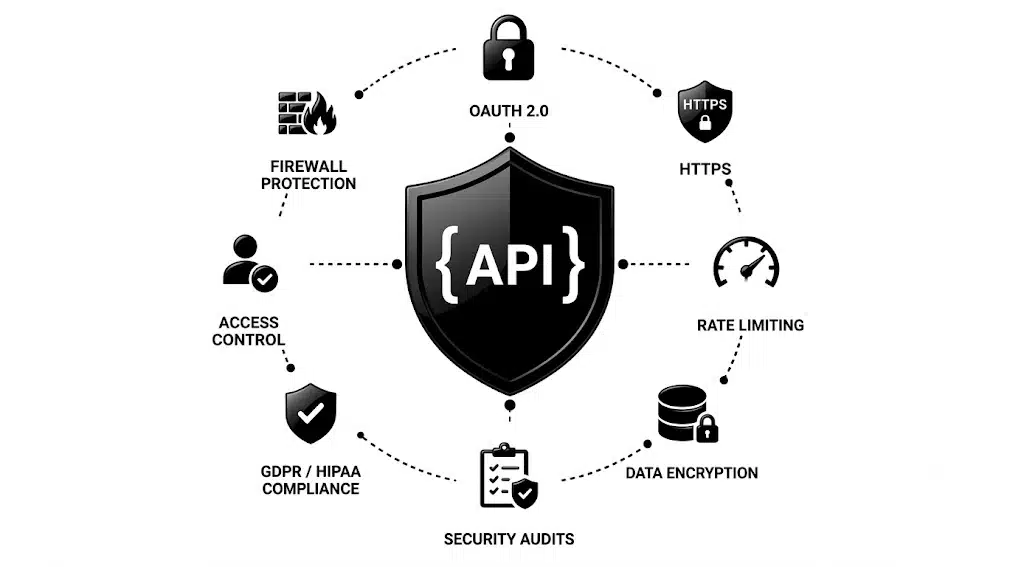
Security cannot be bolted onto an API after launch. It needs to be part of the architecture from day one, since APIs are often the exact point where sensitive data leaves a system.
- Authentication and authorization: OAuth 2.0 has become the standard for secure, token-based access, letting users grant limited permissions without sharing their actual credentials. API keys work for simpler use cases but offer less granular control.
- Encryption in transit and at rest: All API traffic should run over HTTPS, and sensitive data stored by the API should be encrypted at rest. This is a baseline requirement, not an advanced feature.
- Rate limiting and abuse prevention: Beyond protecting server performance, rate limiting also helps prevent brute force attacks and credential stuffing attempts against authentication endpoints.
- Regulatory compliance: APIs handling healthcare data need to account for HIPAA, those handling European user data need to meet GDPR requirements, and any API processing payments needs to meet PCI DSS standards. Compliance requirements should shape your data handling and logging practices from the start, not get retrofitted after an audit flags a gap.
- Regular security audits: Periodic penetration testing and code review catch vulnerabilities that automated tools miss, particularly around business logic flaws that do not show up in standard security scans.
| Building security into the architecture from the beginning is far less expensive than retrofitting it after a breach or compliance failure, particularly once real user data is already flowing through the system. |
Who Do You Need on Your Team?
Building a solid API requires a specific mix of skills beyond general software development experience.
A backend engineer with API design experience understands how to structure endpoints, handle errors gracefully, and design for scalability from the start. A DevOps engineer is essential for setting up deployment pipelines, monitoring, and infrastructure that can handle production traffic reliably. A QA engineer with API testing experience is critical, since testing an API well requires more specialized skills than testing a typical user interface. A technical writer or developer advocate dramatically improves documentation quality, which directly affects how quickly other developers can integrate. For APIs handling sensitive data, a security specialist should review the architecture before launch rather than after.
Smaller teams do not need every role filled from day one, but skipping dedicated API testing expertise or security review almost always leads to expensive rework or incidents later.
API Monetization Strategies
APIs are not just technical infrastructure. Many companies have turned their APIs into significant revenue streams. Here are the mainstream monetization strategies:
- Usage-based pricing: charges customers based on the number of API calls, data processed, or transaction volume. This model directly ties revenue to customer engagement and works well for payment processing, messaging, or location-based services where usage varies widely across accounts.
- Freemium access: offers basic functionality for free while reserving advanced features or higher usage limits for paid plans. This encourages broad adoption while creating a clear upgrade path as customers grow.
- Revenue sharing with partners: lets other platforms build on top of your API in exchange for a share of the revenue their integration generates. This works well for APIs that plug into existing partner ecosystems, such as logistics tracking or payment processing.
Conclusion
API development sits at the intersection of technical architecture, security, and developer experience. The APIs that succeed share a few clear traits.
- They choose the right architecture style, REST, GraphQL, or SOAP, based on actual use case needs rather than following trends.
- They treat security and rate limiting as core requirements from the very first version, not features to add later.
- They invest in documentation and developer experience as seriously as they invest in the underlying code.
Choosing the right architecture, building the right features, and testing thoroughly before launch will determine whether your API becomes infrastructure other developers rely on, or one they abandon after a frustrating first integration attempt.
If you are ready to move from planning to building, working with an experienced API and App development company that understands security, scalability, and developer experience can save significant time and budget compared to learning these lessons mid-project.
Frequently Asked Questions
Q1. How long does it take to build an API?
Ans. A simple API typically takes two to four months from planning to launch. A mid-tier API with deeper integrations usually takes four to seven months. Advanced APIs with extensive compliance and scale requirements can take seven to twelve months or longer.
Q2. Should I use REST, GraphQL, or SOAP for my API?
Ans. REST is the safest default for most new APIs due to its simplicity and wide tooling support. GraphQL is worth considering if your app pulls data from many related sources in a single screen. SOAP is rarely the right choice for a new build unless you are integrating with a legacy system that specifically requires it.
Q3. What is the most important feature for a new API?
Ans. Documentation and authentication are the two features that matter most from day one. Poor documentation slows down every developer trying to integrate with your API, while weak authentication creates real security risk. Both should be prioritized even in an early version.
Q4. How do I make my API secure?
Ans. Start with OAuth 2.0 or token-based authentication, encrypt all data in transit and at rest, and implement rate limiting to prevent abuse. Regular security audits and penetration testing catch vulnerabilities that automated tools often miss, particularly around business logic flaws.
Q5. Do I need to test my API before launch?
Ans. Yes, thoroughly. Testing should cover individual functions through unit testing, how components work together through integration testing, performance under heavy traffic through load testing, and vulnerabilities through security testing. Skipping any of these increases the risk of failures once real users depend on the API.
Q6. Can an API generate revenue on its own?
Ans. Yes. Many companies monetize APIs directly through usage-based pricing, freemium tiers with paid upgrades, or revenue-sharing agreements with partners. Stripe, Twilio, and Plaid all built substantial businesses primarily around API access rather than a traditional consumer product.