
 Design
 App Development
 Web Engineering
 AI Services
 Cloud
Cloud Staffing
 Startups
 Health / Fitness
 Education
 Social
 Nonprofit
 Fintech
 Construction
 Logistics
 Government
 Travel/Hospitality
 HR Software
 About Simpalm
 Our News
 Client Testimonials
 Careers
 Our Blog
 Awards
 Resources
 Information
Key Takeaways
- The global event management software market is projected to surpass $14.9 billion by 2030, growing at a CAGR of 11.4%, signaling a massive commercial opportunity for builders entering this space.
- Event management apps serve three distinct user roles simultaneously: attendees, organizers, and admins. Each role demands its own dedicated feature set and UX logic.
- AI-powered features like smart attendee matchmaking, predictive ticket demand analytics, and chatbot check-in are rapidly becoming competitive necessities rather than optional upgrades.
- The most successful event apps built recently have been vertical-specific, targeting specific audiences such as weddings, corporate summits, or music festivals, rather than building another general-purpose platform from day one.
_________________________________________________________________________________________
The event industry is undergoing its most significant digital transformation in decades. More than 62% of event organizers now prefer mobile-first management tools. The global event management software market is expected to hit $14.9 billion by 2030. What once required weeks of back-and-forth coordination between spreadsheets, emails, and printed attendee lists can now be handled end-to-end through a single well-built event management app.
Event management apps are not just replacing manual processes. They are fundamentally changing the relationship between organizers and their audiences by delivering real-time data, personalized attendee experiences, and revenue tracking that was previously impossible for anyone outside a large enterprise.
For businesses, the commercial upside is equally compelling. For example:
- Fortune 500 companies use them to run global internal conferences without a single printed schedule.
- Music festival promoters use them to manage 50,000-person crowds
- Real estate developers use event apps to drive property launch registrations
In this complete guide to building event management app, we cover everything you need to know, from market opportunity and feature planning to tech stack decisions, development cost, and post-launch growth strategy.
Market Overview: Why Event Management App Development is a High-Value Opportunity in [Q2 2026]
The event technology market has moved well beyond its post-pandemic recovery phase. It is now in an active expansion phase driven by three converging forces: the permanent normalization of hybrid events, the mobile-first expectations of younger audiences, and the growing appetite among enterprise clients for proprietary event data rather than data locked inside a third-party platform.
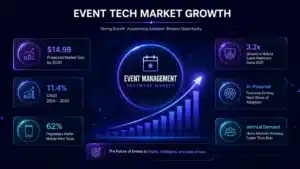
Key Market Insights:
- $14.9B – Projected market size by 2030
- 11.4% – CAGR from 2024 to 2030
- 62% – Organizers prefer mobile-first tools
- 3.2x – Growth in hybrid event platforms since 2021
Here is how the event management market is evolving:
- Mobile-first attendee behavior: Over 99.5% of the attendees like to use app for their events, making a dedicated app experience a commercial necessity rather than a design preference.
- Hybrid events as the new standard: Enterprises now expect platforms that can serve in-person and remote attendees simultaneously, pushing demand for more sophisticated infrastructure than traditional event software can provide.
- Data ownership as a competitive advantage: Businesses running events on third-party platforms like Eventbrite lose access to their own attendee behavioral data. Custom-built apps solve this problem entirely, creating a strong motivation to build rather than buy.
- AI integration accelerating adoption: AI-powered features like smart recommendations, predictive analytics, and automated check-in are creating a new performance benchmark that organizers now evaluate when selecting any event tool.
- Vertical-specific demand growing fastest: Niche markets, including university campus events, non-profit fundraisers, and regional music festivals, remain significantly underserved by today’s mainstream platforms, creating clear entry opportunities for purpose-built solutions.
Now that we understand the market opportunity, let’s look at developing an event management app and how these platforms work.
What is Custom Event Management App Development?
Custom event management app development refers to the end-to-end process of designing, engineering, and deploying a mobile or web-based application that allows users to plan, organize, promote, ticket, manage, and analyze events digitally. These platforms are purpose-built to handle the full lifecycle of an event from its creation to the moment post-event analytics are reviewed and acted upon.
It is important to distinguish event management apps from two adjacent categories that are often confused with them.
A ticketing app focuses narrowly on purchasing and delivering digital passes, while an event planning tool tends to cover the workflow once an attendee has purchased the ticket for the event, this includes attendees and organizer workflow.
However, an event management app covers both: it serves organizers, attendees, and platform admins simultaneously through a unified system, handling everything from registration and payment processing to real-time check-in validation, in-app networking, and revenue reporting.
How an Event Management App Works
Understanding the user flow is critical before jumping to discuss the build of event app, because it directly determines the information architecture, API design, and where the most development effort will be concentrated.
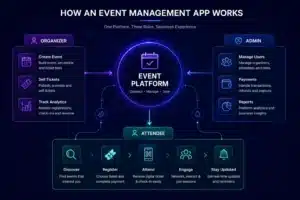
Here’s the basic workflow of an event management application:
- Organizer flow: Creates an event, sets ticket tiers and capacity, publishes the listing, monitors registrations in real time, runs QR-code check-in on event day, and reviews analytics afterward.
- Attendee flow: Discovers the event through search or a shared link, selects a ticket, completes payment, receives a digital ticket, gets push notification reminders, attends and engages, then submits a post-event rating.
- Admin flow: Manages user accounts and organizer approvals, tracks commission income, moderates content, handles refunds, and monitors platform-wide analytics from a centralized dashboard.
Next, let’s look at the different types of event management apps and which category fits your business model.
Types of Event Management Apps
Not all event management apps serve the same audience, and choosing the wrong structural model before development begins is one of the most expensive mistakes a product team can make.
Here are the primary categories to evaluate various categories that are suitable for your business model:
| App Type | Best For | Core Differentiator | Build Complexity |
| Attendee-facing app | Consumer events, festivals | Discovery, digital tickets, schedules | Medium |
| Organizer-facing app | Event agencies, enterprises | Management dashboard, analytics | Medium–High |
| Two-sided marketplace | Eventbrite-style platforms | Both organizer and attendee tools | High |
| Single-event app | One-off large conferences | Deep event-specific features | Low–Medium |
| Virtual/webinar platform | Online summits, workshops | Streaming, engagement tools | High |
| Hybrid event platform | Enterprises, large conferences | In-person and online sync | Very High |
| White-label platform | Agencies serving multiple clients | Rebrandable single codebase | High |
Various Event Management App Categories: A Deeper Look
Beyond structural classification, event apps are also segmented by the industry vertical they serve. Each category carries its own feature priorities and technical requirements, such as:
- Wedding and social event apps deal with highly personal occasions that require exceptional customization, guest communication tools, and multi-vendor coordination workflows.
- Corporate conference and summit apps must integrate with enterprise systems like Salesforce, support multi-track session scheduling, and meet higher security standards for attendee PII.
- Music festival and concert apps face the most demanding ticketing-at-scale requirements, including entry validation speed, barcode fraud prevention, and F&B or merchandise upsell integrations.
- Sports event management apps need live scoring integrations, fan engagement features, and the ability to handle stadium-level concurrent users reliably.
- University and campus event apps serve a technically sophisticated but budget-sensitive audience and benefit from integration with existing student information systems and campus ID infrastructure.
- Hybrid event platforms remain the most technically demanding category, requiring synchronized in-person and remote attendee experiences with reliable low-latency streaming and virtual engagement features.
Now that we’ve covered app types, let’s explore who stands to benefit most from building a dedicated event management platform.
Who Benefits Most from Building a Custom Event Management App?
The most important question to answer before beginning any event app project is: who is this platform primarily being built for? The answer shapes every product decision that follows, from your feature priority list to your monetization model.
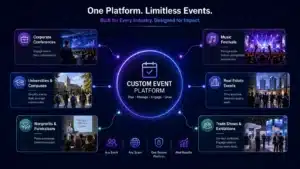
Here’s the audience analysis
- Event Organizers & Agencies: They feel operational pain most acutely and are the most motivated buyers of dedicated event tooling.
- Enterprise Teams: Internal all-hands meetings, product launches, and training events represent a high-value niche that is significantly underbuilt.
- Universities & Non-Profits: Distinct workflows and budget sensitivities open the door for purpose-built solutions at lower development complexity.
- Real Estate Developers: Property launch events and open houses benefit from registration management, digital check-in, and buyer engagement tracking.
- Festival & Concert Promoters: High-volume ticketing, crowd management, and on-site engagement tools are mission-critical at this scale.
Strategic Insight
The most successful event apps built in the last five years have been vertical-specific rather than horizontal. Picking a clear niche and building deeply for that audience is a more reliable path to product-market fit than attempting to compete directly with Eventbrite or Cvent from day one.
Core Features Every Event Management App Should Have
Building an event management app that stands out in a crowded market requires more than assembling a standard feature list. Every feature must solve a specific, measurable problem for one of your three user types: the organizer, the attendee, or the admin. Below are the core features to prioritize during development, along with real-world examples of how each one creates value in practice.
1. User Registration & Smart Onboarding
A friction-free registration system supporting email, Google, Apple, and social login is the first conversion point in the attendee journey. The onboarding flow should collect preference data, event categories of interest, location, notification settings, etc., so the app can deliver relevant content from the very first session.
Example – A first-time user signs up with their Google account, selects “music festivals” and “tech conferences” as interests, and immediately sees a personalized event feed rather than a generic listing page. This feature results in a significant reduction in the time to first engagement.
2. Event Discovery & Advanced Search
For event marketplace like eventbrite and meetup.com, where people search for events, attendees shall be able to find events quickly using filters for category, date range, location radius, price, and format (in-person, virtual, hybrid). Search quality is a direct driver of ticket conversion, and platforms that deliver irrelevant results lose users to competitors within the first session.
Example – A user in Michigan searches for “tech conferences this month under $2,000” and gets a filtered results page sorted by proximity and relevance instead of a generic national listing requiring manual filtering.
3. Ticket Booking & Multi-Tier Pricing
Support for multiple ticket categories such as General Admission, VIP, Early Bird, Group. This feature can be supplemented along with seat selection for reserved-format events is essential for any platform serving professional event organizers. Discount codes, referral pricing, and waitlist management are closely adjacent features that significantly increase organizer revenue.
Example – A conference organizer creates three ticket tiers with different pricing and access levels, sets an early bird deadline that automatically switches to standard pricing, and watches the countdown drive a 38% spike in registrations in the final 48 hours.
4. QR Code Digital Ticket Generation
Every confirmed booking should instantly generate a unique, encrypted QR code stored in the attendee’s in-app ticket wallet. The code must be accessible offline so that poor venue connectivity does not create check-in queues. The organizer-side scanner validates codes in under a second and automatically updates the live attendee count.
Example – An attendee arrives at a sold-out concert in an area with no mobile signal, opens the app, and their QR code loads instantly from local cache. Using QR code you can speed up the entry process to be completed in under five seconds without requiring any internet connectivity on either end.
5. Agenda & Schedule Management
For conferences, summits, trade shows, and multi-session events, agenda management is one of the most important features of an event management app. Organizers should be able to create and manage the complete event schedule, including session tracks, speaker profiles, presentation details, workshop timings, venue locations, and session capacities. Attendees, on the other hand, should be able to browse the agenda, save favorite sessions, build personalized schedules, and receive reminders before sessions begin.
A well-structured agenda system helps attendees navigate complex events while ensuring organizers can deliver a seamless event experience.
Example – A three-day business conference features over 50 sessions across multiple tracks. Attendees use the app to browse the schedule, save sessions they plan to attend, and receive reminders before each session starts. Meanwhile, organizers can update speaker information or adjust session timings in real time, with changes instantly reflected across all attendee schedules.
6. Sponsor & Exhibitor Management
Sponsors and exhibitors play a critical role in the success and profitability of many events. The app should provide dedicated profiles for sponsors and exhibitors, allowing organizers to showcase company information, product offerings, booth locations, promotional materials, contact details, and special offers. Attendees should be able to browse sponsor listings, bookmark exhibitors of interest, and access relevant resources directly within the app.
This feature increases sponsor visibility, improves attendee engagement, and helps organizers demonstrate measurable value to event partners.
Example – At a large trade show, attendees use the app to explore the exhibitor directory and identify vendors relevant to their interests. They save several booths to visit during the event and access product brochures directly from exhibitor profiles. Sponsors benefit from increased exposure, while organizers can track engagement metrics such as profile views, resource downloads, and booth visits.
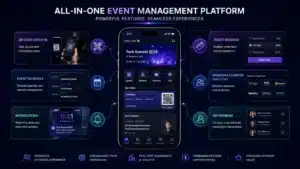
7. Real-Time Organizer Dashboard
Organizers need a live command center that shows ticket sales by tier, check-in rate, revenue breakdown, attendee demographics, and promotional performance, all updating in real time throughout the event. This replaces manual spreadsheet tallies and gives organizers the data they need to make on-the-fly decisions during the event itself.
Example – With 30 minutes before doors open, the organizer checks the dashboard, sees that 60% of VIP ticket holders have already checked in but only 20% of general admission have arrived, and makes the call to hold the main stage start by 15 minutes.
8. Push Notifications & Smart Reminders
Automated notification workflows handle the entire pre-event communication cycle: registration confirmation, 7-day reminder, 24-hour reminder, day-of logistics update, and post-event feedback request. Segmented notifications allow organizers to send targeted messages to specific attendee groups without broadcasting to their entire registrant list.
Example – An attendee who registered for a workshop three weeks ago receives a contextual push notification the morning of the event with the venue address, parking instructions, and a reminder of which session they signed up for, thus reducing the volume of “where is it?” support queries on event day.
9. Attendee Networking & In-App Messaging
Especially critical for B2B conferences and professional summits, in-app networking features allow attendees to browse a public attendee directory, send connection requests, and message each other before and during the event. This transforms the app from a logistics tool into an active engagement platform that attendees return to voluntarily.
Example – A marketing manager attending a SaaS conference browses the attendee list, finds three potential agency partners, sends meeting requests through the app, and schedules coffee chats during the lunch break, all without exchanging a single business card.
10. Ratings, Reviews & Post-Event Feedback
A structured post-event survey triggered 24 hours after the event collects star ratings for the overall experience, individual sessions, speakers, and venue. Such feedback allows organizers to collect quantitative data to improve future editions. Aggregated ratings also build trust for new attendees, evaluating whether to register for the next event. When organizers do not want to build the survey layer from scratch, evaluating a Jotform alternative that handles branching questions and exports results into the dashboard cuts the time spent on the feedback collection piece without compromising on the depth of data captured.
Example – An organizer reviewing post-event ratings discovers that the keynote session scored 4.8 out of 5 while the afternoon networking session scored 2.9, providing clear direction to invest in a structured networking format rather than an unguided mixer for the next edition.
Now, let’s look at the advanced and AI-powered features that are separating leading event platforms from the average ones.
Advanced & AI-Powered Features to Build in 2025–26
The baseline feature set above gets your platform to parity with existing tools. What separates a market-leading event app from a functional but forgettable one is the intelligent layer built on top of that foundation.
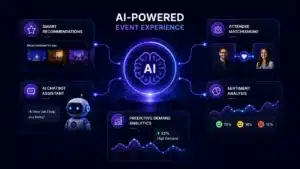
These are the AI-powered capabilities that are actively driving user retention and organizer loyalty in 2026.
- AI-powered event recommendations: Analyzes each attendee’s past event history, browsing behavior, and stated preferences to surface relevant upcoming events on the home feed, increasing discovery-to-purchase conversion rates measurably.
- Smart attendee networking matchmaking: Uses professional profile data and mutual interest signals to recommend specific attendees to connect with, particularly valuable for B2B conference formats. Such smart networking features improve the quality of connections matchmaking, which directly determines the perceived event ROI.
- Chatbot check-in assistant: Handles common day-of attendee queries, such as “where is my QR code,” “what time does my session start,” “how do I get to hall B?” Such chatbots help reduce the load on event staff during the highest-pressure window of the event.
- Predictive ticket demand analytics: Draws on historical data from past events and comparable local events to help organizers forecast demand, optimize pricing, and time promotional campaigns for maximum impact rather than guessing based on intuition.
- Sentiment analysis on post-event feedback: Processes open-ended review text at scale to identify recurring themes in negative and positive responses, giving organizers pattern-level insights they would miss reading individual responses manually.
- Facial recognition check-in: At high-volume events where entry speed directly impacts attendee experience, camera-based check-in enables faster crowd movement by processing hundreds of attendees per minute. Since it relies on biometric identification, organizers must also account for GDPR requirements and strict biometric data compliance.
Build Prioritization Note
AI-powered recommendations and chatbot check-in deliver the highest return relative to implementation effort and should be considered for version-1 if budget allows. Facial recognition and sentiment analysis belong in version-2 after you have a validated user base and the compliance infrastructure to support them.
How to Build an Event Management App: Step-by-Step Development Process
Building an event management app that reaches production quality and sustainable user adoption is a multi-phase process. Rushing through the early stages to reach the development phase faster is one of the most common causes of expensive rework later in the project.
- Market Research & Competitor Analysis:Identify your niche, study what existing platforms do well and where they fall short, and define your positioning before committing to a feature scope. Make sure to formulate a clear MRD (Market Requirement Document).
- Define Target Audience & Niche: Narrow your focus to a specific event type, user segment, or geography so that every feature decision has a clear, consistent north star throughout development.
- Finalize Feature List & MVP Scope: Separate the non-negotiable MVP features from v2 (version-2) enhancements and document the scope clearly to prevent scope creep from inflating your timeline and budget.
- UX Wireframing & Prototyping: Build low-fidelity wireframes for all core user flows, such as registration, ticket purchase, check-in, and validate them with real users before moving to visual design.
- UI Design & Design System: Develop a complete component library with defined typography, color, spacing, and interaction patterns that ensure consistency across all screens and accelerate future development.
- Frontend & Backend Development: Build in parallel where possible, with clear API contracts established early so that frontend and backend teams can work without blocking each other on shared dependencies.
- Third-Party API Integrations: Integrate payment gateways, maps, notification services, video conferencing tools, and CRM systems using well-documented APIs with proper error handling and fallback logic.
- QA Testing & Load Testing: Conduct functional, performance, and security testing with specific attention to high-concurrency scenarios like ticket drops, where thousands of simultaneous users stress the payment and inventory systems.
- App Store Submission & Launch: Prepare App Store and Google Play submissions with keyword-optimized descriptions and high-quality screenshots, accounting for the typical 1–3 day review window in your go-live timeline.
- Post-Launch Monitoring & Iteration: Track crash rates, user drop-off in critical flows, and support ticket patterns closely in the first 30 days and use that data to prioritize your first patch and feature release.
Next, let’s look at the tech stack choices that make event apps scalable, reliable, and cost-efficient to maintain.
Tech Stack for Event Management App Development
Technology choices made at the start of development have compounding consequences throughout the product’s life. Choosing the right database for your access patterns and the right real-time infrastructure for your concurrency requirements from day one prevents the technical debt that becomes increasingly costly to address once real users start using the platform.
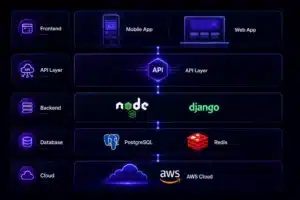
| Layer | Recommended Technology | Purpose |
| Mobile Frontend | React Native / Flutter | Cross-platform iOS and Android from a single codebase |
| Web Frontend | Next.js (React) | SEO-friendly public event pages and organizer dashboard |
| Backend | Node.js / Python (Django) | API server, business logic, authentication |
| Primary Database | PostgreSQL | Transactional data — users, tickets, payments |
| Cache & Locks | Redis | Fast session management, ticket availability locking |
| Real-Time Engine | WebSockets / Firebase Realtime DB | Live attendee counts, check-in sync, dashboard updates |
| Cloud Infrastructure | AWS / GCP | Auto-scaling, global CDN, managed databases |
| Payments | Stripe / Razorpay | Global and India-specific payment processing |
| Notifications | Firebase Cloud Messaging | Push notifications across iOS and Android |
| Media & Storage | AWS S3 + CloudFront | Event images, assets, and digital ticket storage |
Now let’s talk about cost, which is one of the most important and most frequently misunderstood aspects of event app development.
How Much Does Event Management App Development Cost?
Development cost depends on feature scope, platform choices, team geography, and whether you are building a focused MVP or a full-scale enterprise platform.
The following ranges reflect estimates for teams operating at professional quality standards.
| App Tier | Scope | Estimated Cost | Timeline |
| Basic MVP | Core features, single platform, 1–2 user roles | $5,000 – $15,000 | 2-3 months |
| Mid-Level App | Full feature set, iOS + Android + web, 3 roles | $15,000 – $40,000 | 3-5 months |
| Enterprise Platform | AI features, hybrid events, white-label, integrations | $30,000 – $100,000+ | 5-8 months |
Beyond the initial development cost, founders consistently underestimate total cost of ownership.
Cloud infrastructure for a mid-scale app typically runs between $500 and $1,500 per year, depending upon active users and events per year. Also, the ongoing maintenance, including security patches, OS compatibility updates, and bug fixes, generally requires 3 to 5 percent of the original development cost annually. Planning for these recurring costs from the outset is essential for building a financially sustainable product.
Revenue and Monetization Models for Event Management Apps
Choosing the right monetization model is as consequential as the technology stack decision, because it directly determines your unit economics, sales motion, and which features to prioritize in your product roadmap.
Here is a comparison of the most proven models in the event app market.
| Model | How It Works | Best For | Key Risk |
| Transaction Commission | 2–5% fee per ticket sold | Marketplaces, consumer apps | Low revenue on small events |
| Organizer Subscription | Monthly or annual SaaS fee | B2B and enterprise tools | Slower initial adoption curve |
| Freemium | Free for small events, paid for large | SMB organizers, growth stage | Heavy free-tier support costs |
| White-Label Licensing | License the platform to other businesses | Agencies, enterprise clients | Complex customer success requirements |
| Premium Feature Add-Ons | Paid upgrades for analytics, branding, marketing tools | Any model as a secondary revenue layer | Feature gating can create user frustration |
The most durable monetization strategy for a new event management app combines a low-friction freemium entry point with an organizer subscription for access to advanced analytics, marketing tools, and branded event pages. This structure drives organic growth from free users while generating predictable recurring revenue from the most engaged organizers, the two growth levers that compound most reliably over time.
Famous Event Management Apps You Can Refer For Market Gap Analysis
Understanding the competitive landscape in depth is one of the most valuable exercises before committing to a product direction. Each of the major platforms has made specific strategic choices about user focus, feature depth, and monetization. Studying those choices reveals both the standards your product will be measured against and the gaps your product can own.
| Event Management App | Type | Best For | Business Model | Notable Strength |
| Eventbrite | Two-sided marketplace | Public consumer events | Transaction fee per ticket | Discovery network and audience reach |
| Cvent | Enterprise SaaS | Corporate and large conferences | Annual subscription | End-to-end enterprise workflow |
| Hopin | Hybrid event platform | Virtual and hybrid events | Subscription + transaction | Virtual venue infrastructure |
| Whova | Conference app | Academic and professional conferences | Per-event licensing | Attendee networking features |
| Bizzabo | B2B event platform | Enterprise marketing events | Annual subscription | CRM and marketing stack integrations |
| Meetup | Community events | Interest-based local groups | Organizer subscription | Community discovery and repeat attendance |
| Ticket Tailor | Ticketing focused | Cost-sensitive SMB organizers | Flat fee per ticket | Simplicity and low cost for small events |
Common Challenges in Event App Development and How to Solve Them
Every event app development project encounters predictable challenges that are well-documented across the industry. The teams that navigate these challenges most efficiently are the ones that have planned their architecture with these scenarios in mind from the start rather than discovering them under production pressure.
1. Traffic Spikes During Ticket Drops
When a popular event goes on sale, thousands of users hit the purchase endpoint simultaneously. Without auto-scaling infrastructure and a proper queue system, this creates race conditions resulting in oversold events and failed transactions.
Solution
Implement cloud auto-scaling combined with Redis-based ticket availability locking and a virtual waiting room UX for high-demand events. This distributes the load gracefully and eliminates oversell conditions entirely.
2. Payment Failures and Refund Complexity
Payment gateway failures are an operational reality. Without proper retry logic, webhook-based payment confirmation, and an idempotent transaction model, users may have a poor experience in which they are charged but not issued a ticket.
Solution
Build payment confirmation on webhook callbacks rather than synchronous API responses, implement idempotency keys for all transaction requests, and create an automated refund workflow that resolves failed transactions within 24 hours without requiring manual support intervention.
3. Poor Offline Experience at Venues
Event venues, particularly outdoor festivals and basement conference spaces, frequently have unreliable mobile connectivity. An app that requires a live internet connection for ticket validation will create queues and a poor first impression at the moment that matters most.
Solution
Design the check-in module as offline-first with local caching of the attendee list and background sync. Ticket validation should work entirely without network connectivity and reconcile with the server-side attendee count once connectivity is restored.
4. Low Organizer Adoption After Launch
The supply side of an event platform is harder to grow than the demand side. Organizers are sophisticated buyers who evaluate tools critically, and a complex onboarding experience causes app churn before a single event is ever published.
Solution
Invest in a guided event creation wizard that walks organizers through the setup process with contextual tips at each step, pre-built event templates for common formats, and a free tier for small events so there is no financial risk to trying the platform for the first time.
How Simpalm Can Help You Build and Launch a Scalable Event Management App
For teams that have validated the opportunity and are ready to move from planning to execution, the biggest challenge is rarely development alone. It is making the right product decisions early, such as defining an MVP scope, prioritizing features that drive organizer adoption, architecting for ticketing spikes, and avoiding technical debt that slows growth later.
This is where working with an app development partner who has experience in building event management apps becomes valuable. Simpalm helps businesses move from idea validation to launch by combining product strategy, UI/UX design, scalable backend architecture, and mobile app development under a structured delivery process. Whether the goal is a niche event platform, a hybrid conference solution, or an organizer-facing SaaS product, the focus should remain the same: launching a technically reliable product that can scale as user demand grows.
Conclusion
Building a successful event management app is a fundamentally different challenge from building one five years ago. The baseline technical expectations from both organizers and attendees are higher. Moreover, the competition from established platforms is also stiffer. And the cost of a poor user experience directly impacts on user retention and business ROI.
The founders and product teams who succeed in this market share three characteristics:
- They start with a clearly defined niche rather than trying to serve everyone at once
- They treat their MVP launch as the beginning of a user research process rather than a finished product release
- They invest seriously in the three specific areas: UI/UX design quality, offline-first architecture, and post-launch analytics instrumentation.
Given the competition and market needs, vertical-specific event platforms targeting underserved segments like corporate internal events, university campuses, and regional festivals can grow significantly. Targeting these underserved segments also makes it easier to build a loyal user base without needing to compete with industry leaders such as Eventbrite or Cvent from day one. Therefore, the most strategic question for a successful event management app is how to precisely scope the product and how quickly to put it in front of real users.
Frequently Asked Questions
Q1. How much does it cost to build an event management app?
Ans. The cost of event management app development typically ranges from $5,000 to $100,000+, depending on feature scope, platform coverage, and technical complexity. A focused MVP with core features like registration, ticketing, and QR check-in costs significantly less than an enterprise platform with AI recommendations, hybrid event support, and third-party integrations.
Q2. What features should an event management app have?
Ans. A modern event management app should include user registration, event discovery, event agenda, customized schedule, ticket booking, QR-code check-in, push notifications, organizer dashboards, attendee networking, and post-event feedback tools. For competitive differentiation in 2026, many platforms also include AI-powered recommendations, chatbot support, and predictive analytics.
Q3. How long does it take to develop an event management app?
Ans. Development timelines generally range from 2 to 9 months, depending on complexity. A basic MVP may take 2 to 3 months, while a mid-level multi-platform app typically requires 4 to 6 months. Enterprise-grade event platforms with hybrid event support, white-labeling, or advanced integrations often take 6 to 9 months or longer.
Q4. What is the best tech stack for event management app development?
Ans. A scalable event management app often uses React Native or Flutter for mobile development, Next.js for web interfaces, Node.js or Django for backend services, PostgreSQL for transactional data, and AWS or GCP for cloud infrastructure. Real-time features such as live attendee tracking typically rely on WebSockets or Firebase.
Q5. Should you build a custom event management app or use a third-party platform?
Ans. A third-party platform works well for businesses with standard event requirements and limited customization needs. A custom event management app becomes a stronger option when data ownership, branded attendee experiences, workflow customization, or long-term scalability are business priorities. Companies running recurring events or serving niche audiences often benefit more from a custom-built solution.