
 Design
 App Development
 Web Engineering
 AI Services
 Cloud
Cloud Staffing
 Startups
 Health / Fitness
 Education
 Social
 Nonprofit
 Fintech
 Construction
 Logistics
 Government
 Travel/Hospitality
 HR Software
 About Simpalm
 Our News
 Client Testimonials
 Careers
 Our Blog
 Awards
 Resources
 Information
![What is Android Application Development? [Complete Guide]](https://www.simpalm.com/wp-content/uploads/2026/01/what-is-android-app-development-Complete-Guide.jpg.webp)
In simpler words, Android development is the process of creating software solutions meant for Android-powered smartphones, TVs, and tablets. The Android app development process involves the use of programming languages such as Kotlin and Java, alongside various functional frameworks and tools.
Building an Android app is a complex process that demands professionals to have a proficiency in software engineering fundamentals and principles. Beyond that, a strong understanding of the Android SDK is also a priority for anyone to build a robust application. Android Studio is referred to as the official IDE (Integrated Development Environment) for building Android apps.
So, are you planning on building an Android app for your business? If yes, it’s important that you learn the core attributes of it, alongside the key resources that back the entire process. In this article, you will get an in-depth insight into what Android app development is, and learn about the associated technicalities that matter.
Why Develop an App for Android OS?
Did you know? Android managed to maintain its position as the leading smartphone operating system across the globe in the third quarter of 2025. However, that’s not the only reason why you can trust the initiative of building an Android app. This OS offers several development advantages that can aid your prolonged business success, which include:
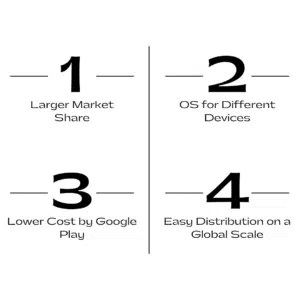
1. Larger Market Share
When you compare the global smartphone market share, Android holds around 70-73% of it, compared to 27-28% of Apple’s iOS. Following that, <1% of market share is held by other systems such as KaiOS, Linux, and others. Thus, it shows that Android has an unparalleled market outreach on a global scale, which entices businesses to build an Android app and target the diverse demographics.
For instance, upon building an Android app, businesses will be catering to a larger group of active users in all emerging markets. Android smartphones are used by people of almost all income groups, giving your business a chance to personalize the offerings for users, depending on their varying preferences and spending power.
2. OS for Different Devices
Android offers developers extensive freedom for building apps that can replicate performance based on the newer technologies. Android OS was primarily designed for touchscreen mobile devices. However, now Google has built Android variants for several growing devices such as smartwatches, IoT devices, in-car entertainment devices, mobile proxy unlimited and others.
For instance, if you are from the automotive industry, you can develop an Android-based car dashboard app, which would let users play music from their Android phones, navigate through Google Maps, and use Google voice search features.
3. Lower Cost by Google Play
Android app development can be more cost-efficient when compared to building apps for other platforms. It is mostly because of Android’s open-source nature, combined with the diverse range of devices powered by this OS. Thus, it means that developers have the liberty to avoid high licensing costs and additional financial constraints while building an Android application.
For instance, it will cost only a one-time payment of $25 for developers to open your account on Google Play and push your app into it. On the other hand, Apple charges a $99 recurring annual fee for the same! Moreover, the in-app purchases on the Google Play Store are often less expensive than those on Apple’s App Store.
4. Easy Distribution on a Global Scale
You can easily distribute your Android app across customers, partners, or employees by simply publishing it on Google Play. It is true that there are a few guidelines that you must adhere to with your app to be accepted by Google Play. Once approved, you will have a vast market that you can reach through this online platform.
Once the developer fees are paid and the app is published on Google Play, it will be live within the next couple of days. Also, it is very easy to distribute the test build of an Android App compared to iOS App, you can use Firebase or email to distribute the .APK file of Android app for testing and review. As stated earlier, Android OS dominates the smartphone technology market, which means there will be numerous active devices with the capability of running your app, giving you a wide audience outreach.
What Languages are Used for Writing Android Apps?
There are multiple languages available for developers to write Android apps, depending on their specific skill set. As a business owner, you also ought to understand the efficacy of each of these languages for being able to choose the best for your Android app development project:
1. Kotlin
Kotlin was developed by JetBrains and officially supported by Google in 2017 for Android app development. Since 2017, it has become the most used language for native Android app development. Kotlin has replaced JAVA for Android app development. This language enables developers to quickly & efficiently write code, while fostering interoperability with Java through the JVM.
Pros:
- Reduces boilerplate code for ensuring the codebases are more concise and readable.
- Prevents NullPointerExceptions with built-in null safety for eradicating frequent app crashes.
- Supports modern language features like data classes, extension functions, sealed classes, and more.
- Facilitates stronger Android Studio support and integration with Android Jetpack libraries.
Cons:
- Initial compilation is slower with Kotlin.
- Limited resources and community support.
2. Java
Java was the first programming language used for developing Android applications, mostly popular for its user-friendliness and security aspects. JAVA received competition from Kotlin in 2017 for native app development. The best part of JAVA is, a compiled Java code can run across all platforms without the need for recompilation. It means the code can run on any JVM, irrespective of the computer architecture.
Pros:
- Extensive community support and resource availability
- Platform independence
- Immense built-in security features
- Code reusability, maintainability, and modularity
- Efficient utilization of processor resources through multithreading support
- Support for integration with several advanced technologies
Cons:
- Java’s verbose syntax can lead to more complex or lengthy code for specific tasks.
- Java-built Android apps often require higher memory consumption.
3. JavaScript
JavaScript for Android app development is used alongside cross-platform frameworks like Ionic and React Native. Using them, developers can write a unified codebase for building an Android app, which can also be deployed on iOS, without the need for rewriting the entire code.
Pros:
- Supports cross-platform development
- Great developer community
- Supports quick development lifecycles
- Enables code reusability
Cons:
- Limited accessibility to native features.
- JS has a dependency on frameworks for overcoming limitations or adhering to changes.
4. Dart
Dart is a programming language developed by Google, and the first version of it, Dart 1.0, was released in 2013. However, it gained momentum in 2019 with the release of Dart 2.0. This language is used alongside the Flutter framework for Android App development, and is highly approachable and offers modern-day features such as pattern matching and null safety. Apps written using Dart are compiled to ARM, RISC-V, and x64 machine code for desktop, mobile, and backend. Thus, it ensures optimal performance and enhanced user experience of an app on Android devices.
Pros:
- Supports faster development with the hot reload feature
- Strongly typed, concise, and consistent language for Android development
- Supports asynchronous programming.
Cons:
- Complex learning curve.
- Smaller community when compared to other languages.
5. C#
C#for Android app development is used alongside .NET MAUI, enabling developers to build cross-platform applications. It was first introduced in the year 2000, as part of the .NET framework initiative. Being backed by Microsoft, C# and .NET offer robust documentation, a larger developer community, and regular updates. With access to native APIs, C#, and .NET MAUI can help your app achieve near-native performance.
Pros:
- Supports cross-platform development
- Strong developer community
- Ensures near-native app performance
- Seamless integration with the .NET ecosystem
Cons:
- Apps built using C# and .NET MAUI often result in larger app sizes.
- Complex learning curve for new developers.
Tools & Frameworks Being Used for Android App Development
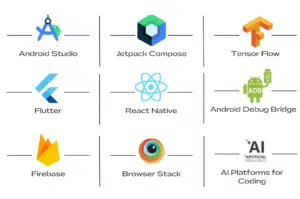
Beyond the coding languages, you also need the right frameworks to approach Android app development and build a high-performance solution to run your business on. So, here are the essential tools and frameworks being used for Android App Development:
1. Android Studio:
Android Studio is Google’s official IDE, which is an efficient tool used by developers for setting up the project, editing the code, debugging, testing, and publishing the app. All of it is made possible through a single interface. The rich editor capabilities, such as third-party plugins, built-in GitHub integration, and smart code completion, help you accelerate the development pace.
2. Jetpack Compose:
It is a modern Android UI toolkit that helps you revolutionize the native interface development. This tool enables developers to adopt a declarative reactive programming model. Just like SwiftUI and React, Jetpack Compose enables you to build responsive UIs through composable functions. Thus, it will automatically translate all the app state changes into UI updates in the backend.
3. Flutter:
Flutter by Google is in trend for Android development, mostly because of its ability to help developers build appealing and natively compiled apps. It facilitates the hot reload feature that enables developers to quickly experiment the code changes, UI customizations, and rapid iterations. Your Android app developers can also use customizable widgets for curating intuitive interfaces for your app.
4. React Native:
React Native will enable your Android developers to build cross-platform apps using React and JavaScript. Just like Flutter, React Native also enables developers with a hot reloading feature for making changes on the go, which will improve the development velocity.
5. TensorFlow:
TensorFlow is yet another open-source platform by Google, meant for building & deploying ML models. The TensorFlow Lite framework enables developers to implement pre-built ML models for enabling features like object detection, speech processing, and image classification on Android devices, without any server-side intervention. Thus, with access to high-accuracy ML capabilities, you have the opportunity to build contextual and interactive next-gen apps.
6. Android Debug Bridge (ADB)
ADB is a simple computer tool that is backed by SDK platform tools. Developers or the QA team use it for talking to a device or emulator that’s connected to the computer. In short, this tool helps with testing an Android app on an emulator, finding potential problems, and fixing them using commands.
7. Firebase
Firebase by Google is a comprehensive platform backed by robust tools and solutions to support Android app development. It offers developers with crashlytics tools for monitoring the app performance and stability. Following that, Firebase also supports seamless app distribution to trusted testers and collects quick feedback. Its remote configuration feature enables developers to dynamically configure the app’s appearance and behavior without the need for launching multiple updates.
8. BrowserStack
It is one of the most integral cloud-based tools used for testing Android apps on multiple devices or emulators, considering varying screen sizes and OS versions. This tool enables QA professionals to conduct both automated and manual tests for streamlining the overall Android app testing process, ensuring quality, performance, and user experience.
9. AI Platforms for Coding
With technological advancements in the app development industry, there are now new-age AI tools or platforms available to streamline coding for Android apps. Tools like Google Gemini, ChatGPT, Claude Code, Copilot, and others are used for generating accurate code snippets that can help developers speed up their overall process.
Different Components of Android App Development
Every Android app is built with a combination of multiple loosely coupled components. They are all independently and separately invoked for efficient development, but are meant to interoperate within an app’s ecosystem. Each of these components interacts differently with its specific hardware configurations, and you ought to learn about them in brief. The four major Android app development components include:
1. Activity
It is referred to as the presentation layer of any Android app, which dictates the user’s GUI (Graphical User Interface) and how users interact with it. For instance, a simple email app can have one activity for sign-in/sign-up, one for viewing the inbox & reading emails, and another for composing new emails. Moreover, it is the component that keeps a tab on what’s currently on the app’s display and what the previous activities were.
2. Services
It is a backend component that contributes to managing the long-running operations in the background. For instance, an app or service may be playing non-stop music in the background, while the user engages with a different application. In other words, a service might also fetch data from the network without blocking a user’s interaction with other activities or apps.
3. Broadcast Receivers
A broadcast receiver is the Android development component that allows the system to deliver events to the application, outside the standard user flow. This way, the app can seamlessly respond to the broadcast announcements across the system. As this component is referred to as an entry point for the app, it enables the system to deliver broadcasts even to applications that aren’t active. Reminders and alarms are evident examples of a broadcast receiver component for Android development.
4. Content Providers
This component is responsible for managing shared app data for storing it within the file system, on the web, in a SQLite database, or any other specified storage location. Through the content provider, all other apps on the device can modify or query the data, depending on whether they have the permission to do the needful. For instance, a media player app can access music files stored in your phone storage, using the content provider component.
Step-by-Step Process for Android App Development
Now that you are aware of all the fundamentals associated with the Android app development process, it is time to give you a breakdown of all the stages that your project will undergo:
1. Strategizing:
Your idea for building an Android app requires proper strategizing before it can be handed over to the team of developers. Therefore, a team of consultants will be discussing your business idea and preparing a concept map for it. In the process, they will be examining your targeted users and the key competitors. Thus, a plan of action will be created!
2. Wireframing and Prototyping:
Now, your Android app will be getting a low-fidelity mockup for mapping out the app’s user flow and functionalities. Designers will be using wireframes to create an engaging and visually appealing UI design, aligning with Android’s Material Design guidelines. Following that, a basic & interactive prototype will be created for enabling initial users to interact with the core functionalities of your app, and leave their feedback.
3. Designing:
The UI/UX experts will then take over the project and build the aesthetics of your Android app. In the process, the designers will be crafting the icons, colors, brand theme, typefaces, and other such elements of the app, while keeping in mind the responsiveness aspect.
4. Development:
Now, your Android app project has its skeleton ready, following which the developers can now dive into the coding aspects of it. They make use of select programming languages and high-end tools or frameworks to code the usability of your app. The developers working on your project will also be integrating the custom features or functionalities that align with your business needs.
5. Testing & QA:
Before your Android app can go live on the Google Play Store, it must undergo multiple tests to validate if it is ready to deliver the best experience to users. At the same time, this stage also ensures that your Android app is adhering to all the Google Play Store guidelines for being published in the marketplace. Experts will test your app for functionality, compatibility, performance, and quality.
6. Deployment and Maintenance
Finally, experts will then be optimizing your app’s listing on Google Play by using relevant keywords, high-quality screenshots, and descriptions. The purpose is to help your Android app be more discoverable. Even after the launch, the experts you hire will be constantly looking to improve the performance of your app with bug fixes and new updates/features.
Simpalm is Your One-Stop Hub for High-Performance Android App Development!
To ensure that your Android project is built with all development fundamentals considered and efficient execution of all the crucial stages, you need the help of a leading Android app development company. And with Simpalm, your search for the best ends right here!
We have been driving excellence with our Android app development services for more than a decade. Our dedicated team of Android app developers have successfully deployed more than 100 projects for companies all across the United States.
From UI/UX design and custom development to Play Store listing and post-launch maintenance, we will be assisting you across all stages of Android development, while ensuring complete transparency.
Reach out to us today, and let us walk you through our method of approach for curating your high-performance and unique Android app.