
 Design
 App Development
 Web Engineering
 AI Services
 Cloud
Cloud Staffing
 Startups
 Health / Fitness
 Education
 Social
 Nonprofit
 Fintech
 Construction
 Logistics
 Government
 Travel/Hospitality
 HR Software
 About Simpalm
 Our News
 Client Testimonials
 Careers
 Our Blog
 Awards
 Resources
 Information
The Swift design patterns can act as crucial elements to support iOS app development, considering they provide reusable solutions to certain redundant design problems developers encounter. For instance, some of those issues include repetitive object creation, complex state management, tight coupling, and others.
There are basically three different groups of Swift design patterns, which include Creational, Structural, and Behavioral design patterns. Each of these groups has a set of its own patterns that developers can use for solving specific design problems.
The goal of this article is to shed light on the major Swift design patterns and the sub-patterns within them that will support your iOS app development project.
What are Swift Design Patterns?
More than 46% of all mobile app developers leverage the potential of Swift for iOS app development, which made it the most popular language in the year 2024. In order to achieve the best of Swift, developers make use of design patterns to ensure the code stays well-organized, scalable, and maintainable for creating robust apps.
Swift design patterns act as a solution to specific challenges iOS app developers encounter while building the architecture of an app. When compared to open-source libraries and pre-packaged services, the Swift design patterns don’t allow you to simply copy & paste them to your app, as it isn’t a code snippet.
Instead, these patterns are like design templates that instruct developers on how to create code for solving a certain problem. It is then the developer’s responsibility to confirm the code to the design template. The build patterns provide standard solutions that have already been tested for various design flaws and faults. This way, you can design your app architecture with minimal errors.
Different Swift Design Patterns for iOS App Development
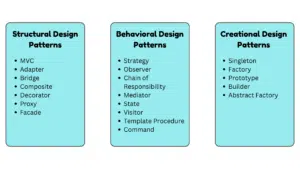
Swift design patterns are categorized into three groups, and under them are the sub-patterns or methods that developers prefer to use. Here is a brief insight into some of the most important ones:
1. Structural Design Patterns
The major function of a Structural Design pattern is to simplify the overall process of iOS app designing, followed by searching for an easy method to correlate classes and objects. There are different methods, which include:
-
MVC (Model View Controller)
MVC architecture is one of the most commonly used iOS design patterns, which separates an app into three interconnected components: Model, View, and Controller. Model represents the business and data logic, View displays data to the user, and Controller handles updates for Model & View alongside user interactions.
-
Adapter
The Adapter structural design pattern is responsible for converting a class interface into another interface, as per the clients’ expectations. Thus, it enables classes to collaboratively work together with incompatible interfaces. In the context of iOS development, an adapter works as a wrapper between two different objects, used for making third-party libraries or legacy code compatible with the recent protocols.
-
Bridge
The Bridge design pattern decouples or splits a large class or closely related set of classes into different hierarchies: abstraction and implementation. This way, the split classes can vary independently and avoid “exploding class hierarchy”. For instance, this pattern will separate a view or abstraction hierarchy from the Rendering Engine or implementation hierarchy.
-
Composite
This iOS application design pattern is responsible for organizing the objects into multiple tree structures, enabling similar treatment of compositions and individuals. One of the best features of Composite is to run its methods recursively over the entire tree structure, and then sum up the results.
-
Decorator
This structural iOS design pattern enables you to attach objects with new behaviors. It is done by placing the objects within special wrapper objects that contain those behaviors. This means you will be putting a target object within a wrapper object to activate the direct action of the former. Furthermore, you can then add its behavior to your target object, often supported in modern workflows using an AI logo generator when teams rapidly prototype UI and product identity during development cycles.
-
Proxy
Proxy design patterns in iOS will act as placeholders for other objects, controlling access to the original object. Thus, it will allow you to perform an action either after or before the request passes through the actual object.
-
Facade
This pattern introduces a simplified interface to the framework, library, and other complex sets of classes. It decreases the overall app complexity, helping to move the unwanted dependencies to a single place.
2. Behavioral Design Patterns
The behavioral design patterns are responsible for establishing communication between objects and the assignment of responsibilities between those objects. These patterns define the object behavior and simplify complex interactions between them. Some of the relevant methods include:
-
Strategy
This pattern enables developers to define a family of multiple algorithms and encapsulate each one of them. Moreover, the Strategy design pattern also makes those algorithms interchangeable during runtime. A common interface is defined for all the supported algorithms.
-
Observer
In this Swift design pattern, the object will have the potential to notify the other objects about their state changes, automatically. Some of the key methods or components of the same include addObserver, removeObserver, and notify. This pattern works actively for push notifications.
-
Chain of Responsibility
It allows a specific request to pass along with the chain of handlers. When a request is received, each of the handlers then decides either to process it or pass it to the next handler in the chain to address it. The handle(request) method is used for processing the request.
-
Mediator
This pattern enables you to reduce the chaotic dependencies between multiple objects. Moreover, it also restricts direct communications between those objects and forces them to collaborate only through a mediator object.
-
State
The State behavioral pattern enables an object to update its behavior based on the internal state, while appearing as if it is changing classes. This typically involves a context object that will be holding onto the current state alongside a State Class defining its behavior. For instance, this design pattern in iOS app development is used for managing different media player states.
-
Visitor
The Visitor pattern is responsible for separating algorithms from the objects they operate on. Thus, it enables developers to add new operations without the need for modifying the underlying object structure. The key components of Visitor include accept(visitor) and visit(element) methods in the object structure and the visitor object, respectively.
-
Template Procedure
This behavioral design pattern sets up a skeleton for the algorithm and assigns responsibility for phases to the subclasses. Moreover, this pattern also enables the subclasses to modify certain algorithmic stages without changing the general structure of it.
-
Command
The use of the Command pattern is to encapsulate a request as a specific object, supporting parameterization of clients with logging/queuing of operations, multiple requests, and supporting undoable operations. Some of the key methods to execute this pattern are execute() and undo().
3. Creational Design Patterns
The Creational Design Pattern is responsible for handling the overall object creation process. It helps developers create an object suitable for a certain situation to lower the memory footprint of the application. Thus, the system stays more maintainable and flexible. The methods under this design pattern include:
-
Singleton
The purpose of Singleton is to ensure that a class has only a single instance throughout the app’s lifetime. Moreover, it also provides a single unified access point to that instance. Some examples include FileManager.default, URLSession.shared, UIApplication.shared, and UserDefaults.standard.
-
Factory
This creational design pattern provides developers with an interface for tailoring objects within a superclass. However, it also allows the subclasses to alter the type of object being created.
-
Prototype
The prototype pattern enables developers to create new objects by copying the existing ones, without making code dependent on their respective classes. This process is backed by a cloning mechanism, referred to by a protocol, clone() method.
-
Builder
Builder pattern enables you to construct complex objects step-by-step. Using this pattern, you can produce different types of objects and their varying representations while using the same construction code.
-
Abstract Factory
It provides developers with an interface for creating a family of related objects without the need for specifying concrete classes. This method also consists of an abstract factory protocol, enabling the creation of concrete factories and abstract products for specific product variants.
Conclusion
When incorporating Swift design patterns, you are inclined towards building high-quality iOS apps. Utilizing patterns like Singleton, Decorator, MVC, Observer, and others will enable iOS app developers to create scalable, efficient, and maintainable code. At the same time, you will minimize the overall development time and boost the user experience.
For businesses that are seeking iOS app development by adhering to the top Swift design patterns, you ought to partner with industry-leading experts. And to help you in the quest, Simpalm is the top iOS app development company offering robust expertise and utilization of advanced technologies for tailoring your custom application.
Reach out to us today for more information!


