
 Design
 App Development
 Web Engineering
 AI Services
 Cloud
 Staffing
 Startups
 Health / Fitness
 Education
 Social
 Nonprofit
 Fintech
 Construction
 Logistics
 Government
 Travel/Hospitality
 HR Software
 About Simpalm
 Our News
 Client Testimonials
 Careers
 Our Blog
 Awards
 Resources
 Information
Key Takeaways:
- A successful migration starts before launch with detailed planning, and documentation, reducing the risk of costly mistakes.
- Protecting high-value pages is essential for preserving search rankings, organic traffic, and conversions after migration.
- Content audits help eliminate outdated, duplicate, or low-performing pages, making the website stronger and more efficient.
- Thorough testing before and after launch is critical for identifying issues before they affect users or search visibility.
- The most successful migrations treat the transition as an opportunity to improve site structure, performance, and long-term growth potential.
_________________________________________________________________________________________
A website migration can be your most rewarding project or it can also be the riskiest. Whether you are moving to a new domain, changing your CMS, redesigning your website or upgrading your hosting environment, even small mistakes can lead to traffic losses, broken pages, reduced conversions and frustrated users. A botched up migration is not about bad luck, it is mostly about skipping steps and assuming that quick-fix is good to go.
A successful migration with the right checklist helps in planning, documentation, testing and execution. With a structured website migration, businesses can protect their SEO performance, preserve revenue and deliver a better user experience.79% of top websites pass Google’s Core Web Vitals assessment.
This checklist will walk you through every step of the migration process, from planning to long-term optimization. Following this will help to make the migration process as smooth and hassle-free as possible.
Strategic Planning and Alignment Before the Actual Migration
Your website migration may be a technical project but successful migration will start long before the developers start moving files or updating URLs. The planning stage will determine whether a migration will strengthen your website or cause unnecessary delays and complexities.
Since a website migration can impact search rankings, lead generation, revenue, customer experience, and brand perception, every migration will have a clear strategy, realistic expectations and alignment with stakeholders involved.
Before making any technical changes, make sure what is changing, why it is changing and how you will measure success.
What Type of SEO Website Migration Are You Planning?
Most organizations treat migration in the same way, although different migrations have different types of risks and complexities. If you identify the type of migration you are looking for, you can easily anticipate the associated challenges and build an appropriate plan.
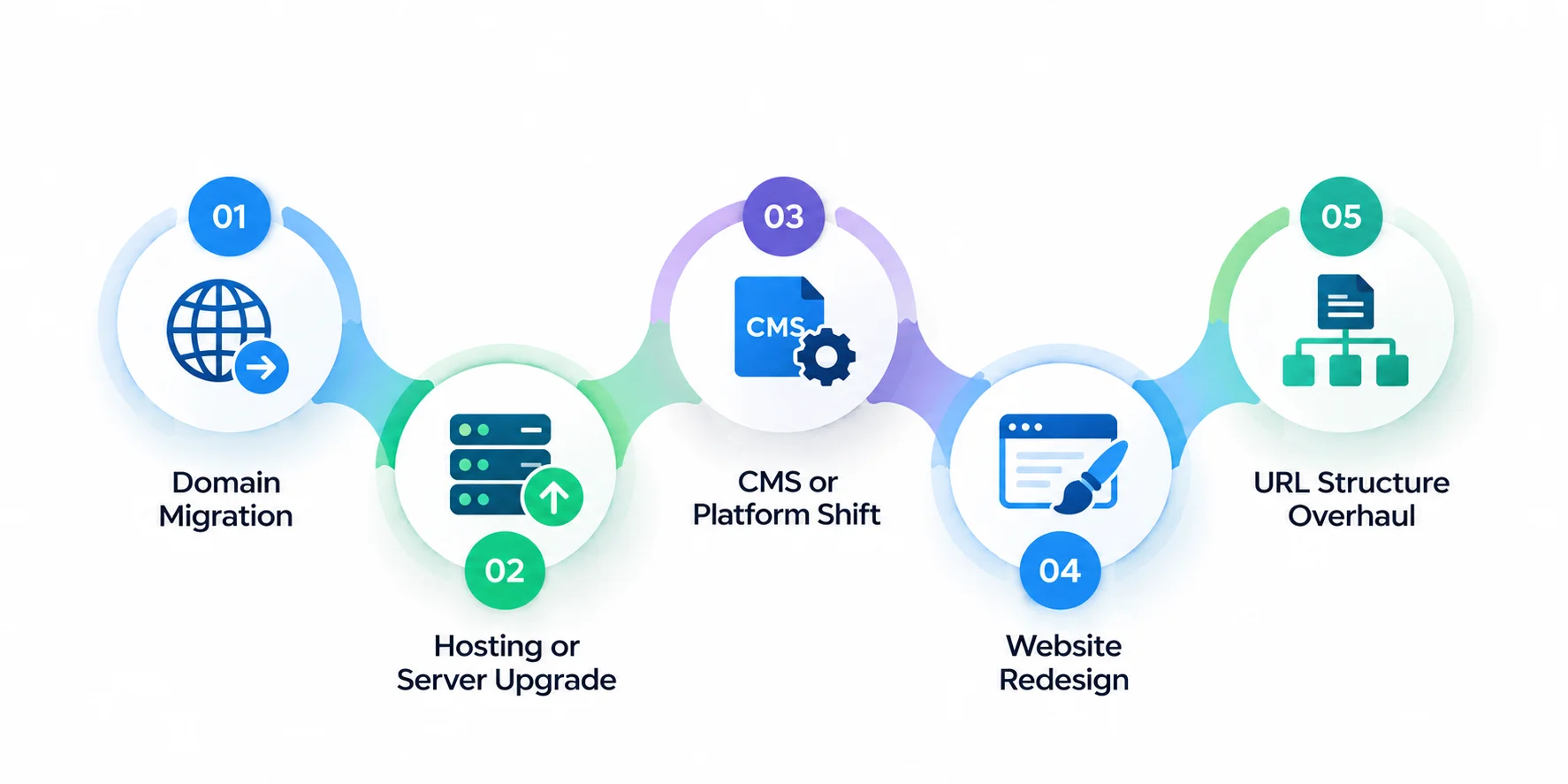
Here are the most common types of SEO migrations:
1. Domain Migration
A domain migration usually occurs when the business moves forward from one domain to another. This often happens when there is rebranding, mergers, acquisitions, or global expansion. For example- when a company moves from abcservices.com to abcglobal.com to create a strong brand identity, it is a domain migration.
Although this change looks straightforward and simple, search engines can see this new domain as a completely new property. If this website migration process is done without proper planning, it can lead to your search authority disappearing overnight.
A complete domain migration requires:
- Complete URL mapping – Create a detailed mapping of every old URL and its corresponding new destination. This will ensure that no important pages are lost during migration and it helps preserve search visibility.
- Proper 301 redirects – Implement 301 redirects from old URLs to their most relevant new pages. This passes the SEO value, maintains a smooth browsing experience and prevents users from landing on broken pages.
- Domain verification in Google search console – Verify the new domain in the Google Search Console so search engines can properly crawl, index and monitor the newly migrated website. It also helps track any issues that arise after launch.
- Updated internal links – Update all the internal links to point directly to the new URL instead of relying on redirects. With this you can improve crawl efficiency, page performance and overall site health.
- Updated backlinks wherever possible – Reach out to important websites for creating backlinks. Along with redirects, direct backlinks to new domains establish strong SEO practices.
- Careful post-migration monitoring – Try to detect issues early and fix problems before they impact website performance. Monitor traffic, rankings, indexing, crawl errors and redirects closely after launch.
For website domain change, your goal is to transfer as much ranking authority while maintaining a seamless user experience.
2. Hosting or Server Upgrade
A hosting or migration involves moving a website to a new server environment, cloud infrastructure or hosting provider. This is done to improve website speed, reliability, security, scalability and resource availability. Although this upgrade usually causes fewer SEO disruptions than a domain migration, technical issues can cause significant problems. Most common risks of server upgrade includes:
Site downtime – If your website is temporarily unavailable during migration, users and search engines will not be able to access the pages. This will hurt traffic, conversions and trust.
DNS propagation issues – Once you update the DNS settings, it can take time for changes to reflect globally. As a result some users will be able to see the new site while others will access the old site.
SSL certificate errors – Improper SSL warnings can trigger security warnings in the browser
Database connectivity issues – Server migrations can disrupt connections between the website and its database triggering missing content, errors and broken functionalities.
Slow server response times – If the new hosting environment is optimized properly, it can lead to slow page loads. This will negatively affect search rankings, conversion rates and user experience.
Before you commit to hosting or server upgrade, confirm whether the new environment is fully tested and capable of supporting future traffic levels.
Also Read: 10 Best Web Development Companies in DMV Area
3. CMS or Platform Shift
Businesses often outgrow their existing content management systems as their user base grows. Examples of this shift include
URL structures – Different CMS platforms generate URLs in different formats, and this can change page address during migration. With careful URL mapping you can preserve rankings and prevent broken links.
Page templates – Each CMS has its own template system so you need to rebuild page layouts, design systems and content placement to maintain consistent user experience.
Content formatting – Text, images, tables, embedded media and custom content blocks may appear differently after migration. Conduct a thorough review to ensure everything displays correctly.
Metadata handling – SEO elements such as title tags, meta descriptions, canonical tags and social sharing settings should be transferred accurately to avoid losing search visibility.
Navigation system – Recreate elements such as menus, breadcrumbs, category pages and internal linking so users can easily navigate the new website.
Ecommerce functionality – Ecommerce businesses have critical features like product catalogs, customer accounts, payment gateways, inventory management and checkouts. These should be migrated and tested carefully to prevent lost sales and poor customer experiences.
4. Website Redesign
A website redesign is one of the common types of website migration. Most businesses redesign their websites to modernize their brand, improve usability, support new business goals, or create better customer experiences. However, redesign is not just about changing colours, layouts, or visuals. It is also about SEO, user behavior, conversions or content discoverability if not handled carefully.
When you do a website redesign, the content gets reorganized or pages are removed. Even if you create a visually impressive redesign, it can still disrupt conversions if the users are not able to navigate the site seamlessly.
Few important questions include:
Can your users find important information after redesign?
Review whether visitors can quickly access key pages like services, products, pricing, contact information, or support resources without additional clicks.
Are high-performing pages being preserved?
Pages that drive significant organic traffic, backlinks, leads, or sales must be protected during redesign and not changed unless there is a clear business benefit.
Has content been unintentionally removed?
Before launching the newly designed website, compare the old and new sites to ensure that important pages, resources, and assets are intact.
Do conversion paths remain clear?
Review every conversion journey to ensure that the users can complete important actions like submitting forms, requesting demos, making purchases, or contacting your business.
Is the navigation hassle-free for new and returning visitors?
Your users must not think too hard about navigating to their required pages and they should be able to find information faster.
Does the new design perform well on mobile devices?
As mobile traffic accounts for a large share of website visits, you should test every page across smartphones and tablets. Make sure the website has responsive layouts, fast loading speeds, and easy-to-use navigation.
Are SEO elements preserved?
A redesign should not result in the loss of title tags, meta descriptions, heading structures, internal links, schema markup, or other important SEO components that support search visibility.
How is the site speed?
Modern designs often include large images, videos, and interactive features. Make sure these enhancements do not negatively impact page speed or Core Web Vital performance.
Does the redesign align with business goals?
While maintaining aesthetics, the new websites should be able to support specific objectives like lead generation, ecommerce growth, customer engagement, or brand positioning.
When you redesign the website, the goal should not be to make the website look better but to create an experience that helps users engage more effectively and convert more frequently.
Also Read: Responsive Web Design Best Practices: Complete Guide for 2026
5. URL Structure Overhaul
As websites grow, the URL structure becomes cluttered, inconsistent or difficult for both users and search engines to understand. Additionally, over time, different teams can add new pages, content categories can change, and URL naming conventions may become inconsistent. A website migration will provide the perfect opportunity to reorganize URLs and create a clean and more scalable website architecture.
Example:
Old URL: example.co,/category/item?id=123
New URL: example.com/services/web-development
As shown above, the new URL is short, descriptive and tells users and search engines what the page is about. The new URL is readable and supports better site organization and content discovery.
Overhaul URL structures when you want to:
- Create a cleaner website architecture
- Improve user experience and navigation
- Align URLs with current products and services
- Simplify content categorization
- Improve SEO and crawlability
- Remove outdated URL parameters or directory structures
- Standardize naming conventions across the website
URL mapping document – For large websites that have evolved over several years, restructuring URLs can significantly improve site organization and scalability.
Before making any changes to the URL, create a comprehensive mapping spreadsheet.
The document must include:
| Old URL | New URL | Redirect Type |
| /services/we-design-old | /services/web-design | 301 |
| /blog/seo-tips-2022 | /blog/seo-tips | 301 |
This spreadsheet will become a roadmap for your developers, SEO teams, and project managers throughout the migration process. However, make sure that every existing URL has a planned destination, even if the associated content is merged or removed.
Once the URL mapping is complete, you can implement 301 redirects from old URLs to their corresponding new URLs. For best results, maintain topical relevance between old and new pages, test redirects before launch and monitor performance after migration.
Common Redirect Mistakes
Many URL migration failures occur because of poor redirect implementation. You can avoid this the following:
Redirect chains – When one URL redirects to another URL that redirects again, users and search engines pass through multiple hops slowing down page access and reducing crawl efficiency.
Redirect loops – This prevents pages from loading properly with continuous back and forth redirects.
Mass homepage redirects – Avoid redirecting every old URL to the homepage as it creates poor user experience and lowers SEO value.
Update Internal Links
Do not forget to update internal links and these links should point directly to the new URLs instead of relying on redirects. This improves user experience, crawl efficiency, page performance and site maintenance.
You must test everything before launch, including, redirect behavior, internal links, canonical tags, navigation paths, XML sitemaps, and crawlability.
Document every change
One of the biggest mistakes teams make is to assume they will remember every change and process. Avoid this assumption and document every URL modification, redirect rule, and structural update before the migration begins. This will help you troubleshoot issues easily and save your website traffic or rankings.
Set Clear Goals for Migration Success
Every successful website migration starts with clearly defined goals. Without measurable objectives, it becomes difficult to evaluate whether the migration actually delivered value or simply moved the website from one platform to another. Help your team make informed decisions by establishing goals early and keeping all stakeholders aligned throughout the process.
Zero or minimal traffic loss – The primary goal of your website migration should be to preserve existing search traffic. Although minor ranking fluctuations are normal after launch, a well-planned migration should minimize disruptions and maintain visibility for all the pages.
Faster page load speed – Many organizations migrate websites to improve performance. Faster loading pages create a better user experience, reduce bounce rates and support strong SEO performance, especially on mobile devices.
Clean architecture – Websites accumulate unnecessary pages over time. This creates confusion in navigation paths and inconsistent URL structure. With a proper migration, you can streamline your site’s architecture and create a consistent structure for both users and search engines.
Improved mobile usability – Mobile traffic accounts for majority of website visits across industries, hence mobile usability should not be an afterthought. Create mobile-friendly websites with responsive design, faster loading times and easy navigation for small screens.
Higher conversion rates – The goal of your website migration should not be just to support technical improvements, but to enhance business outcomes. Make conversion optimization a part of your migration strategy to generate more leads, increase sales and improve form submissions.
Better content organization – As your website grows, the content can become more scattered or duplicated and even difficult to navigate. With a seamless migration, your teams reorganize content into a structure that makes information easy to find.
Enhanced SEO performance – Beyond preserving rankings, many organizations use migration as an opportunity to improve technical SEO, strengthen internal linking, fix crawlability issues, and build a strong foundation for future growth.
Also Read: How Much Does it Cost to Build a Website? (Complete Guide)
Build the Right Team
Website migration is not just a technical exercise. It also affects SEO, user experience, content, analytics, and business performance. Since there are so many moving parts. Successful migration is a departmental collaboration and not just a developer effort.
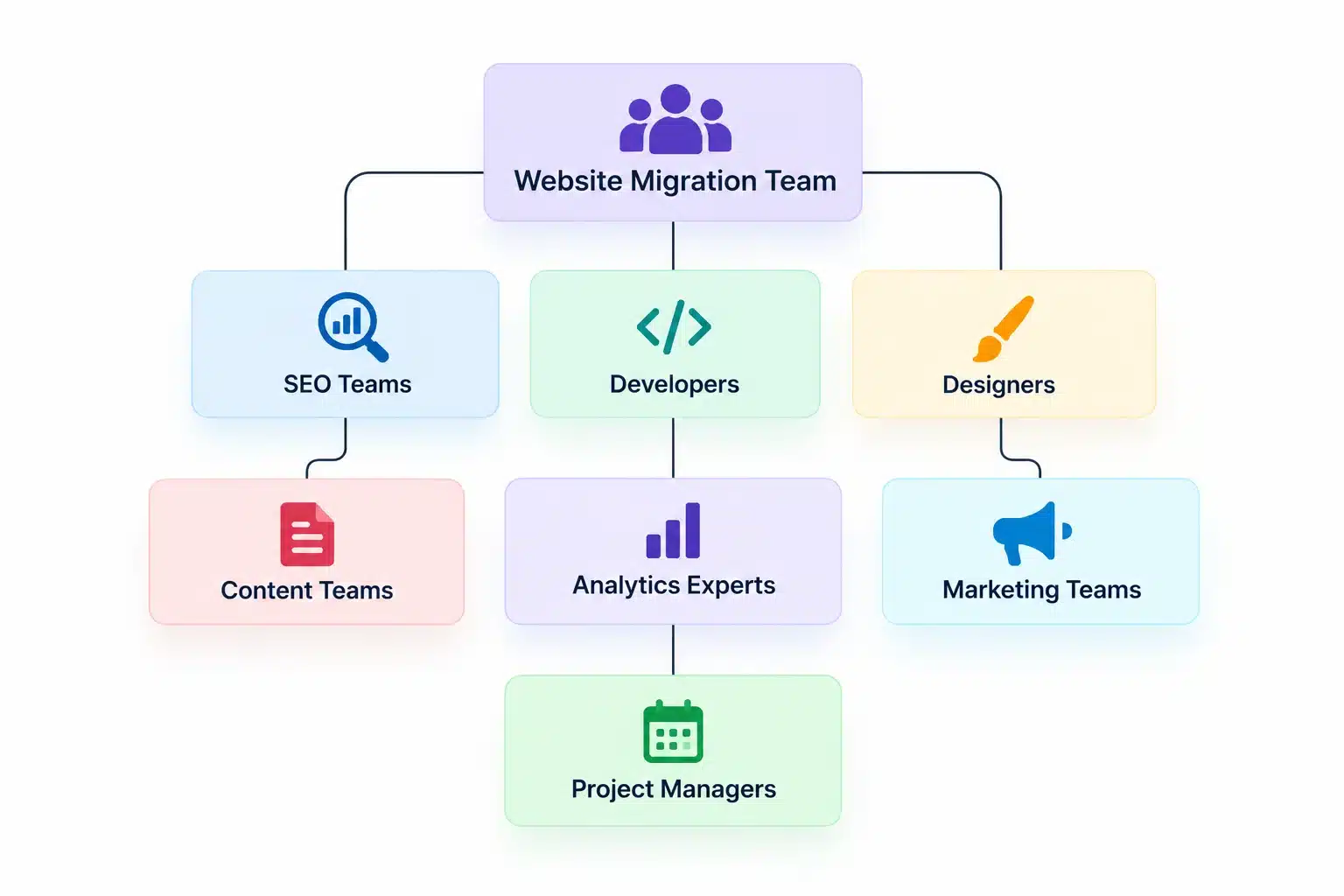
Here’s how:
- SEO teams protect rankings and visibility – Your SEO specialists will ensure that critical ranking signals are preserved during migration. They will oversee the redirects, URL mapping, metadata, crawlability, indexation and other factors that directly affect search performance.
- Developers implement technical changes – Developers execute the migration plan, including server configurations, redirects, CMS implementation, integrations, site functionality and resolving technical issues before and after launch.
- Designers ensure consistency – The design team will focus on creating an intuitive user experience while maintaining visual consistency across the website. This will help visitors navigate the site more easily and engage with content effectively.
- Content teams manage messaging – Your content team will review existing pages, update outdated information, improve messaging and ensure that valuable content is migrated properly without affecting user experience or SEO value.
- Analytics experts validate tracking – Analytics teams verify that tracking tools, conversion events, reporting dashboards and performance measurements function correctly without creating gaps in critical business data.
- Project managers keep deadlines on track – Project managers coordinate communication between departments, manage timelines, track progress, and ensure that dependencies are completed on time.
- Marketing teams care about conversions – Marketing teams focus on generating lead generation, sales, user engagement, and ensuring that the migration supports broader business objectives.
Enable Streamlined Communication
Most website migrations fail as teams work in silos, rather than because of technical mistakes. Even minor misunderstandings between teams can lead to missing redirects, lost content, or tracking issues.
With regular communication, your teams can:
- Stay aligned on project goals – Maintain regular communication with teams to understand migration objectives, priorities, and success metrics, reducing chances of conflicting outcomes.
- Identify risks early – Uncover potential issues like missing redirects, technical limitations or content gaps with frequent discussions.
- Resolve issues faster – When your teams communicate openly, problems can be escalated to the right people quickly, minimizing delays and keeping projects on track.
- Track progress effectively – Regular status updates provide visibility into completed tasks, upcoming milestones, dependencies and areas that need extra attention.
- Prevent duplicate work – Clear communication will help your teams understand the tasks each one owns and prevent situations where multiple people work on the same task.
- Maintain accountability – Regular check-ins define responsibilities and ensure every team understands its role and completes assigned tasks on time with the highest quality.
Create a Realistic Timeline
One of the most common causes of website migration plan process failure is a rushed approach and accelerating the timeline. There are thousands of interconnected tasks and doing everything without a proper plan and thorough testing leads to more damage than success. This is because when teams work under pressure they often miss critical steps. The consequences also include incomplete test coverage, missed redirects, broken functionality, lost content and eventually higher cost of fixing problems.
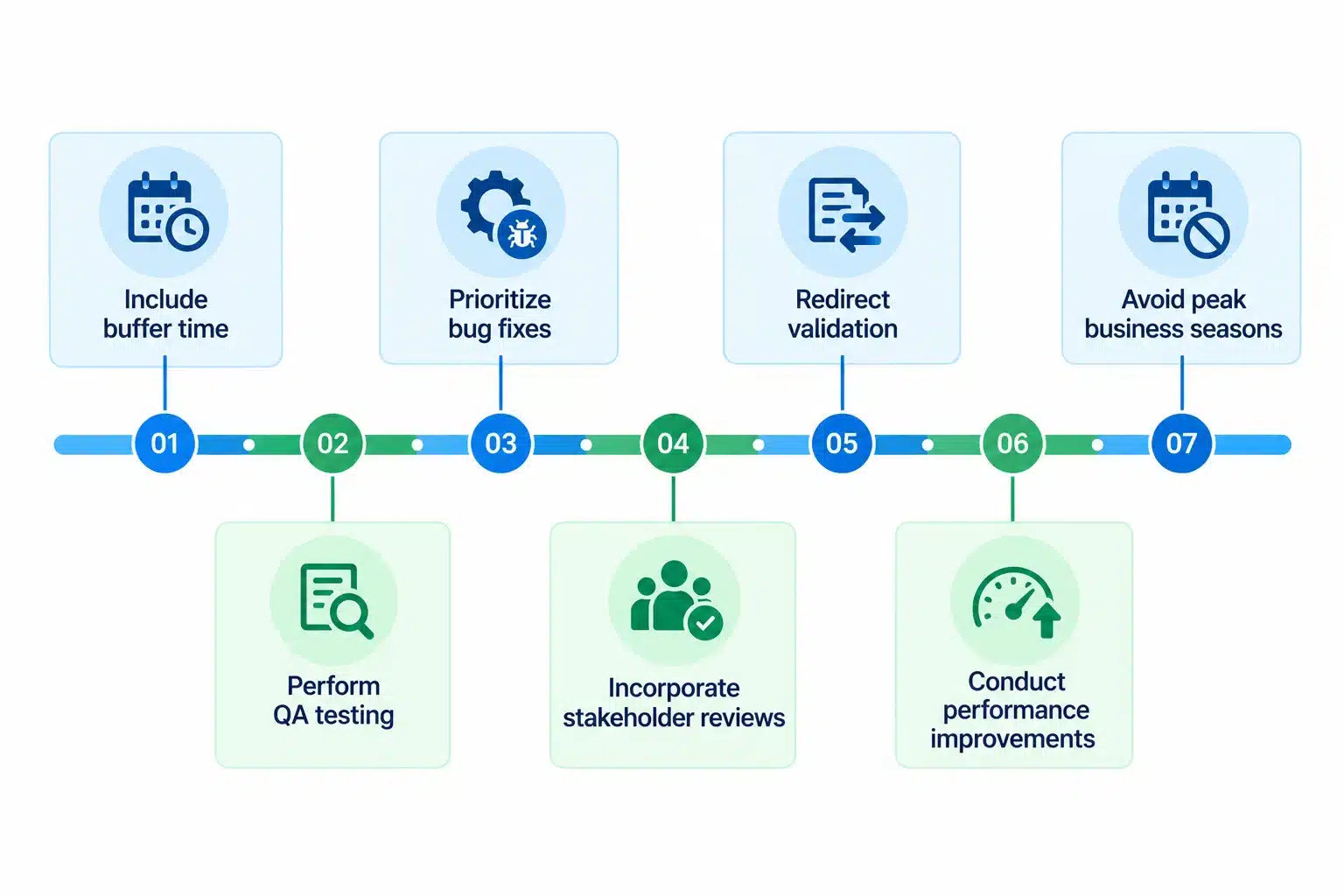
Here’s how to create a realistic timeline:
- Include buffer time – Build extra time into the schedule to address unexpected challenges during migration and avoid project delay.
- Perform QA testing – Additional testing will help your team fix broken links, content issues, functionality errors and SEO problems before they impact users.
- Prioritize bug fixes – Even well-planned migrations can have sudden technical issues. Use buffer time to resolve bugs properly without compromising launch quality.
- Incorporate stakeholder reviews – Business leaders, marketing teams, content owners and other stakeholders often need time to review and approve changes before launch. Plan for feedback cycles to prevent last-minute delays.
- Redirect validation – Large websites contain thousands of redirects. Use extra time to allow teams to test redirect rules thoroughly and verify that users and search engines reach the correct pages.
- Conduct performance improvements – Optimize page speed, Core Web Vitals, and server response times to ensure the new and improved site performs as per user expectation.
- Avoid peak business seasons – Migration success also depends on the timing of launch. Making the website live during critical business hours and peak holiday seasons can increase the risk of revenue loss.
Document Everything Before Migration
Before starting with website migration steps, create a complete inventory of the existing website. With thorough documentation you can critically review key SEO elements, content, functionality, and user experience components. It will also provide a benchmark for validating the website after migration and identify and resolve issues faster.
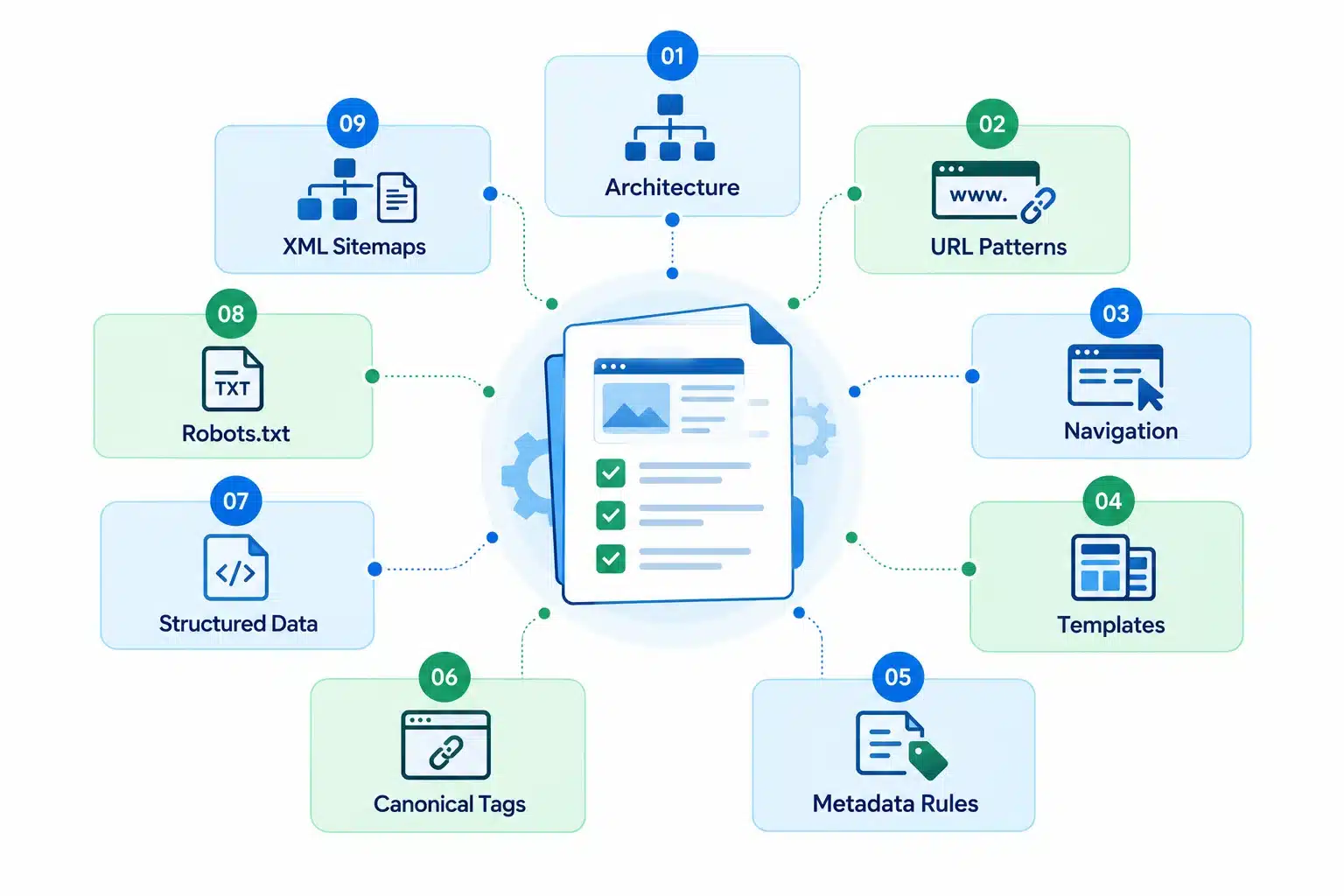
Architecture – Document the current website structure including page hierarchy, categories, subcategories, and content relationships to ensure the new site maintains crawlability.
URL Patterns – Record all existing URL structures, naming conventions, folder paths, and parameter usage to support accurate URL mapping and redirect planning.
Navigation – Capture primary navigation, footer menus, breadcrumbs,internal links, and user journeys to preserve usability and site discoverability after migration.
Templates – Identify all page templates, layouts, and content types currently in use so important design and functional elements are not lost during development.
Metadata Rules – Document title tag, meta description, heading, and image alt text conventions to maintain SEO consistency.
Canonical Tags – Review and record canonical tag implementation to prevent duplicate content issues and ensure proper indexing after migration.
Structured Data – Audit all schema markup used across the site such as organization, product, article, FAQ, and local business schemas to preserve search visibility.
Robots.txt – Save current robots.txt file to ensure important pages remain crawlable and restricted areas protected.
XML Sitemaps – Document sitemap structures, sitemap indexes, and include content types to support search engine discovery after migration.
Conduct a thorough pre-migration audit to establish a comparison with post-migration components.
Website Migration Checklist: The Complete 8-Step Breakdown
A successful website migration requires careful planning, execution and monitoring. Every phase plays an important role in protecting SEO performance, preserving user experience, and ensuring business continuity. A structured migration helps minimize risks, prevent costly mistakes and creates a smooth transition.
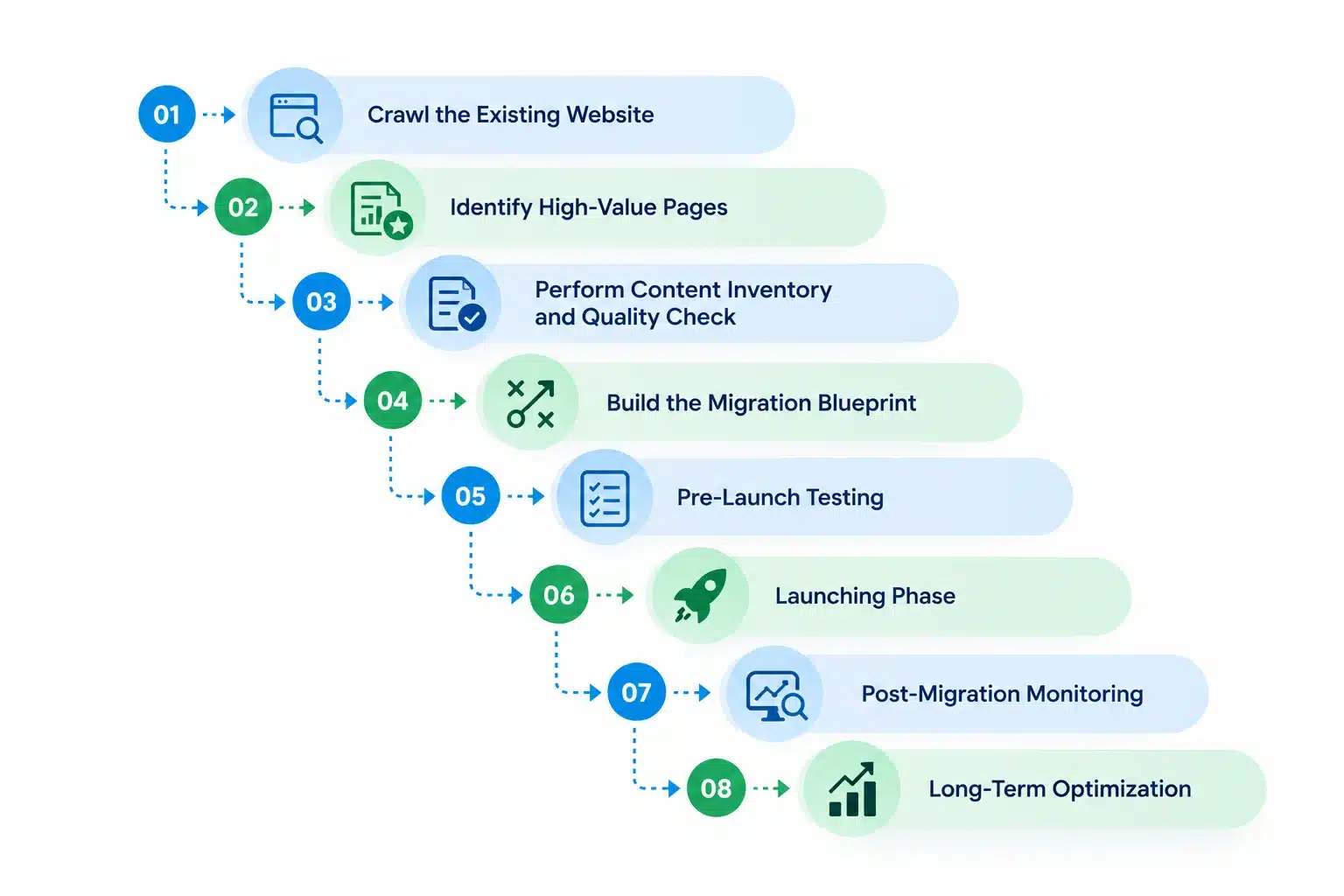
Step 1: Crawl the Existing Website
Create a complete snapshot of the current website before making any changes. This audit will lay the foundation for the migration decision and process.
- Capture all URLs – Create a complete inventory of indexable and non-indexable pages.
- Record metadata – Export title tags, meta descriptions, headings, and image alt text.
- Audit Canonical Tags – Identify canonical implementations and potential inconsistencies.
- Review Status Codes – Document all 200, 301, 302, 404 and other status codes.
- Map Internal Links – Understand how pages connect and pass authority throughout the site.
- Audit Structured Data – Record existing schema markup used across the website.
Step 2: Identify High-Value Pages
All pages do not carry the same level of business and SEO importance during website migration steps. High performing pages should receive special attention throughout the migration process.
- Pages with backlinks – Protect pages that have earned valuable external links and authority.
- Pages with high organic traffic – Prioritize pages that drive significant search engine traffic.
- Pages that convert – Safeguard pages that generate leads, sales, registrations or other business goals.
Step 3: Perform Content Inventory and Quality Check
Website migration is the perfect opportunity to evaluate existing content and improve overall quality check before launch.
- Create content inventory – Maintain a comprehensive list of blogs, landing pages, service pages, resources, and media assets.
- Review content quality – Identify pages that should be updated, consolidated, redirected or removed.
- Eliminate outdated content – Use the migration as an opportunity to reduce content clutter and improve relevance across the site.
Also Read: 15 Best Content Management Systems in 2026: Expert Picks
Step 4: Build the Migration Blueprint
Once you clearly understand the current website, create a detailed migration plan that guides implementation.
- Define technical rules – Establish requirements for URLs, metadata, redirects, canonicals and indexing.
- Create a URL mapping sheet – Match every existing URL to its destination on the new website.
- Develop a redirect strategy – Plan and document all necessary 301 redirects before launch.
- Prepare the staging environment – Set up a secure testing environment that reflects the production website.
Step 5: Pre-Launch Testing
Before going live, thoroughly test the new website to uncover issues and correct them before they affect users.
- Technical SEO testing – Validate redirects, canonicals, metadata, structured data, and crawlability.
- Functional testing – Verify form, search functions, integrations, buttons, and interactive elements.
- UX and design testing – Ensure layouts, navigation, responsiveness and user journeys work correctly.
- Performance testing – Evaluate page speed, Core Web Vitals, and overall site performance.
- Analytics and tracking validation – Confirm analytics platforms, conversion tracking, and tag management tools are working as intended.
Step 6: Launching Phase
This requires careful coordination and attention to detail. Having a structured go-live process helps reduce risks and avoid unnecessary downtime.
- Perform final checks – Verify redirects, analytics, content accuracy and technical configurations before launch.
- Execute DNS and go live – Complete the DNS switch and deploy the new website.
- Conduct post-launch verification – Confirm pages are accessible, redirects work correctly and critical functions remain intact.
Step 7: Post-Migration Monitoring
Ongoing monitoring after launch is critical for identifying and resolving issues before they impact performance.
- SEO monitoring – Track rankings, organic traffic, index coverage, and keyword visibility.
- Technical monitoring – Watch for crawl errors, broken links, redirect issues, and indexing problems.
- UX and conversion monitoring – Analyze user behavior, engagement and conversion performance.
- Troubleshoot common issues – Quickly address traffic drops, missing pages, indexing problems, or broken functionality.
- Document findings and learnings – Record challenges, resolutions, and insights to improve future migrations.
Step 8: Long-Term Optimization
The post migration stage provides an opportunity to strengthen website performance beyond just maintaining the current results.
- Content improvement – Continue enhancing key pages based on user behavior and search data.
- Fix technical debt – Resolve legacy issues that may have carried over during migration.
- Monitor rankings and visibility – Track long-term SEO trends and identify growth opportunities.
- Implement future enhancements – Introduce new features, functionality, and content improvements based on business goals.
The Bottom Line
During website migration, you are not just moving content from one platform to another. It involves careful planning, accurate redirects, SEO protection, thorough testing, and ongoing monitoring to reduce risks and maintain performance.
Partnering with an experienced web design and development company can make the process smoother. They will create a strong migration strategy and map URLs to preserve search rankings. A reliable partner will ensure that critical elements are not neglected and your website traffic, user experience and long-term business growth is at its peak.
Frequently Asked Questions
Q1. What is a website migration?
Ans. A website migration is the process of making significant changes to a website, such as moving to a new domain, CMS, hosting environment, site structure, or design.
Q2. Can a website migration affect SEO?
Ans. Yes. If redirects, metadata, internal links, and indexing settings are not handled correctly, a migration can lead to temporary or long-term ranking and traffic losses.
Q3. How long does a website migration take?
Ans. The timeline depends on the size and complexity of the website, but most migrations require several weeks of planning, testing, implementation, and post-launch monitoring.
Q4. Why are 301 redirects important during migration?
Ans. 301 redirects help search engines and users reach the correct pages while preserving much of the authority and ranking value from the old URLs.
Q5. What should be tested before going live?
Ans. You should test redirects, page functionality, forms, navigation, metadata, structured data, analytics tracking, and overall site performance before launch.
Q6. Should website migration include content cleanup?
Ans. Yes. A migration is the right opportunity to update outdated content, remove low-value pages, and improve the overall quality and organization of the website.